EasyManua.ls Logo

Johnson Controls FX80 - User Manual

Johnson Controls FX80
12 pages
Print Icon
To Next Page IconTo Next Page
Loading...
FX80 Supervisory Controller Installation
Instructions
Applications
This document describes how to mount and wire the following:
DIN-mount, 24 VAC/DC powered FX80 controller
Wall-mount, Class 2 universal AC power adapter supplying 24 VAC
Note: The FX80 controller requires, at a minimum, FX Supervisory Release 14.1. A maximum
of four total option card modules are supported. Separate limits may exist in the controllers
license to further limit functionality.
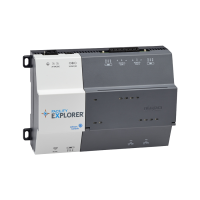
Figure 1: FX80 Controller
North American Emissions Compliance
United States
This equipment has been tested and found to comply with the limits for a Class A digital device
pursuant to Part 15 of the FCC Rules. These limits are designed to provide reasonable protection
against harmful interference when this equipment is operated in a commercial environment.
This equipment generates, uses, and can radiate radio frequency energy and, if not installed
and used in accordance with the instruction manual, may cause harmful interference to
radio communications. Operation of this equipment in a residential area may cause harmful
interference, in which case the users will be required to correct the interference at their own
expense.
Part No. 24-10143-861 Rev. A
2019-03-22
(barcode for factory use only)
FX-SC8BASE-0, FX-SC8BASE-700
*2410143861A*
Question and Answer IconNeed help?

Do you have a question about the Johnson Controls FX80 and is the answer not in the manual?

Johnson Controls FX80 Specifications

General IconGeneral
ModelFX80
Controller TypeProgrammable
Input Voltage24 VAC/VDC
Processor32-bit
EnclosurePlastic
Enclosure RatingIP20
TypeController
Communication ProtocolBACnet MS/TP
Number of InputsUp to 8 Universal Inputs
Inputs/Outputs8 Universal Inputs, 6 Outputs (4 Analog, 2 Digital)
Memory512 MB Flash
Operating Temperature-40 to 70°C (-40 to 158°F)
Relative Humidity5 to 95% RH, noncondensing
SoftwareFX Workbench
Dimensions60 mm

Summary

Applications

North American Emissions Compliance

United States

Describes FCC rules compliance for Class A digital devices in commercial environments.

Installation

Parts and Tools

Lists included parts and special tools required for installation.

General Precautions

Covers general safety warnings, including electric shock risks.

Mounting

Physical Mounting Guidelines

Details physical mounting, including recommended horizontal orientation and DIN rail.

Environmental Requirements

Ambient Conditions and Voltage

Specifies operating temperature, humidity, and acceptable voltage fluctuations.

DIN Rail Mounting

Procedure

Steps for mounting the controller onto a DIN rail, starting with the locking clip.

Module Mounting Procedure

Securing to DIN Rail and Connectors

Details steps for fastening modules to the DIN rail and seating them into connectors.

Wiring

Earth Ground and Power

Explains the importance of earth grounding and the initial steps for power wiring.

Power Wiring

Connecting Ground and Power Sources

Provides options for AC/DC power sources and steps for connecting earth ground and 24V power.

Communications Wiring

Wi-Fi Configuration and Operation

Details the integral Wi-Fi adapter, its settings switch, and default software status.

RS-485 Wiring Guidelines

Explains RS-485 port usage, cabling requirements, and connection to devices.

RS-485 Configuration

Bias Switch Settings

Describes the three-position biasing switch settings (BIA, MID, END) for RS-485 ports.

Ethernet Wiring

Primary and Secondary Ports

Details the two RJ-45 Ethernet ports, their default IP address, and subnet mask.

Power Up and Initial Checkout

Applying Power and Checking LEDs

Steps for applying power and observing STAT and BEAT LEDs for system status.

MicroSD Card Management

Location and Replacement

Identifies the microSD card location and outlines the procedure for removal or replacement.

USB Ports and Switches

Functionality and Configuration

Details the USB ports for backup and debug, and pushbutton functions like backup and shutdown.

Related product manuals