EasyManua.ls Logo

Johnson Controls METASYS Series - User Manual

Johnson Controls METASYS Series
12 pages
Print Icon
To Next Page IconTo Next Page
Loading...
Installation Sheet
Issue Date 0495
© 1995 Johnson Controls, Inc. 1
Part No. 24-7534-2
flat-head screwdriver
needle-nose pliers
drill
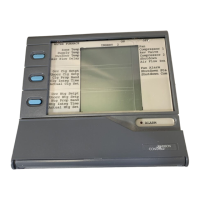
The ZT unit measures 6.88 x 7.31 x 1.52 inch (175 x 186 x 39 mm), and
weighs 1.25 lb (0.57 kg). A coiled, 6-pin telephone-type cord is included.
The cord is 17 inches long and stretches to 5 feet. The ZT contains a
5-year lithium battery, factory installed.
The Wall Mount Base with ZT measures 6.94 x 7.44 x 2.00
(176 x189 x 51 mm).
The Utility Mount Base with ZT measures 6.94 x 7.44 x 6.00
(176 x 189 x 152 mm) when mounted on the ENC100.
Installation of the Zone Terminal must meet the following standards:
Ambient operating conditions: 32 to 122°F (0 to 50°C)
10 to 90% non-condensing relative humidity
86°F (30°C) maximum dew point
Notes: Do not mount the Zone Terminal on a vibrating surface.
The atmosphere must be free of corrosive chemical vapors that
may damage electronic equipment.
Use mild soap and water with a soft cloth to wipe surfaces of the ZT
clean.
Do not immerse the ZT unit in water.
Wipe clean with pure isopropyl alcohol, if surface becomes
excessively dirty.
Zone Terminal
Tools Needed
Physical
Dimensions
Environmental
Information
Cleaning of ZT
Surfaces
Question and Answer IconNeed help?

Do you have a question about the Johnson Controls METASYS Series and is the answer not in the manual?

Johnson Controls METASYS Series Specifications

General IconGeneral
Product SeriesMETASYS Series
CategoryTouch Terminals
Operating SystemEmbedded Linux
Memory1GB RAM
ConnectivityEthernet, USB
MountingWall or panel mount
Operating Temperature0°C to 50°C

Summary

Physical Dimensions of Zone Terminal

Environmental and Operating Conditions

Environmental Specifications

Covers ambient temperature, humidity, and dew point requirements for installation.

Cleaning Zone Terminal Surfaces

Cleaning Procedures

Use mild soap and water, avoid immersion, use alcohol for tough stains.

Installing the Zone Terminal Inserts

Connecting the Zone Terminal

Wiring and Connectivity

Details wiring requirements and lists components compatible with the Zone Terminal connection.

Remote Zone Terminal Connections

Connecting to UNT;VAV via CBLCON-0 and Sensor

Describes connecting the Zone Terminal to UNT/VAV using CBLCON-0 and a Zone Sensor.

Direct VAV;UNT Connection

Connection via Zone Sensor and Connector Caution

Details direct connection and warns about using correct 6-pin jacks to avoid damage.

Wall Mounting and Base Installation

Enclosure Kit Knockout Preparation

Procedure for removing rectangular knockouts from the Enclosure Kit for wire routing.

Enclosure Kit Attachment

Instructions for attaching the Enclosure Kit to a surface for controller connection.

Connecting the Zone Terminal to Base

Steps for plugging the cord into the ZT and snapping it into the mounted base.

Wall Mount Installation

Attaching ZT and Wall Mount Base

Procedure for positioning, marking, drilling, and securing the wall mount base.

Mounting the ZTU Externally on the UPM

UPM Mounting Procedure

Steps for mounting the Zone Terminal Wall Mounting Base on a UPM cover.

Mounting the ZT Internally in UPM

Bracket for Internal UPM Mounting

Information on acquiring a bracket for mounting the ZT behind a window in the UPM.

Removing a Mounted ZT

ZT Removal Procedure

Instructions on using a flat-head screwdriver to pry the ZT out of its mounting base.

Related product manuals