2.4 Software Updating
Update console software with the software updating tool.
b. Load the software update onto the USB flash drive. Insert the USB flash drive into the USB port; the
console will update automatically.
c.
If the software has updated successfully, the console will start initial setup and display the software version.
d. Remove the USB flash drive.
2.5CONSOLE DESCRIPTION-XER/XIR
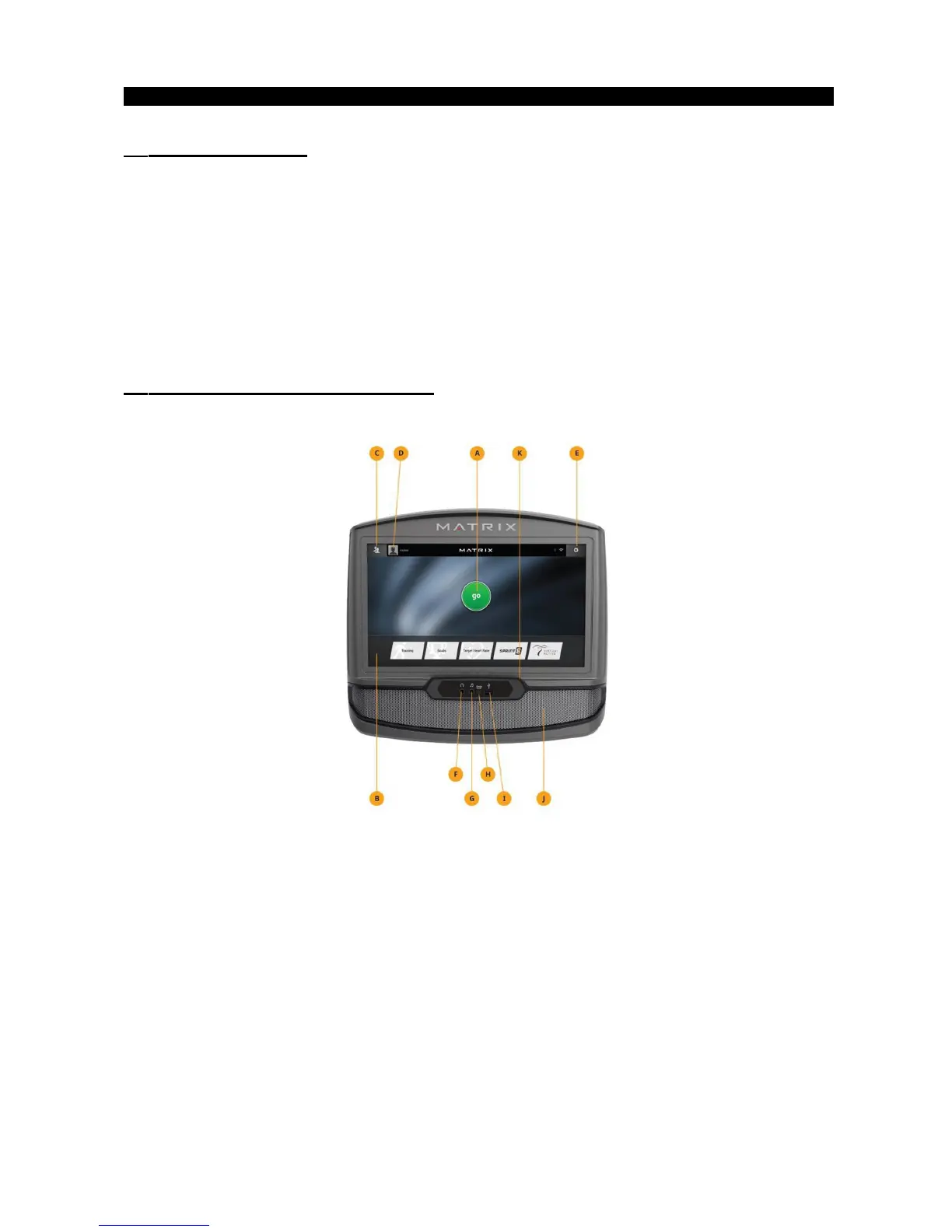
XER/XIR CONSOLE DESCRIPTION
Note: There is a thin protective sheet of clear plastic on the overlay of the console that should be removed
before use. The XER and XIR have a fully-integrated touchscreen display. All information required for workouts
is explained onscreen. Exploration of the interface is highly encouraged.
A) GO: Press to begin a quick start program.
B) PROGRAM BUTTONS: Press to select from a number of preset programs.
C) USER MENU: Select an existing User, Guest or add a User.
D) USER SETUP: Allows you to edit User Information.
E) SETTINGS MENU: Access to Volume Controls, Bluetooth Pairing, Wi-Fi Setup, Sync Passport, Machine
defaults and more.


 To Next Page