Sub-Trim(FunctionMode)
TheSub-TrimfunctionoftheXR-3isanelectronictrimming
featurethatallowstheneutralpositionoftheservooneither
thesteering,throttleorthirdchannel(optional)tobemoved,
whileallowingtheelectronictrim leverforthatchannelto
remaininthecenterposition.Thisfeatureisveryusefulasit
allowstheservoarm/wheelpositionto bemovedtohelp
withcontrollinkageinstallation,eliminatingtheneedto
makemechanicallinkageadjustments.
AlthoughtheSub-Trimfunctionisaveryusefulfeature,it is
suggestedthatonlysmallamountsofsub-trimbeusedso
thatnounwanted,non-equalservotraveliscreated.It'ssug-
gestedthatlessthan30pointsofsub-trimbeusedduring
adjustment.Ifmorethan30pointsofsub-trimarerequired,
it'ssuggestedthatamechanicallinkageadjustmentbeper-
formed.
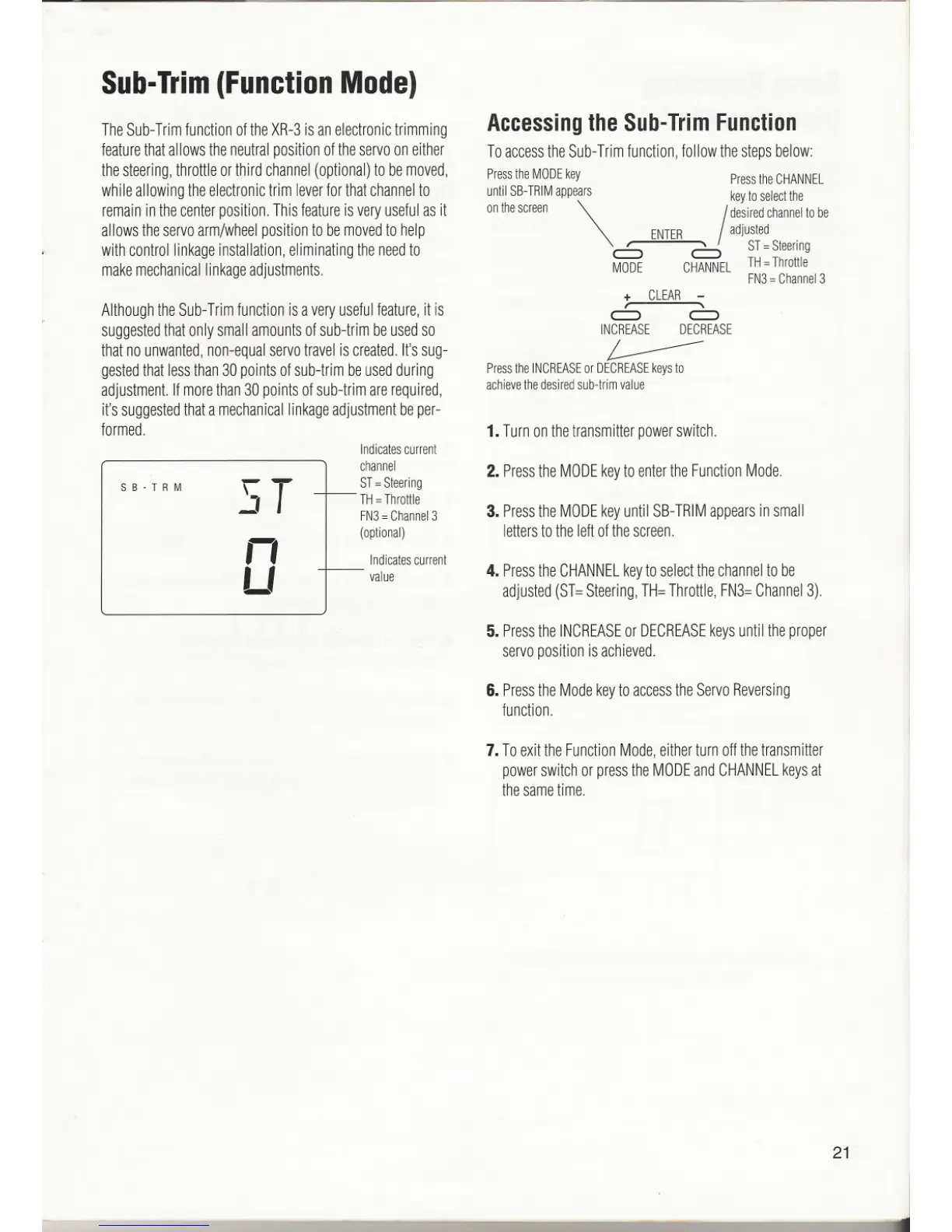
S8-TRM
'=
T
-,
n
Lf
Indicatescurrent
channel
ST=Steering
TH=Throttle
FN3 = Channel 3
(optional)
Indicatescurrent
value
AccessingtheSub-TrimFunction
To accessthe Sub-Trim function, follow the stepsbelow:
PresstheMODEkey PresstheCHANNEL
untilSB-TRIMappears keytoselectthe
onthescreen
\
I
desired channel to be
ENTER adjusted
6 6 ST=Steering
MODE CHANNELTH=Throttle
FN3 = Channel 3
+ CLEAR -
6 6
INCREASE DECREASE
~
Press the INCREASEor DECREASEkeys to
achieve the desired sub-trim value
1. Turn on the transmitter powerswitch.
2. Pressthe MODEkeyto enterthe Function Mode.
3. Pressthe MODEkeyuntil SB-TRIMappearsin small
lettersto the left of the screen.
4. Pressthe CHANNELkeyto selectthe channelto be
adjusted (ST=Steering,TH=Throttle, FN3=Channel3).
5. PresstheINCREASEor DECREASEkeysuntiltheproper
servopositionisachieved.
6. PresstheModekeytoaccesstheServoReversing
function.
7. ToexittheFunctionMode,eitherturnoffthetransmitter
powerswitchor presstheMODEandCHANNELkeysat
thesametime.
21



 To Next Page
 Loading...
