Menu functions
36
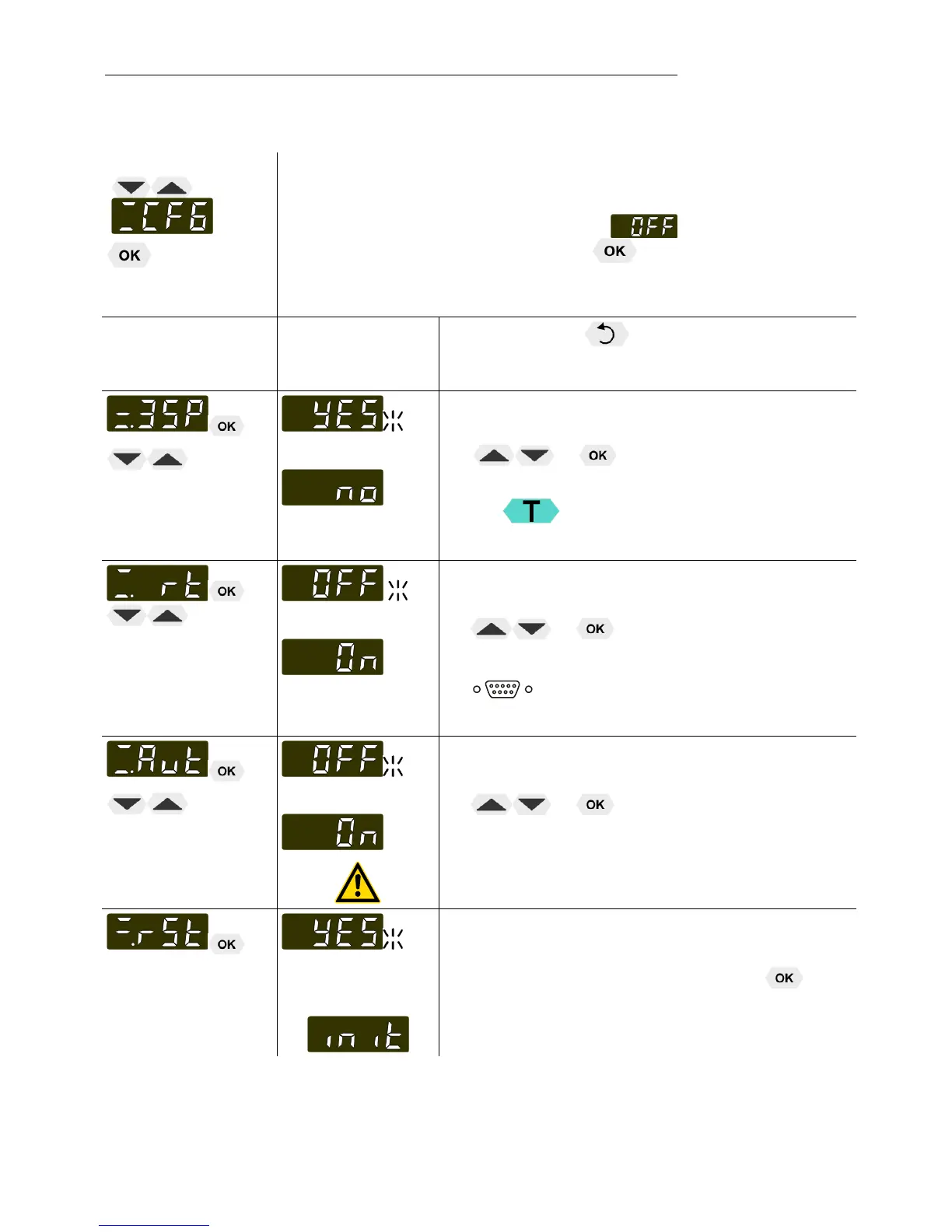
9.2. MENU Configuration
Menu level 1
CFG = MENU CONFIGURATION
L A RESET can be effected only in the > < mode.
Switch off circulator by pressing the key and call up the menu
CONFIGURATION.
Level 2 Parameter level
L Press the key if a parameter is to be
retained. Correction function for parameters and
values (prior to OK).
or
>3SP< - Switch on and off the 3-setpoint mode
L The parameter flashes, set by pressing
+
L >YES< - This function can be used by pressing
the key. (refer to page 28)
or
>rt< - Switch on and off remote control
• The parameter flashes, set by pressing
+
L For remote control refer to 50
L Connect RS232 with PC
or
>Aut< - Switch on and off autostart
• The parameter flashes, set by pressing
+
AUTOSTART on
AUTOSTART off.
See WARNING page 38
>rSt< (RESET) - Use this to reset all values to
factory setting.
• Return to factory settings by pressing
L During the message – init - all parameters are
reset to factory settings.



 To Next Page