SL
63
9.6. Serial Interface
Factory settings:
4800 Baud
even
hardware handshake
For communication between the circulator and a PC or a superordinated
process system, the interface parameters of both units must be identical.
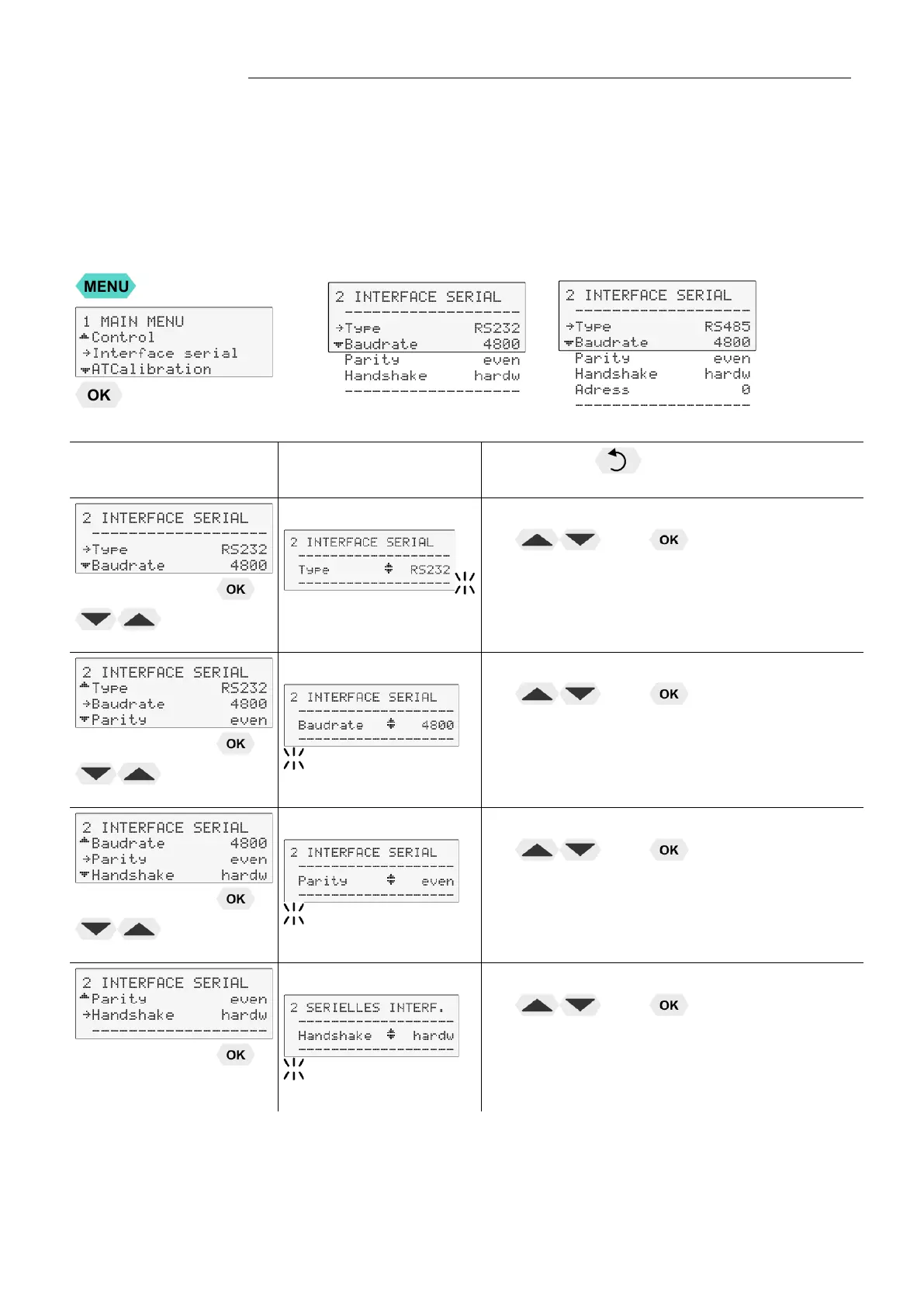
The adjustment is usually carried out one time only in the >Interface serial<
menu.
RS232 RS485
Level 2 Parameter-level
Press the key if a parameter is to be
retained. (prior to OK)
• The parameter flashes, switch by pressing
and
Possible parameters: RS232 / RS485
Address RS485: 0 to 127
• The parameter flashes, switch by pressing
and
Possible parameters:
4800 / 9600 / 19200 / 38400
• The parameter flashes, switch by pressing
and
Possible parameters: no/even/odd
even: Data bits = 7; Stop bits = 1
odd: Data bits = 7; Stop bits = 1
no: Data bits = 8; Stop bits = 1
• The parameter flashes, switch by pressing
and
Possible parameters: hardw / softw
Xon/Xoff-protocol (Software handshake)
Protocol RTS/CTS (Hardware handshake)


 To Next Page