Protección de todos los archivos
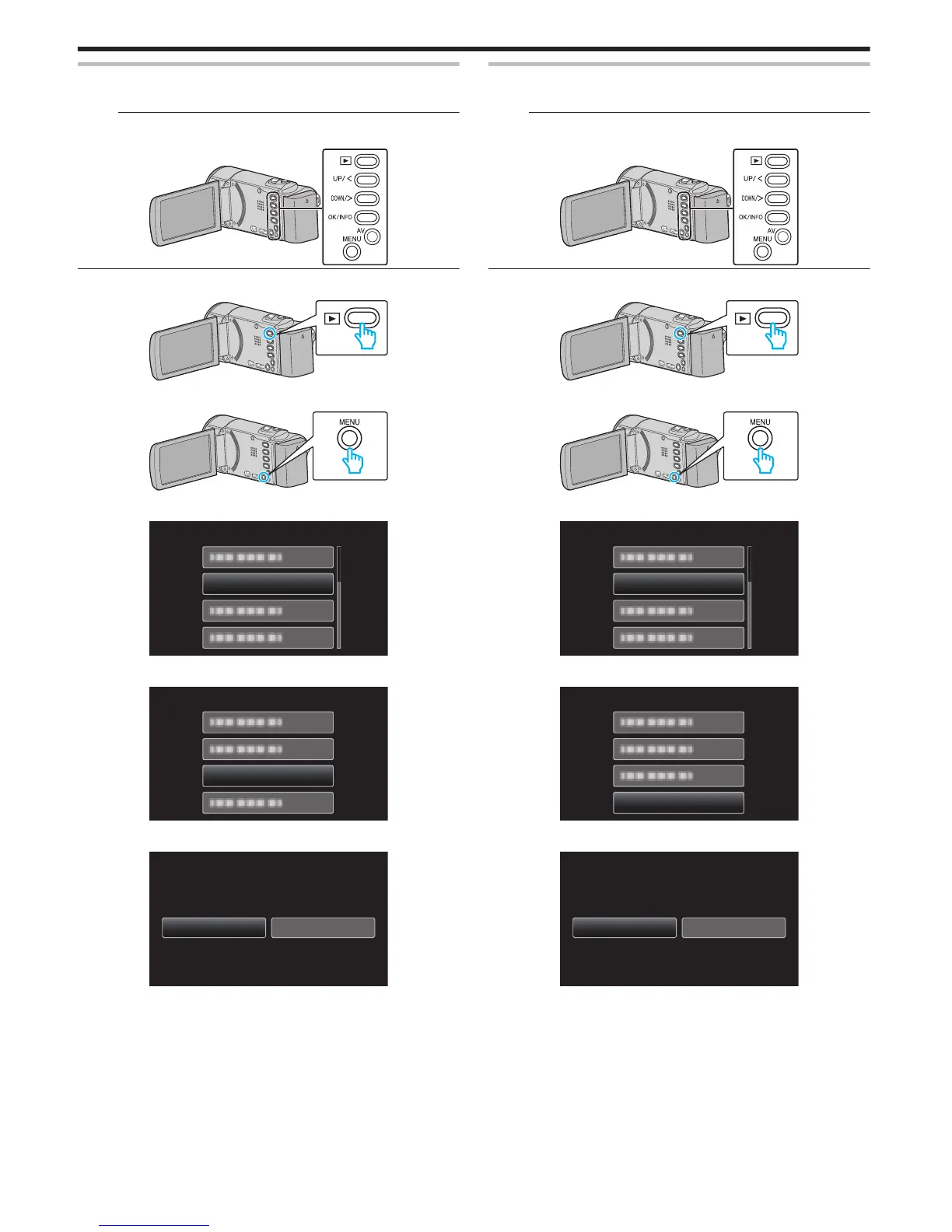
Protege todos los archivos.
Nota :
Para seleccionar/mover el cursor hacia arriba/izquierda o hacia abajo/
derecha, presione el botón UP/< o DOWN/>.
.
1
Seleccione el modo reproducción.
.
2
Presione MENU.
.
3
Seleccione “PROTEGER/CANCELAR” y presione OK.
.
4
Seleccione “PROT.TODO” y presione OK.
.
PROT.TODO
PROTEGER/CANCELAR
5
Seleccione “SÍ” y presione OK.
.
0
Después de realizar los ajustes, presione OK.
Anulación de protección de todos los archivos
Anula la protección de todos los archivos.
Nota :
Para seleccionar/mover el cursor hacia arriba/izquierda o hacia abajo/
derecha, presione el botón UP/< o DOWN/>.
.
1
Seleccione el modo reproducción.
.
2
Presione MENU.
.
3
Seleccione “PROTEGER/CANCELAR” y presione OK.
.
4
Seleccione “CANC.TODO” y presione OK.
.
CANC.TODO
PROTEGER/CANCELAR
5
Seleccione “SÍ” y presione OK.
.
NOSÍ
LAS PROTECCIONES?
¿CANCELAR TODAS
0
Después de que la protección se haya anulado, presione OK.
Edición
46



 To Next Page
 Loading...