SALIDA HDMI
Ajusta la salida del conector HDMI de esta unidad cuando la misma está
conectada a un TV.
Ajuste Detalles
AUTO Se recomienda para seleccionar “AUTO”.
480p Seleccione esta opción si el vídeo no emite en
“AUTO” adecuadamente.
Nota :
0
“1080p”
aparecerá en el monitor LCD si se conecta un TV compatible con
1080p a esta unidad en modo reproducción.
Visualización de la opción
Nota :
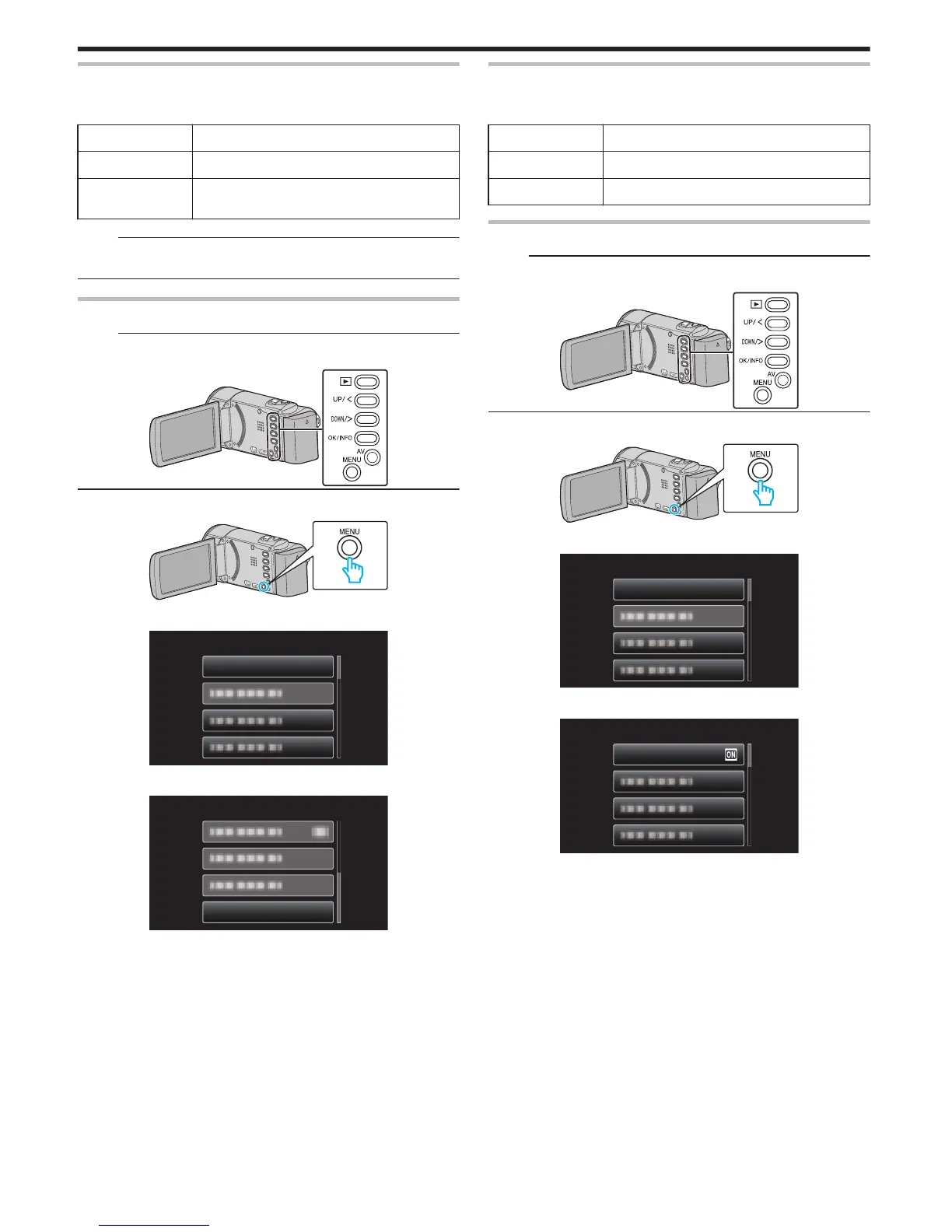
Para seleccionar/mover el cursor hacia arriba/izquierda o hacia abajo/
derecha, presione el botón UP/< o DOWN/>.
.
1
Presione MENU.
.
2
Seleccione “CONFIG. CONEXIÓN” y presione OK.
.
CONTROL HDMI
Establece si desea vincular operaciones con un TV compatible con HDMI-
CEC.
Ajuste Detalles
OFF Desactiva las operaciones.
ON Activa las operaciones.
Visualización de la opción
Nota :
Para seleccionar/mover el cursor hacia arriba/izquierda o hacia abajo/
derecha, presione el botón UP/< o DOWN/>.
.
1
Presione MENU.
.
2
Seleccione “CONFIG. CONEXIÓN” y presione OK.
.


 To Next Page
 Loading...