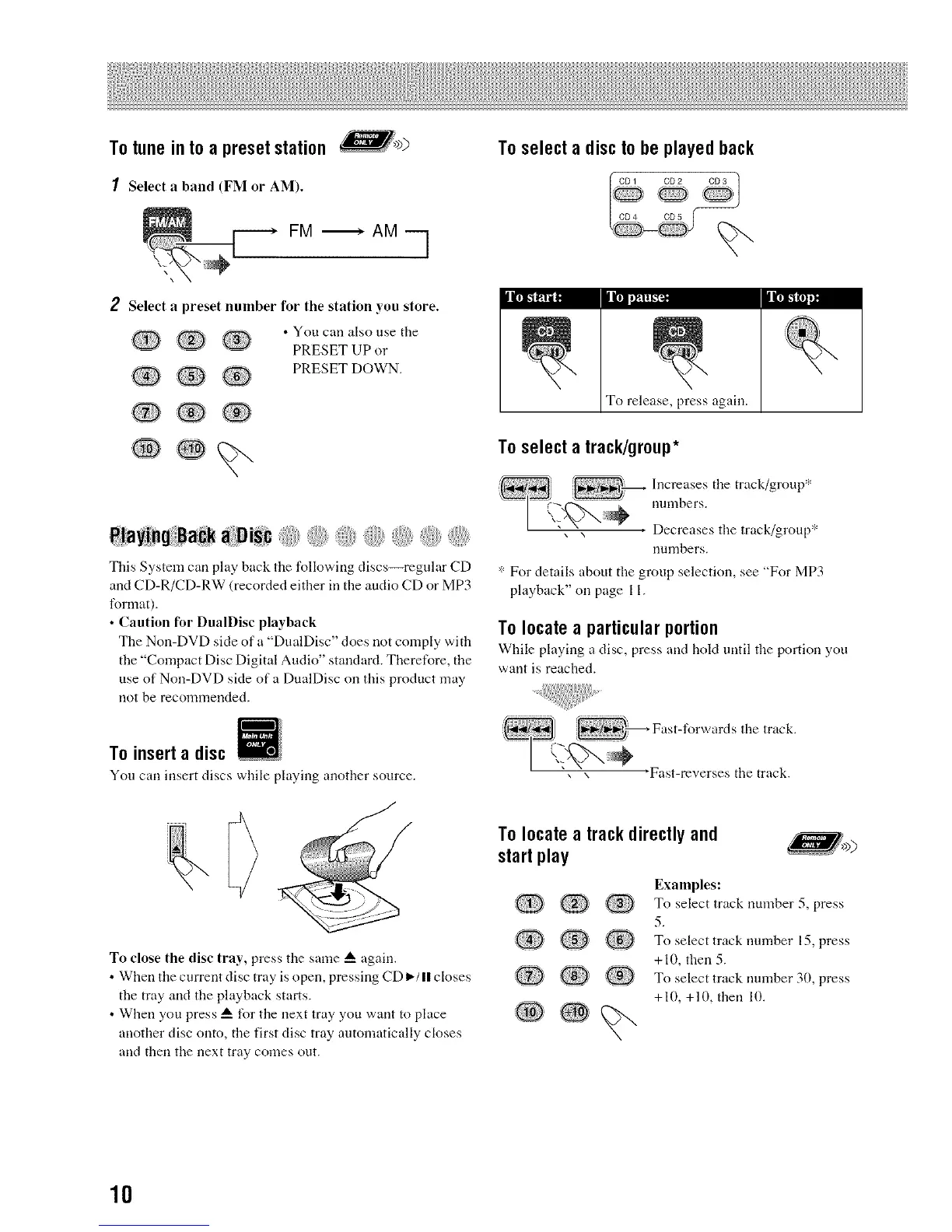
To tune in to a preset station _>)
1 Select a band (FM OF AM).
FM _ AM q
To select a disc to be played back
CD4 CD5
Iltw,..,,..-_ litton.,,
2 Select a preset number for the station you store.
.Q Q
Q ®
• You carl also use tbe
PRESET UP or
PRESET DOWN.
PlayingBack aD sc { :{{,
This System call play back the following discs--regular CD
and CD-R/CD-RW (recorded either in tbe audio CD or MP3
lbnnat).
• Caution for DualDisc playback
The Non-DVD side of a "DualDisc" does not comply with
tbe "Compact Disc Digital Audio" standard. Theretbre, the
use of Non-DVD side of a DualDisc on this product may
not be recommended.
To release, press again.
To select a track/group*
Irrmcr_ae;eStile track/group '_'
uumbers.
* For details about tbe group selection, see "For MP3
playback" on page 11.
To locate a particular portion
Wbile playing a disc, press and hold until tbe portion you
want is reacbed.
To insert a disc
You can irrsert discs while playing arrother source.
To close the disc tray, press tile same A again.
• When tile current disc tray is open, pressing CD It-/II closes
the tray and file playback starts.
• When you press A for tile next tray you want to place
arrotber disc onto, tile first disc tray automatically closes
arrd then tile next tray comes out.
To locate a track directly and
start play
Q@®
Q ,® .......
Examples:
To select track number 5, press
5.
To select track number 15, press
+10, then 5.
To select track nmnber 30, press
+10, +10, then 10.
10


 To Next Page