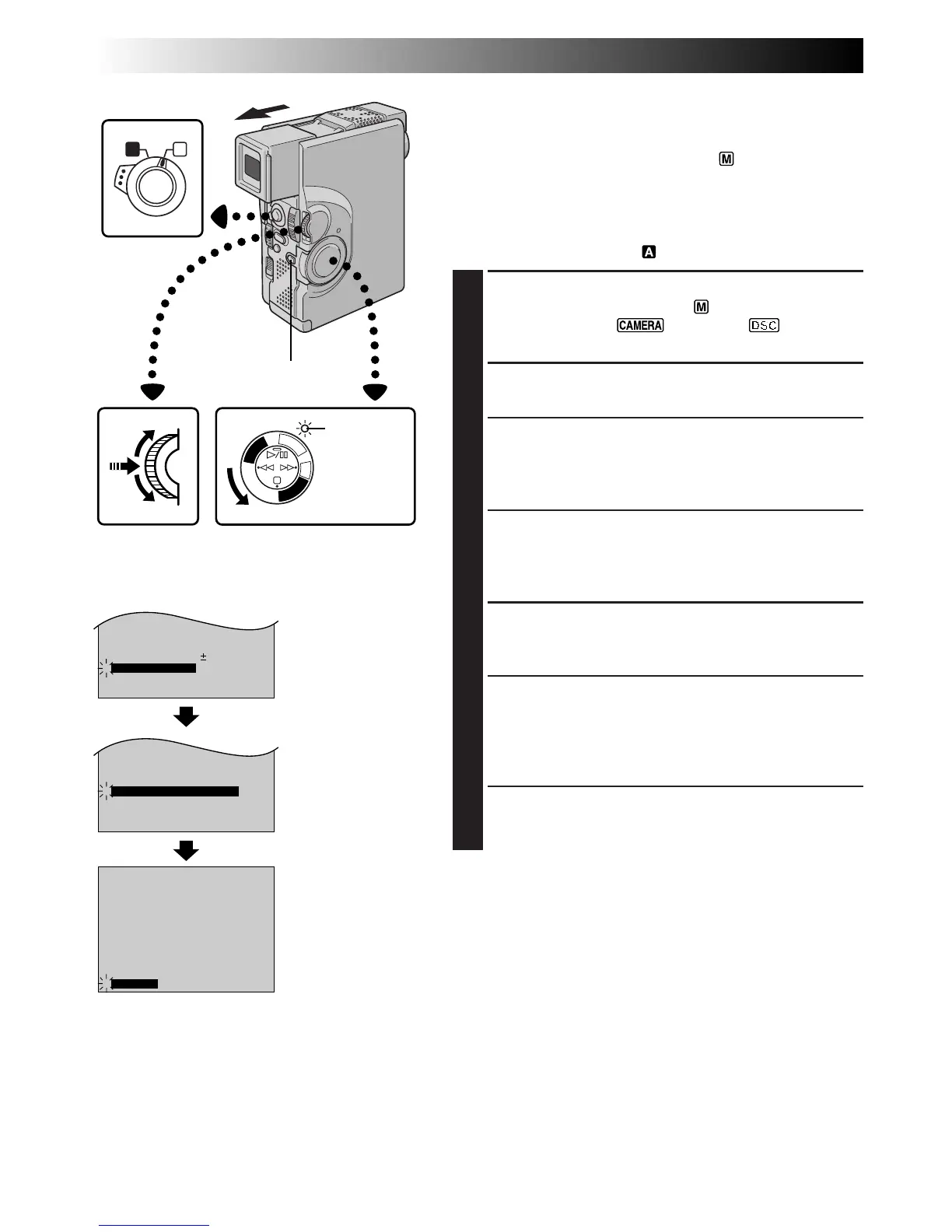
TO MODE MENU
P
L
A
Y
/
P
C
O
F
F
C
A
M
E
R
A
5
S
D
S
C
D
S
C
P
L
A
Y
RECORDING
Advanced Features
Displaying The Date And Time During
Recording
When the Operation Switch is set to “ ”, you can choose
whether to display the date and time during recording or
not. You must first set the date and time (“Date/Time
Settings”, Z pg. 11). Set “DISPLAY” to “ON” in the Date/
Time Menu. The Date/Time is always displayed when the
Operaton Switch is set to “ ”.
1
SELECT OPERATION MODE
Set the Operation Switch to “ ”. Then, set the
Power Switch to “ ”, “5S” or “ ” while
pressing down the Lock Button.
2
ACCESS RECORDING MENU
Press MENU/SET. The Recording Menu appears.
3
ACCESS MODE MENU
Move the highlight bar to “TO MODE MENU” by
rotating MENU/SET. Press it and the Mode Menu
appears.
4
ACCESS DATE/TIME MENU
Move the highlight bar to “TO DATE/TIME MENU”
by rotating MENU/SET. Press it and the Date/Time
Menu appears.
5
SELECT FUNCTION
Move the highlight bar to “DISPLAY” by rotating
MENU/SET, then press it.
6
SET FUNCTION PARAMETERS
Cycle through the available settings of the selected
functions by rotating MENU/SET and stop when the
one you want is displayed. Then press it and the
highlight bar automatically moves to “RETURN”.
7
CLOSE RECORDING MENU
Press MENU/SET twice. Selection is complete and the
menu disappears.
NOTES:
●
Connect the camcorder to a TV and set “ON SCREEN”
to “ON” in the Date/Time Menu. The display appears on
the connected TV .
●
Even if “ON SCREEN” is set to “ON”, the indications are
removed from the TV if “INDICATION” is set to “OFF”
(
Z
pg. 27).
Display
MENU/SET Dial Power Switch
Mode Menu
RECORDING
Advanced Features For Video And D.S.C.
Date/Time Menu
Power lamp
Recording Menu
Lock Button
Operation Switch



 To Next Page