78 EN
P
L
A
Y
/
P
C
O
F
F
C
A
M
E
R
A
5
S
D
S
C
D
S
C
P
L
A
Y
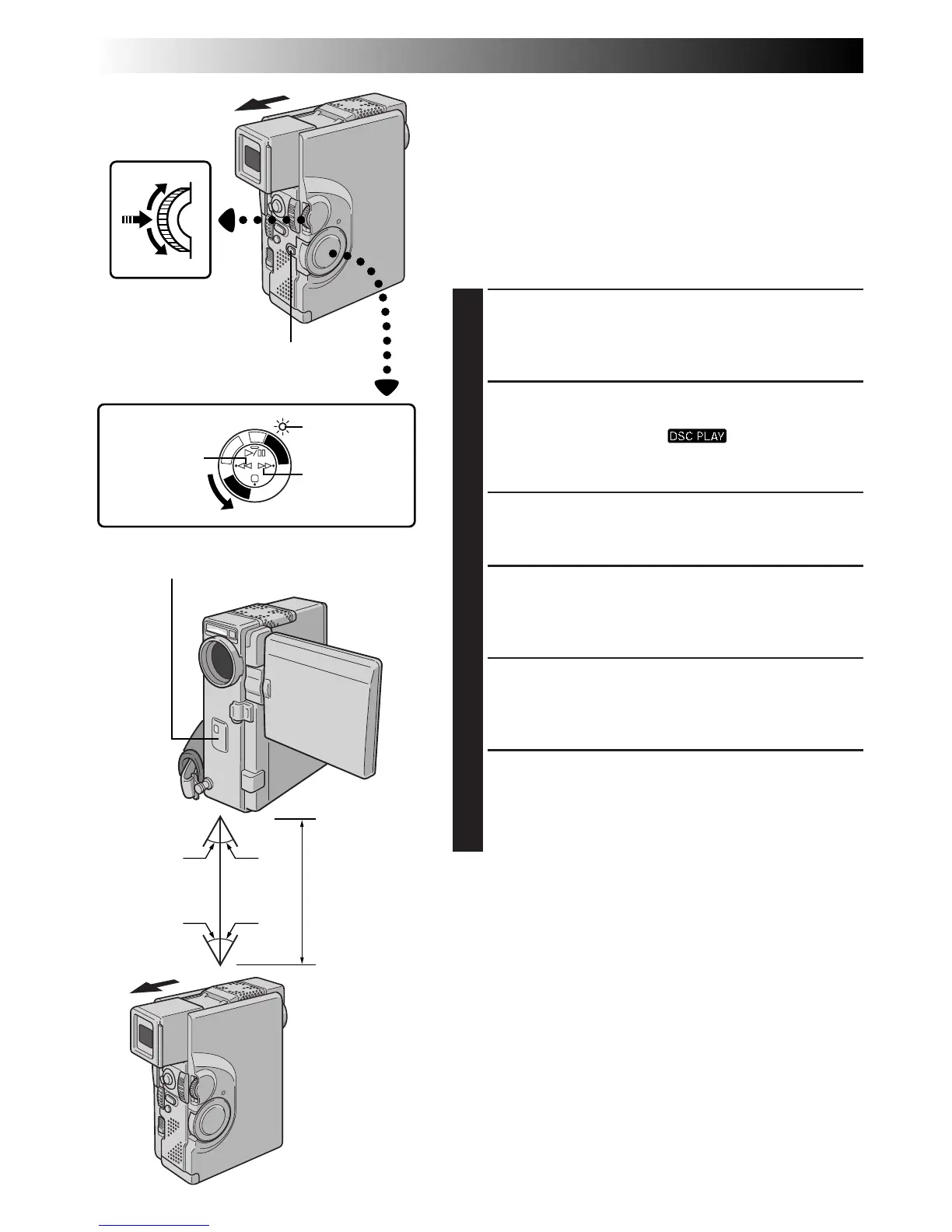
15° 15°
< 50 cm
15° 15°
MENU/SET Dial
Lock Button
Power lamp
Copying Images Using Infrared
Communication [IrTran-P]
Images stored in a MultiMediaCard can be copied
between this camcorder and another piece of equipment
that supports IrDA (IrTran-P) infrared communication,
regardless of its manufacturer.
The following procedure is described using two
GR-DVX7 camcorders as an example. For use of other
video units, refer to their respective instructions.
1
LOAD MULTIMEDIACARDS
[For both receiving and transmitting camcorders]
Insert MultiMediaCards into both receiving and
transmitting camcorders.
2
SELECT OPERATION MODE
[For both receiving and transmitting camcorders]
Set the Power Switch to “ ” while pressing
down the Lock Button. Open the LCD monitor fully
or pull out the viewfinder fully.
3
ACCESS PLAYBACK MENU
[For both receiving and transmitting camcorders]
Press MENU/SET. The Playback Menu appears.
4
SELECT FUNCTION
[For both receiving and transmitting camcorders]
Rotate MENU/SET to move the highlight bar to
“IrTran-P” and press it. The selected parameter blinks.
5
SELECT IrTran-P MODE
[For transmitting camcorder]
Rotate MENU/SET until “TRANSMIT” appears and
press it. The normal playback screen appears.
6
SELECT IMAGE TO BE COPIED
[For transmitting camcorder]
Perform Index Playback (Z pg. 59), Auto Playback
(Z pg. 56) or press
2
or
3
to select the desired
image.
Power Switch
Rewind (
2
)
Button
Fast-Forward
(
3
) Button
DUBBING
(cont.)
Infrared transmitter/receiver



 To Next Page