EN61
001 F 002 S 003 E
005 F
004 F
EXIT
006 F
OFFIrTran-P
PROTECT
TITLE DELETE
FORMAT
FILE DELETE
SELECTED 4
INDEX
SLIDE SHOW
MULTI VIEW
END
4
MULTI
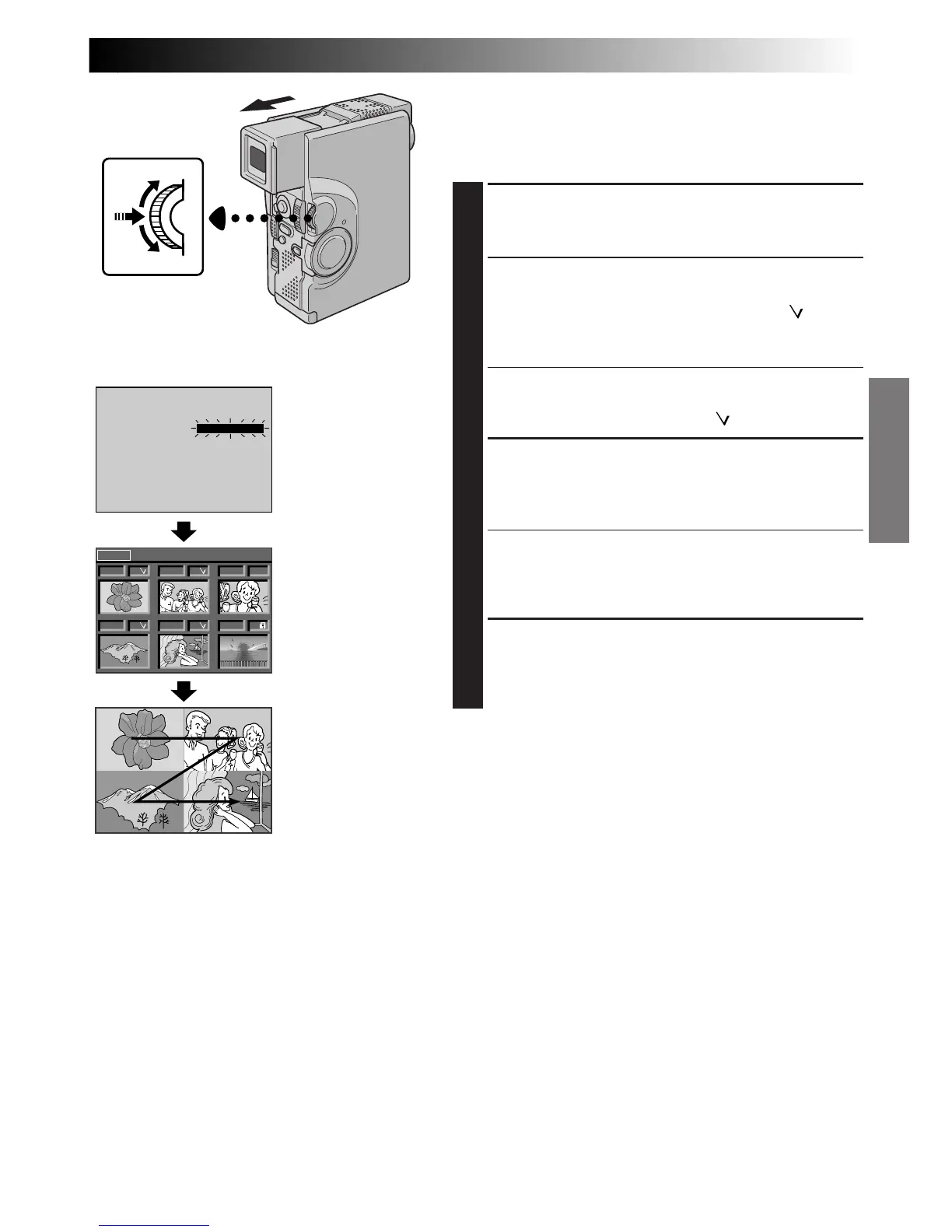
TO CREATE A MULTI-IMAGE SCREEN
USING SELECTED IMAGES
Before doing the following, perform steps 1 through 3
(Z pg. 60).
4
SELECT MODE
Rotate MENU/SET until “SELECTED 4” appears and
press it. The Multi-Image Index Screen appears.
5
SELECT IMAGES
Rotate MENU/SET to move the green frame to the
desired image and press it. A check mark “ ”
appears on the selected image. Repeat this
procedure for all 4 images to be selected.
•To cancel the selection of an image, rotate MENU/
SET to move the green frame to the desired image
and press it. The check mark “ ” disappears.
6
CREATE MULTI-IMAGE SCREEN
Rotate MENU/SET upward to select “EXIT” and press
it. The Multi-Image screen of the selected images
appears.
•The selected images are displayed in numerical
order from left to right and top to bottom.
•If you exit before selecting all 4 images, the Multi-
Image screen is cancelled.
7
END MULTI-IMAGE SCREEN
Set “MULTI VIEW” to “OFF” in the Playback Menu.
OR
Press
3
or
2
to display another image.
NOTE:
If you wish to change the still images which make up the
Multi-Image screen, go back to normal playback and
change the “MULTI VIEW” setting in the Playback Menu.
Display
MENU/SET Dial
Playback Menu
Multi-Image screen
Multi-Image
Index Screen



 To Next Page