18
ENGLISH
○○○○○○○○○
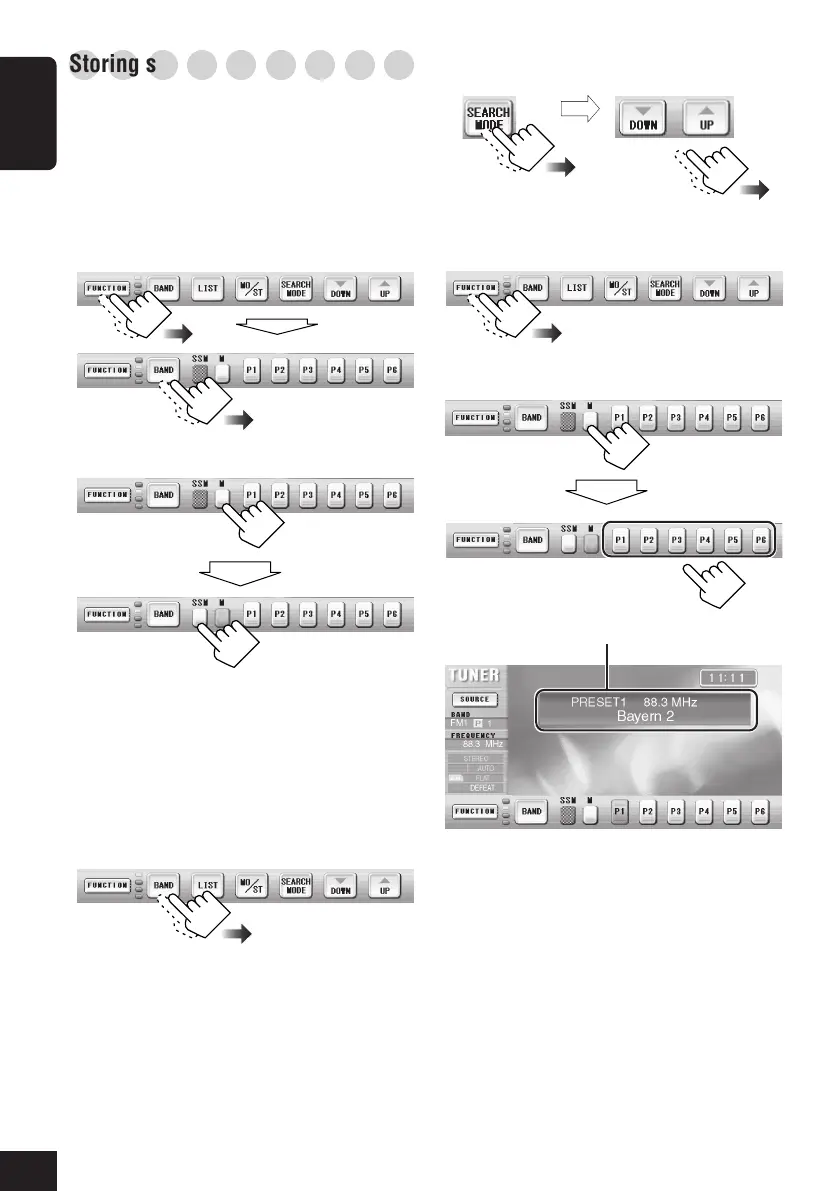
Storing stations in memory
You can preset 6 stations for each band.
FM station automatic presetting—SSM
(Strong-station Sequential Memory)
• This functions only for FM bands.
1
Select the FM band (FM1 – FM3) you
want to store FM stations into.
2
Start SSM.
Local FM stations with the strongest
signals are searched and stored
automatically in the selected FM band.
Manual presetting
1
Select the band (FM1 – FM3, and AM)
you want to store a station into.
2
Tune in to a station.
3
4
Store the station into a preset number.
then
then
then
Preset station information will be displayed.
Select “MANUAL”
(or “AUTO”).
16-19_KD-AV7001[EE]f.p65 4/27/05, 11:55 AM18


 To Next Page
 Loading...