66
ENGLISH
○○○○○○○○○
Searching for songs
You can use search functions to find your
favorite tracks (for CD/MP3) and folders (for
MP3).
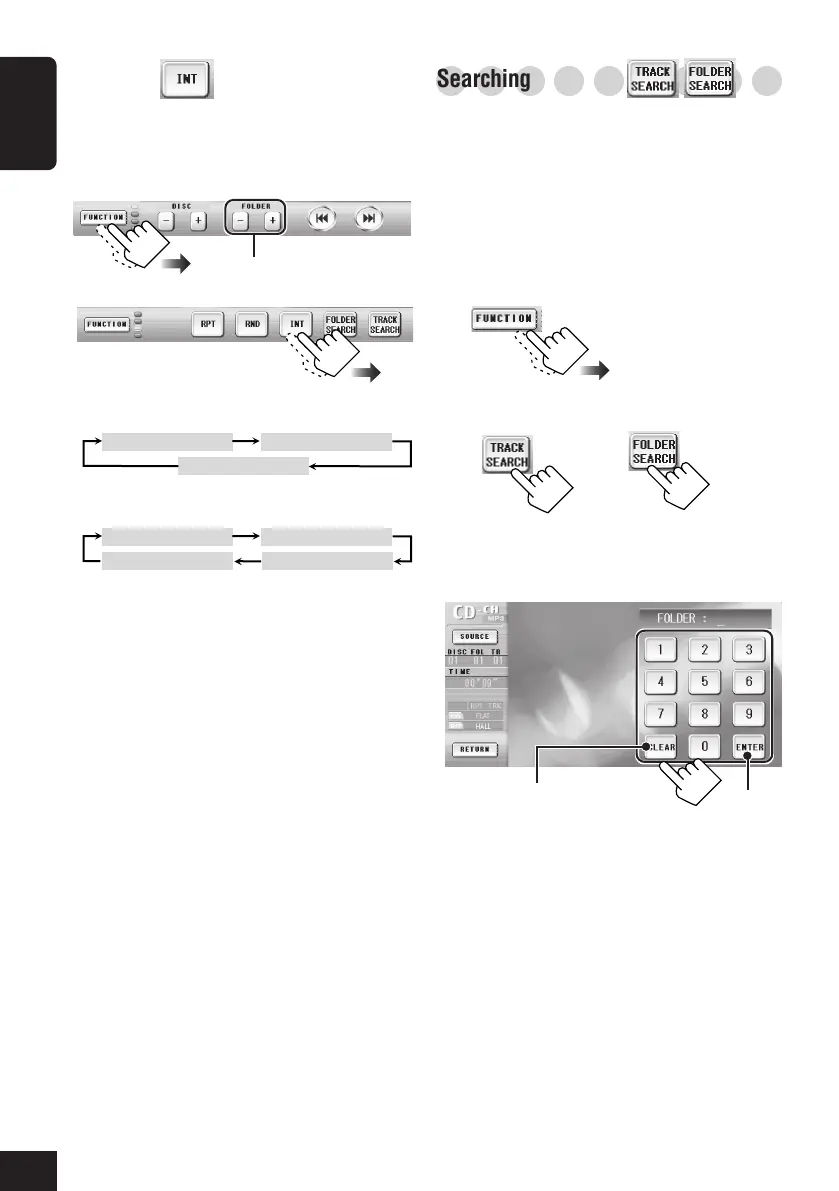
Folder/Track Search
You can select a specific track (for CD/MP3) or
folder (for MP3).
1
2
3
Enter a number, then confirm.
Confirm
Clear the entry.
(For CD/MP3)
(For MP3)
Ex. when playing MP3:
Intro Scan
You can play back the first 15 seconds of each
track sequentially.
1
2
INTRO SCAN
• TRACK: Plays the beginning of all tracks
of the current disc.
• FOLDER: Plays the first tracks of all folders
of the current disc (only for
MP3).
• DISC: Plays the first tracks of all discs
in the magazine.
• OFF: Cancels Intro Scan.
When playing CD:
When playing MP3:
INTRO SCAN TRACK INTRO SCAN FOLDER
INTRO SCAN DISCINTRO SCAN OFF
INTRO SCAN TRACK INTRO SCAN DISC
INTRO SCAN OFF
Only for MP3
61-66_KD-AV7001[EE]f.p65 4/27/05, 11:39 AM66


 To Next Page
 Loading...