ENGLISH
28
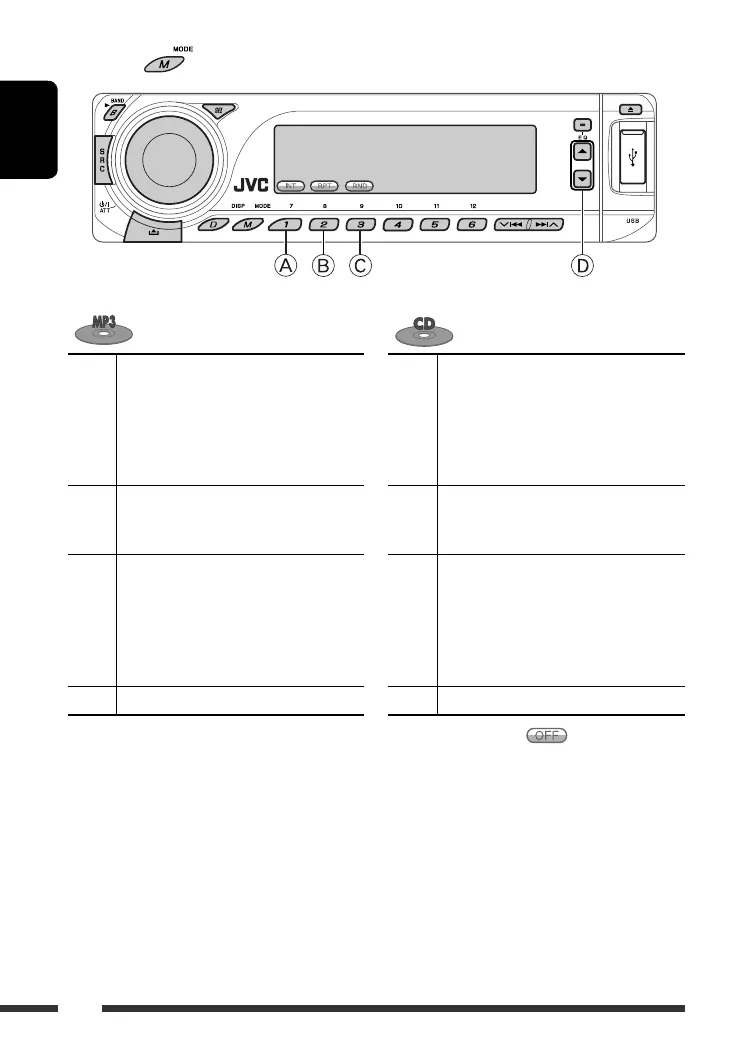
After pressing , press the following buttons to...
A
Intro Track: Plays the first 15 seconds of all
tracks of the current disc
Intro Folder: Plays the first 15 seconds of
the first track of all folders
Intro Disc: Plays the first 15 seconds of the
first track of all the inserted discs
A
Intro Track: Plays the first 15 seconds of all
tracks of the current disc
Intro Disc: Plays the first 15 seconds of the
first track of all the inserted discs
B
Repeat Track: Repeats the current track
Repeat Folder: Repeats the current folder
Repeat Disc: Repeats the current disc
B
Repeat Track: Repeats the current track
Repeat Disc: Repeats the current disc
C
Random Folder: Randomly play all tracks
of the current folder, then tracks of the
next folders
Random Disc: Randomly play all tracks
Random All: Randomly play all tracks of all
the inserted discs
C
Random Disc: Randomly play all tracks
Random All: Randomly play all tracks of all
the inserted discs
D
Skip 10 tracks (within the same folder)
D
Skip 10 tracks
• You can also cancel the playback mode by selecting “Off” or press number button 4 ( ).
EN24-31_DV8306_001A_f.indd 28EN24-31_DV8306_001A_f.indd 28 4/19/07 5:22:22 PM4/19/07 5:22:22 PM



 To Next Page