ENGLISH
9OPERATIONS
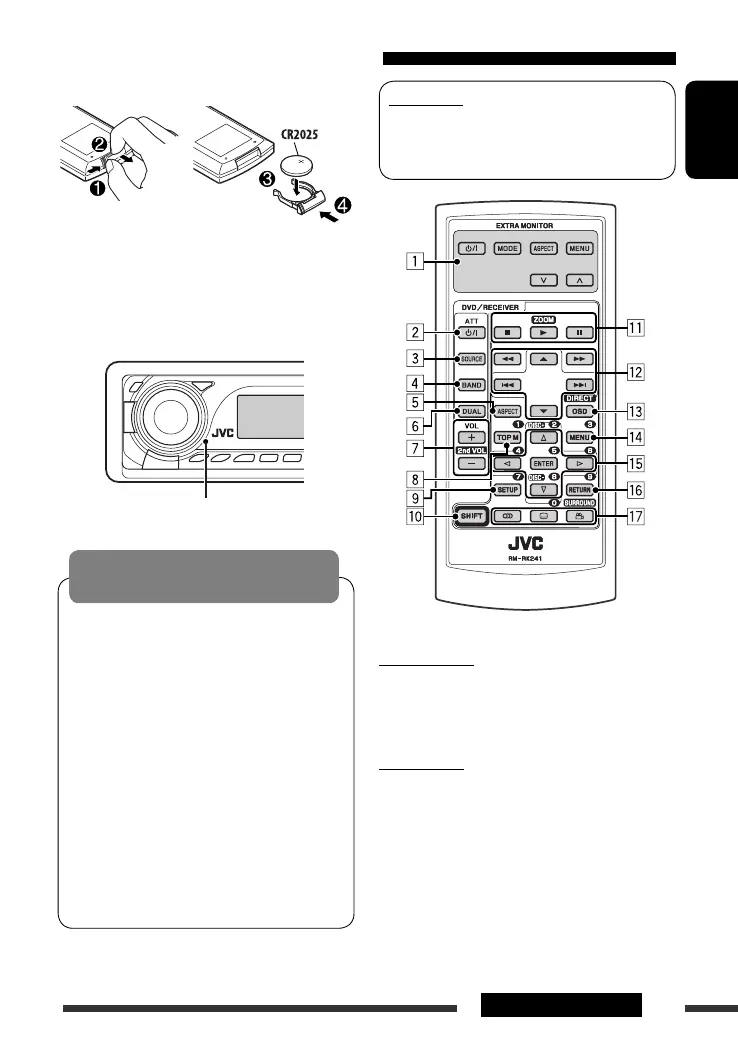
Using the remote controller (RM-RK241)
Installing the lithium coin battery (CR2025)
Before using the remote controller:
• Aim the remote controller directly at the remote
sensor on the unit.
• DO NOT expose the remote sensor to bright light
(direct sunlight or artificial lighting).
Warning:
To prevent accidents and damage
• Do not install any battery other than CR2025 or its
equivalent.
• Do not leave the remote controller in a place
(such as dashboards) exposed to direct sunlight
for a long time.
• Store the battery in a place where children cannot
reach.
• Do not recharge, short, disassemble, heat the
battery, or dispose of it in a fire.
• Do not leave the battery with other metallic
materials.
• Do not poke the battery with tweezers or similar
tools.
• Wrap the battery with tape and insulate when
throwing away or saving it.
Continued on the next page
Remote sensor
IMPORTANT:
If Dual Zone is activated (see page 26), the remote
controller only functions for operating the DVD/CD
player.
EXTRA MONITOR
1 Monitor control buttons
• Used for a JVC monitor—KV-MR9010,
KV-MH6510, KV-M706, or KV-M705.
DVD/RECEIVER
2 • Turns the power on if pressed briefly or
attenuates the sound when the power is on.
• Turns the power off if pressed and held.
3 Selects the source.
4 Selects the FM/AM bands.
5 Not applicable for this unit.
6 Activates or deactivates Dual Zone.
EN08-15_DV8306_001A_2.indd 9EN08-15_DV8306_001A_2.indd 9 4/10/07 2:23:17 PM4/10/07 2:23:17 PM



 To Next Page