ENGLISH
39SETTINGS
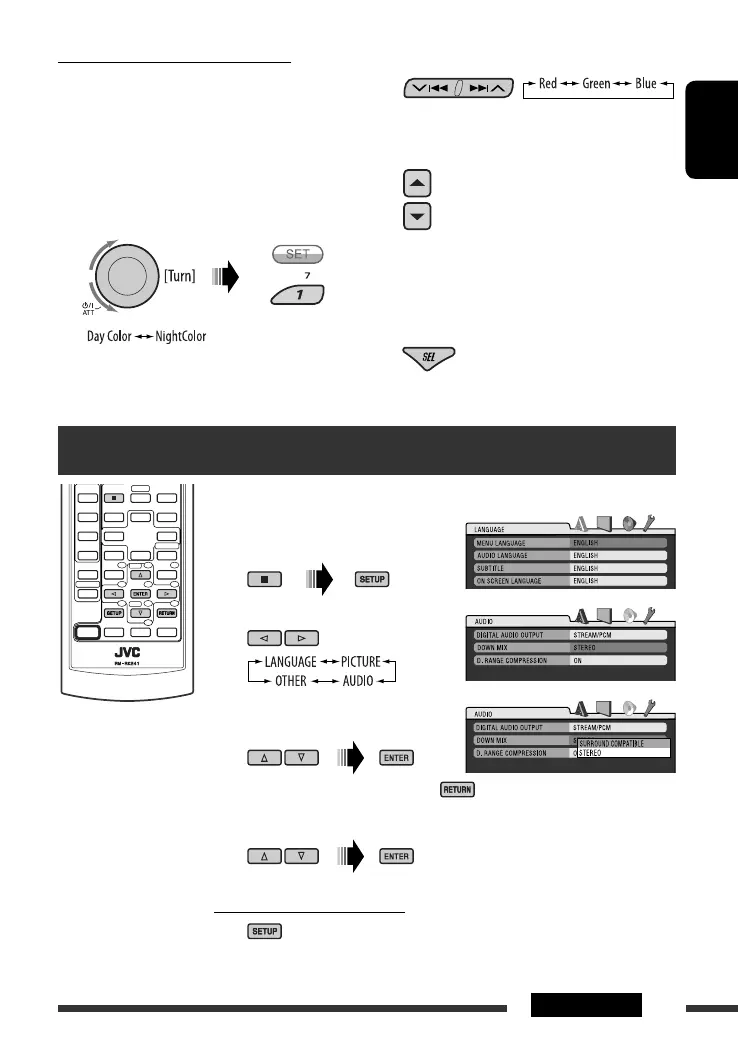
3 Select a primary color.
4 Adjust the level (+00 to +11) of the
selected primary color.
5 Repeat steps 3 and 4 to adjust other
primary colors.
6 Exit from the setting.
Setup menu
These operations are possible on the monitor using the remote controller.
~ Enter the setup menu before or
after playback.
Ÿ Select a menu.
! Select the item you want to set
up.
• To cancel the pop-up menu, press .
⁄ Select an option.
To return to the normal screen
Continued on the next page
Creating your own color—User Color
You can create your own colors—“Day Color” or
“NightColor.”
1 Follow steps 1 to 3 on page 35.
• In step 2, select “COLOR.”
• In step 3, select “Color Set.”
2 Select “Day Color” or “NightColor.”
EN38-43_DV8306_001A_2.indd 39EN38-43_DV8306_001A_2.indd 39 4/10/07 2:24:55 PM4/10/07 2:24:55 PM



 To Next Page