Filename [VS30U_1-EN.fm]
Masterpage:Left
10
EN
Page 10 January 31, 2002 3:21 pm
INDEX (cont.)
ON-SCREEN DISPLAY (for VHS deck)
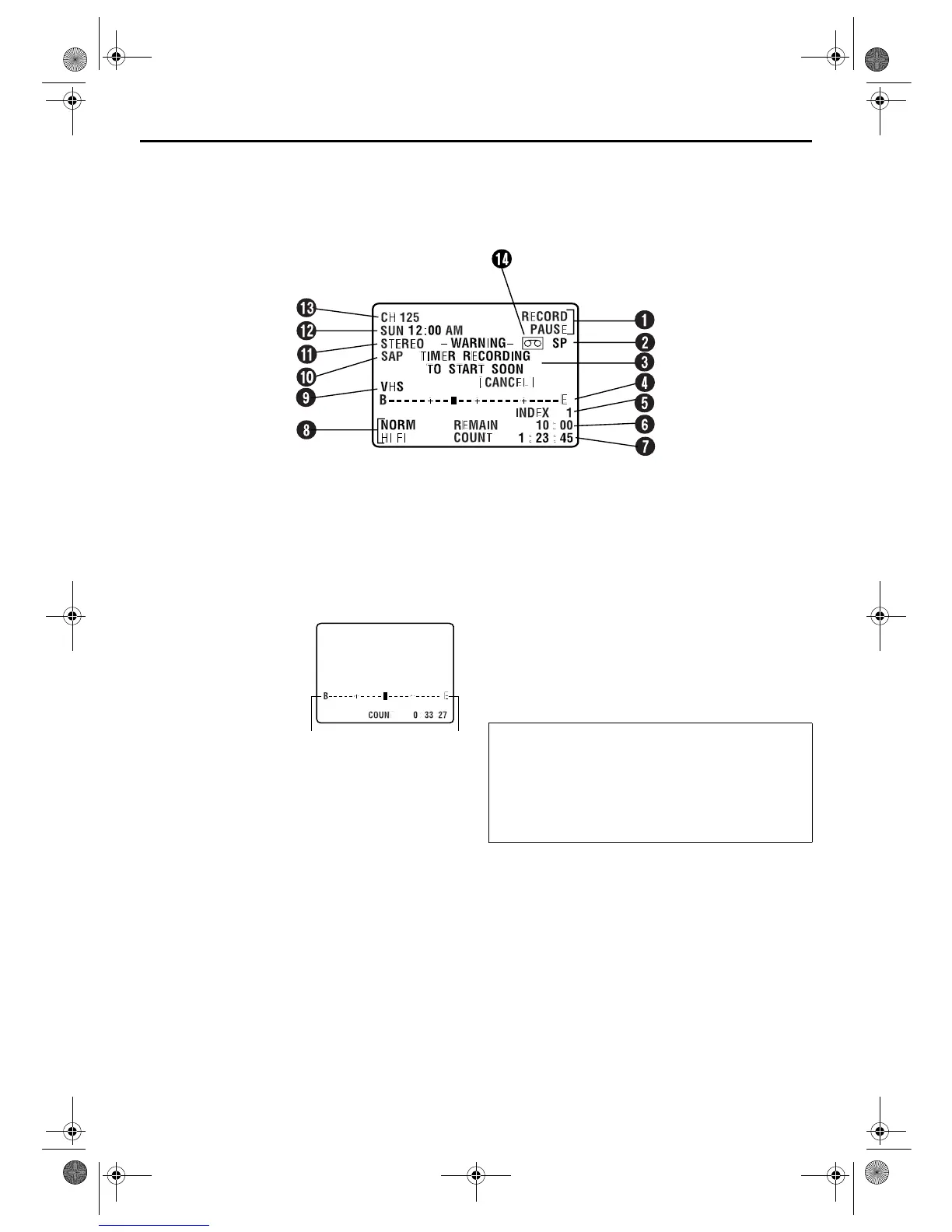
If you press DISPLAY/OSD on the Remote when “SUPERIMPOSE” is set to “ON” (
墌
pg. 71), various operational
indicators appear on the TV screen.
A
Operation Mode Indicators
B
Tape Speed SP/EP
C
Timer Warning Display
A warning appears on the TV screen to tell you that the timer-
recording is to start in 5 minutes if you’re not in the Timer
mode at that time. The warning blinks for the entire 5
minutes leading up to the start of timer recording. To clear
the display, press CANCEL on the Remote.
D
Tape Position Indicator
The tape position indicator
appears on the TV screen
when you press REW (
3
)
or FF (
5
) from the Stop
mode or perform an Index
Search (
墌
pg. 30). The
position of “
q
” in relation to
“B” (beginning) or “E” (end)
shows you where you are
on the tape.
NOTE:
Depending on the type of tape being used, the tape position
indicator may not appear correctly.
E
Index number
墌
pg. 30
F
Tape Remaining Time Indicator
G
Counter Display
墌
pg. 33
H
Audio Mode Display
墌
pg. 31
I
VHS Indicator
J
SAP Indicator
墌
pg. 34
K
Stereo program Indicator
墌
pg. 34
L
Day/Clock Display
M
Channel Position Number/
Auxiliary Input Indicator (L-1 or F-1)
Dubbing Direction Indicators
(DV
]
VHS)
墌
pg. 52
N
“Cassette Loaded” Mark
Beginning End
To recall an indication
A Press DISPLAY/OSD.
●
All indications corresponding to the current status are
displayed for 5 seconds. After that, the counter
information and RECORD/PAUSE if in the Record Pause
mode, remain on the screen.
B Press DISPLAY/OSD again to clear the display.
●
The RECORD/PAUSE indication remains on the screen.
VS30U_1-EN.fm Page 10 Thursday, January 31, 2002 3:33 PM



 To Next Page
 Loading...