Masterpage:Left-index
6
EN
Filename [VS30U_1-EN.fm]
Page 6 January 31, 2002 3:21 pm
INDEX
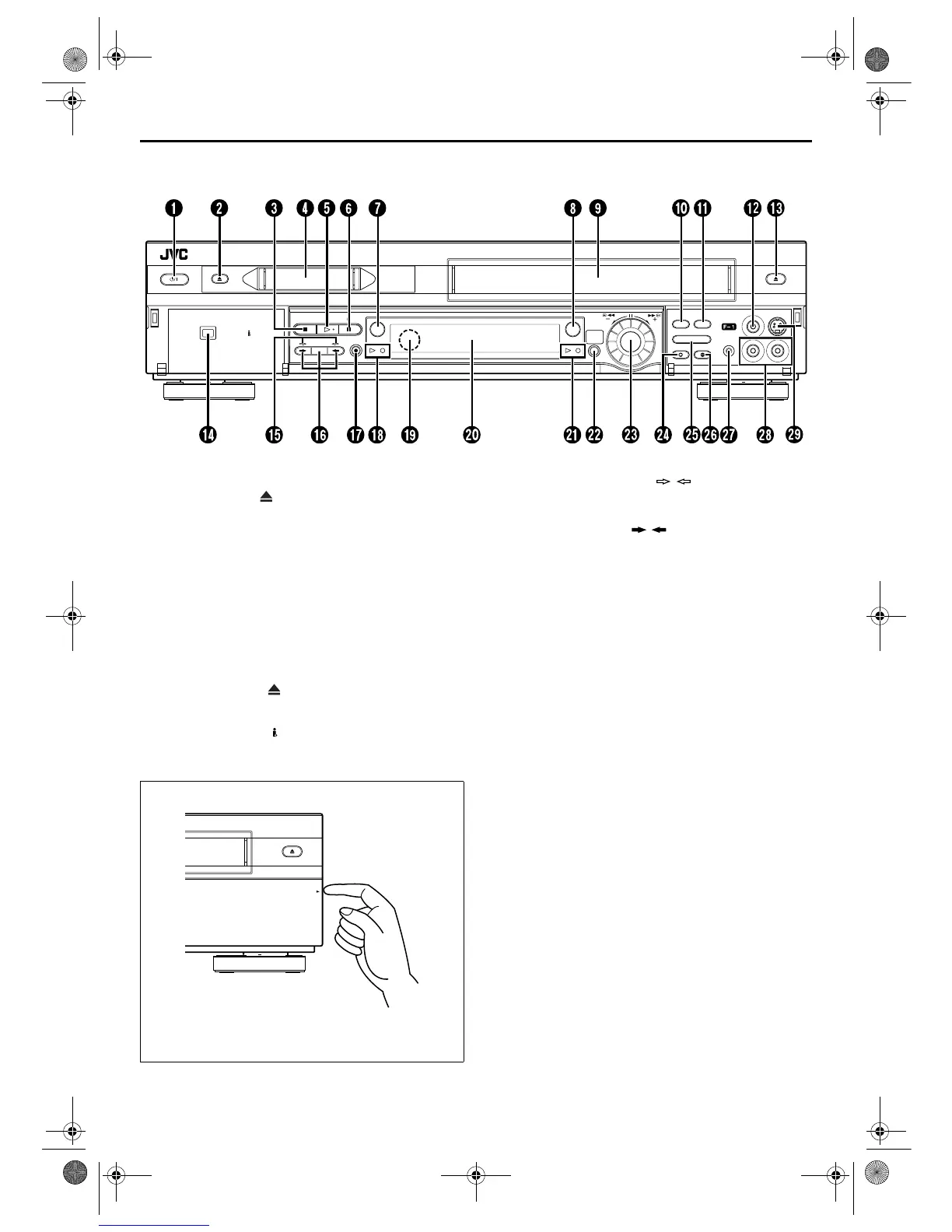
FRONT VIEW
DV IN/OUT
S-VHS
DUB
DV
DV
S-VHS
CH – / +
PUSH / TURN
24HR.
QUICK
PROGRAM
R.A.EDIT
START
IN /OUT
INSERT A.DUB
STOP PLAY PAUSE
REC
EJECT
POWER
REW
FF
EJECT
A
POWER Button
墌
pg. 15
B
DV Eject (EJECT ) Button
墌
pg. 36, 37
C
STOP
8
Button
墌
pg. 26, 27, 36, 37
D
Mini DV Cassette Loading Slot
E
PLAY
4
Button
墌
pg. 26, 36
F
PAUSE
9
Button
墌
pg. 27, 28, 37, 38
G
DV Button
墌
pg. 36, 37
H
S-VHS Button
墌
pg. 26, 27
I
VHS Cassette Loading Slot
J
Random Assemble Edit (R.A.EDIT) Button
墌
pg. 64
K
Random Assemble Edit START Button
墌
pg. 65
L
VIDEO Input Connector
墌
pg. 56, 62
M
VHS Eject (EJECT ) Button
墌
pg. 26, 27
N
DV IN/OUT connector (i.Link*)
墌
pg. 56
* i.Link refers to the IEEE1394-1995 industry specification and
extensions thereof. The logo is used for products compliant with
the i.Link standard.
O
Dubbing Direction (DV / S-VHS) Indicators
墌
pg. 52, 53
P
Dubbing (DUB) Button
墌
pg. 52, 53
Dubbing Direction ( / ) Buttons
墌
pg. 52, 53
Q
REC
7
Button
墌
pg. 27, 37
R
DV mode Indicators
墌
pg. 36, 37
S
Remote Sensor
T
Front Display Panel
墌
pg. 8
U
VHS mode Indicators
墌
pg. 26, 27
V
24HR QUICK PROGRAM Button
墌
pg. 48
W
ADVANCED JOG Dial
墌
pg. 26, 36, 48
X
INSERT Button
墌
pg. 63
Y
Random Assemble Edit IN/OUT Button
墌
pg. 64
Z
Audio Dubbing (A.DUB) Button
墌
pg. 61
a
Remote PAUSE Connector
墌
pg. 56
b
AUDIO Input Connectors
墌
pg. 56, 60, 62
c
S-VIDEO Input Connector
墌
pg. 56, 62
To access covered buttons/connectors, pull and open the
cover.
PULL-OPEN
VS30U_1-EN.fm Page 6 Thursday, January 31, 2002 3:33 PM



 To Next Page
 Loading...