Masterpage:Right-NoTitle0
EN
15
Filename [VS30U_1a-EN.fm]
Page 15 January 31, 2002 3:35 pm
Language
This VCR offers you the language choice to view menus
and some messages — in English, Spanish or French. The
default setting is “ENGLISH”.
A
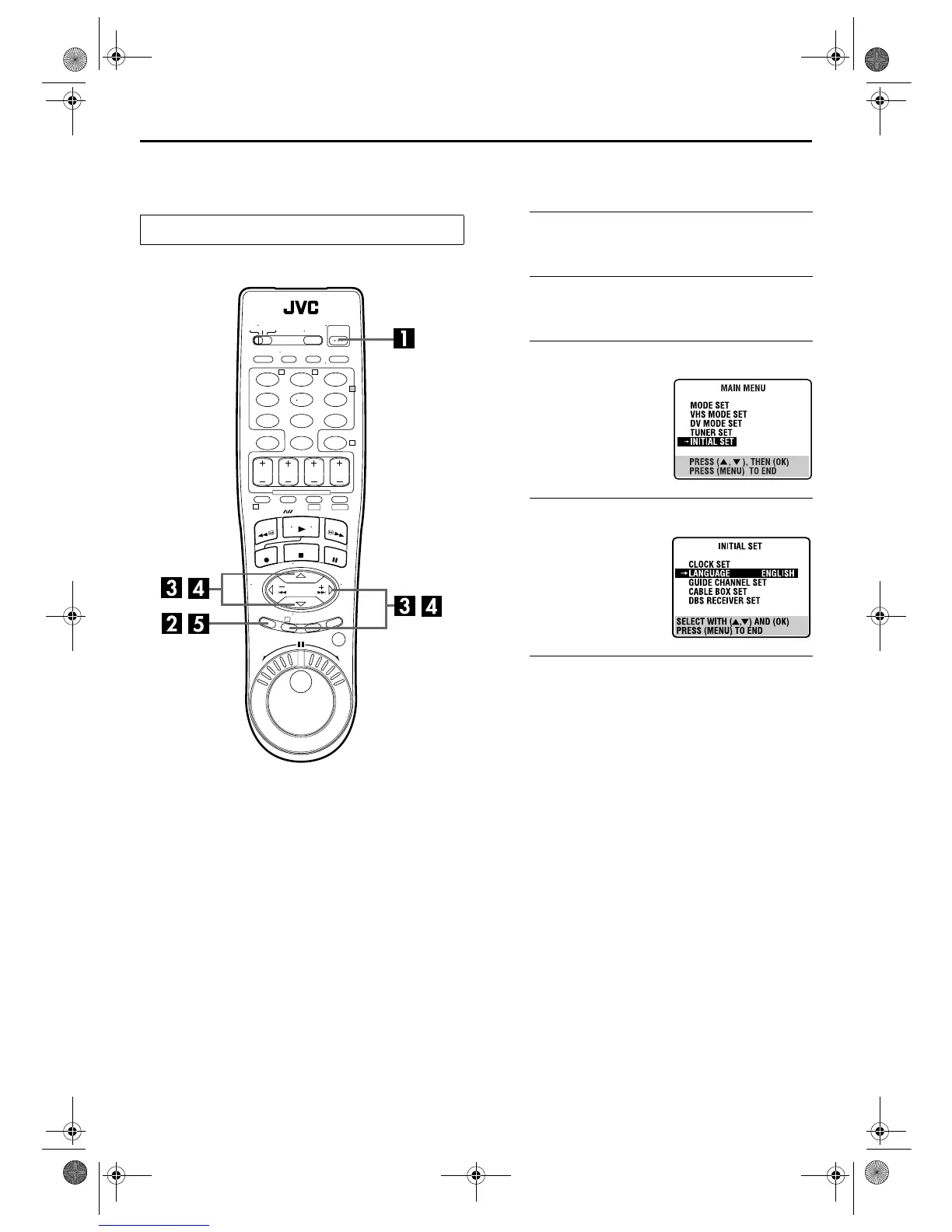
Turn on the VCR.
Press POWER.
B
Access the Main Menu screen.
Press MENU.
C
Access the Initial Set screen.
D
Select the language.
E
Return to the normal screen.
Press MENU.
Turn on the TV and select the AV mode.
123
456
7
89
0
2
4
1
3
T W
DV S-VHS
Press
rt
to move the
highlight bar (arrow) to
“INITIAL SET”, then press OK
or
e
.
Press
rt
to move the
highlight bar (arrow) to
“LANGUAGE”, then press
OK or
e
repeatedly until the
desired language is selected.
VS30U_1a-EN.fm Page 15 Thursday, January 31, 2002 3:35 PM



 To Next Page
 Loading...