Filename [VS30U_2-EN.fm]
Masterpage:Left
50
EN
Page 50 January 31, 2002 3:37 pm
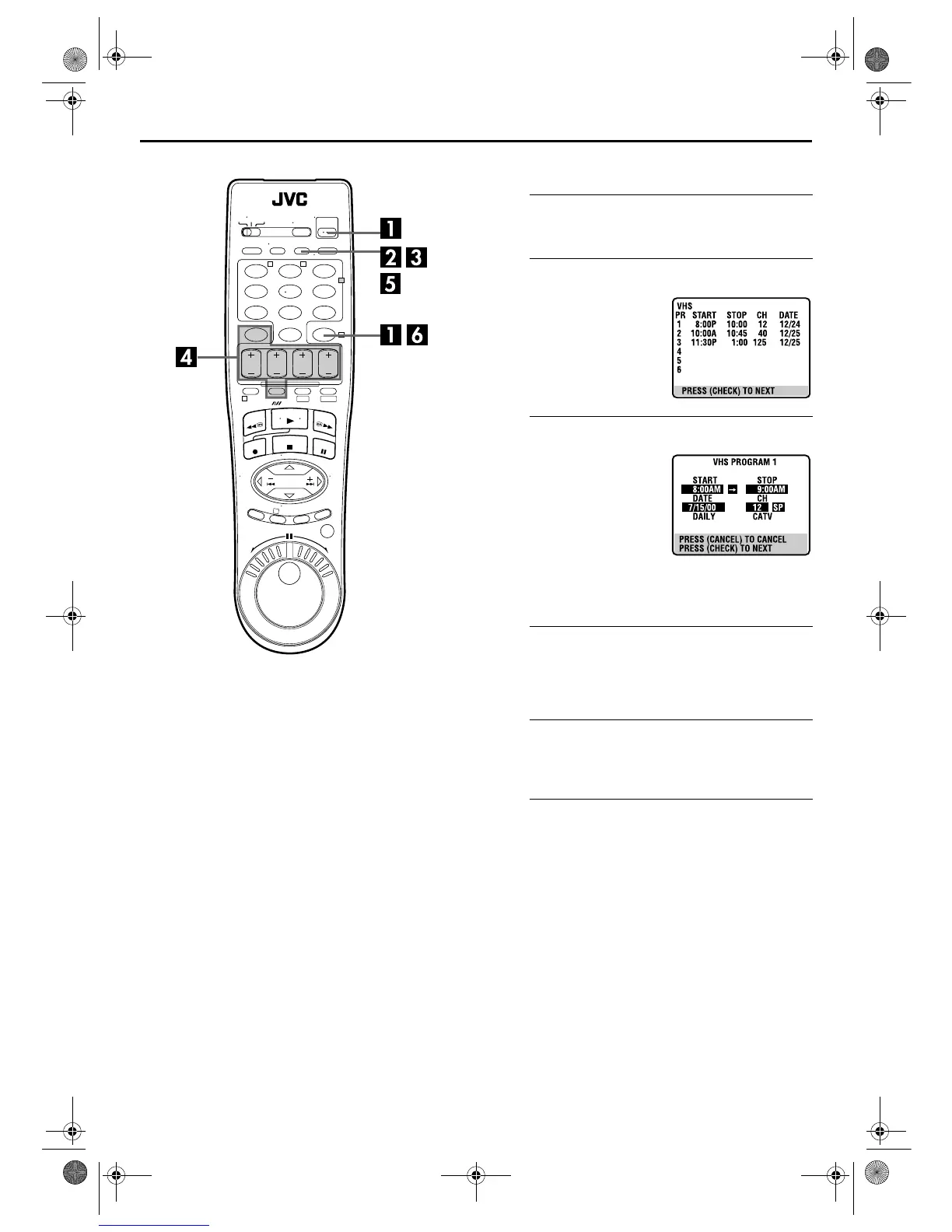
TIMER RECORDING (cont.)
Check, cancel and change programs
A
Disengage the timer mode.
Press
TIMER
, then press
POWER
.
B
Access the Program Check screen.
C
Access the Program screen.
To cancel or change a program...
D
Cancel or change a program.
Press
CANCEL
to cancel a program. To change program
settings, press the appropriate button:
START+/–
,
STOP+/–
,
DATE+/–
,
CH+/–
, and/or
SP/EP
(
p
).
E
Return to the normal screen.
Press
PROG CHECK
as many times as necessary. If there
are still some programs remaining, go to step
6
.
F
Return to the timer mode.
Press
TIMER
.
123
456
7
89
0
2
4
1
3
T W
DV S-VHS
Press
PROG CHECK
.
● The Program Check screen
appears for the deck (VHS or
DV) being selected.
Press
PROG CHECK
again to
check more information.
Each time you press
PROG
CHECK
, the next program’s
information appears.
VS30U_2-EN.fm Page 50 Thursday, January 31, 2002 3:38 PM



 To Next Page
 Loading...