Section 9
Settings
28
9
SECTION 9 - SETTINGS
1
2
3
4
5
6 7 8
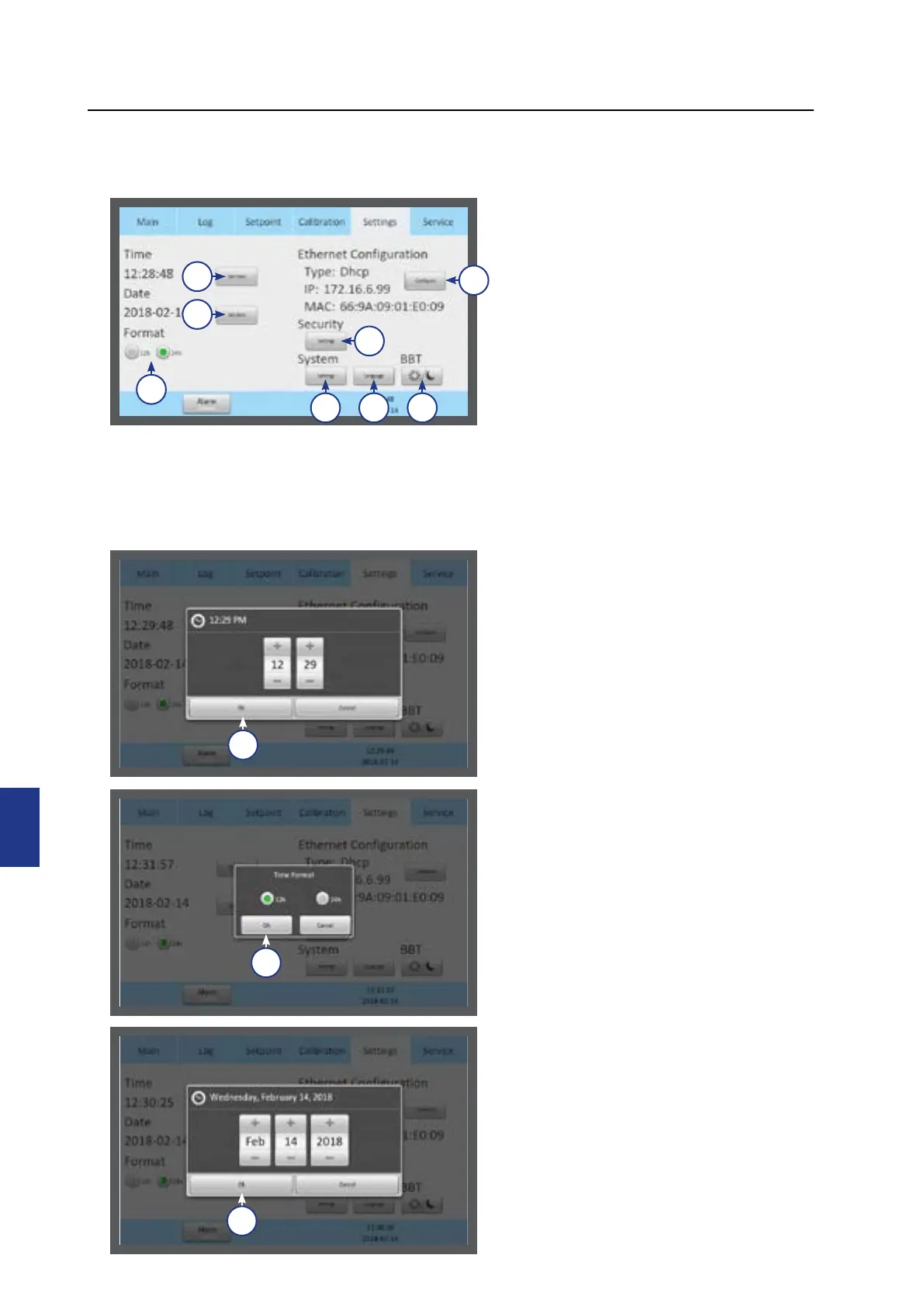
The Settings menu shows:
1. Time settings (1)
2. Date settings (2)
3. Time format (3)
4. Ethernet configuration (4)
5. Security settings (5)
6. System settings (6)
7. Language (7)
8. Basal Body Temperature (BBT)
settings (8)
To change some of these settings requires
a login (see “Security Settings” on page
30 and “Access Levels” on page 31).
Changing the Date and Time
Select the date or time button
1. Adjust the time by pressing the + or -.
2. Press OK (1).
1
3. Select 12 or 24 hour time format.
4. Press OK (1).
1
1
5. Adjust the date by pressing the + or -.
6. Press OK (1).



 To Next Page