Section 9
29
Settings
9
1
2
3
1
2
3
4
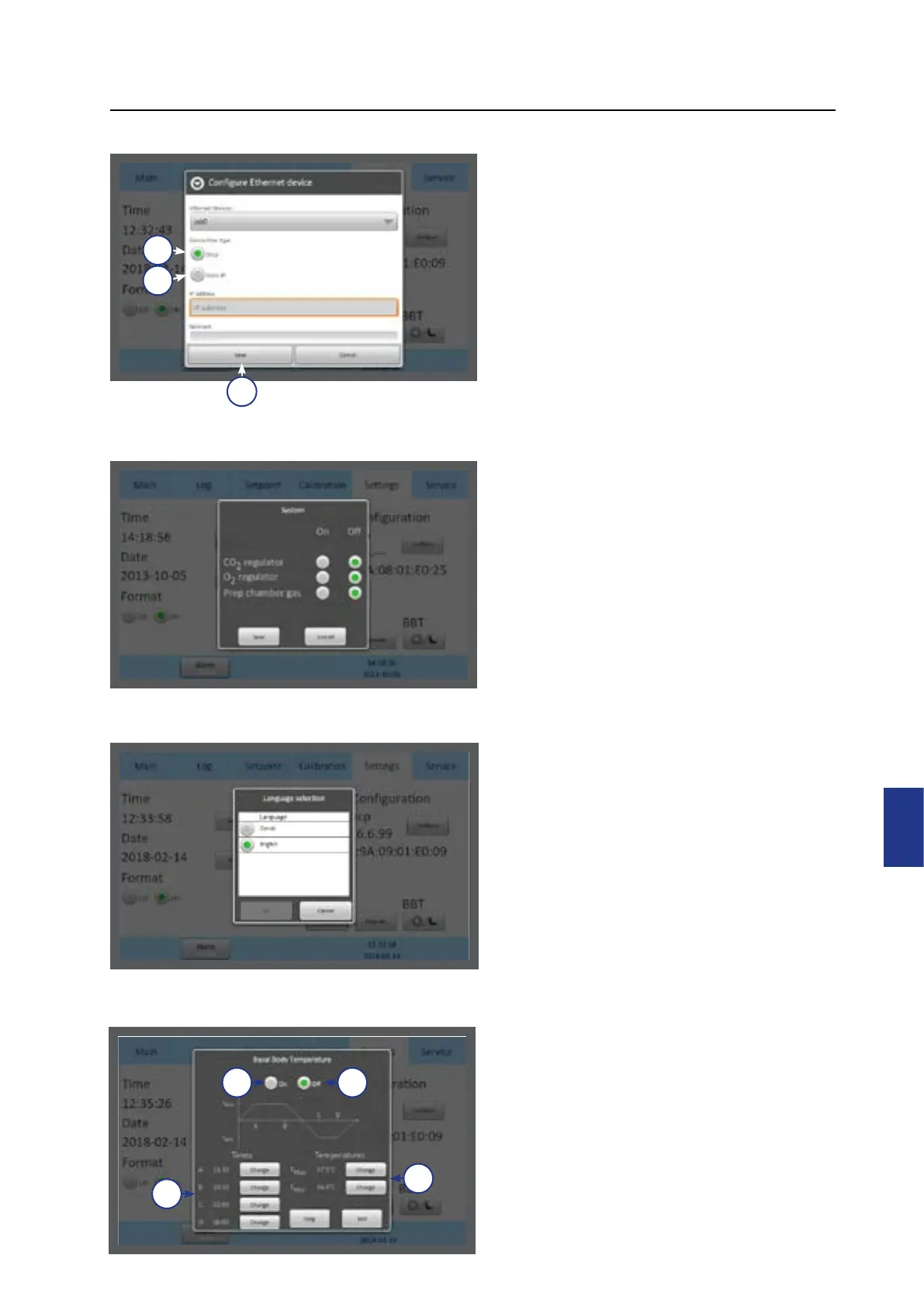
Ethernet Settings
Select the Configure button from the
settings menu. It is recommended to
allocate a static IP address to the device.
Consult an IT Specialist/Department for
network settings.
1. Select DHCP (1), or
2. Static IP (2)
3. If static IP is selected, enter
the settings provided by the IT
department.
4. Press Save (3).
Changing the Gas Control
Settings
Select the Settings button from the
Settings menu (under the System heading).
Changing CO
2
regulator, O
2
regulator and
gas supply to the Preparation Chamber on
or o.
Changing Language
Select the Language button from the
settings menu. Choose the preferred
language in the language menu.
Changing Basal Body
Temperature
Select the BBT button from the settings
menu.
1. Turn the BBT on (1) or o (2)
2. Adjust the time (A, B, C and D) values
(3).
3. Adjust the temperature
T
Max
and
T
Min (4).



 To Next Page