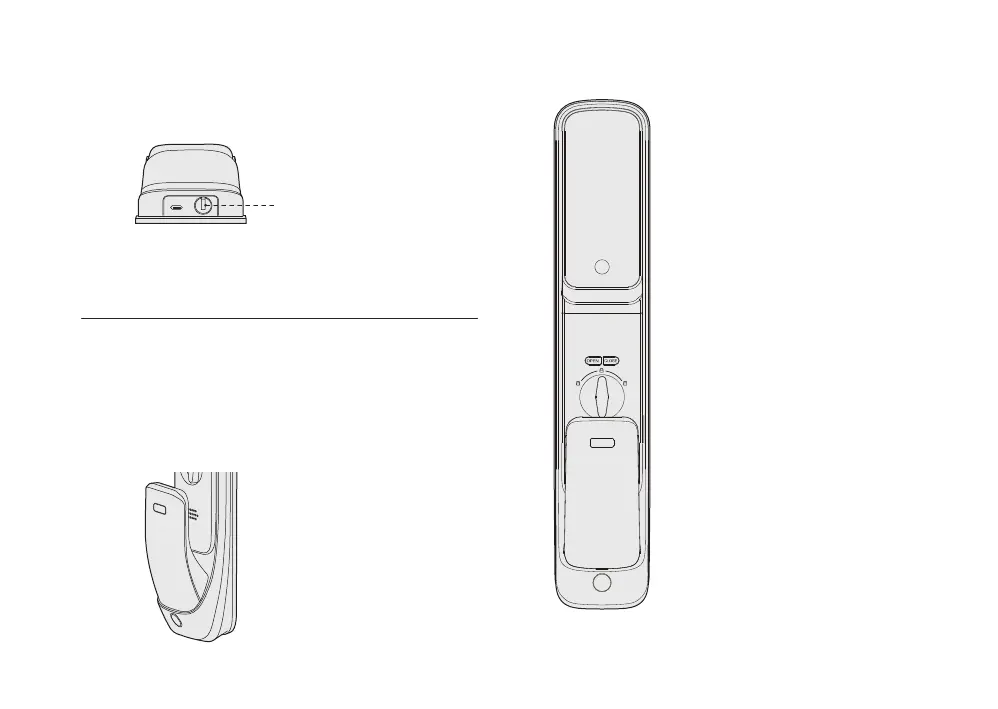
You can unlock by mechanical key if you forget PIN code, the
battery run out or system error occurs.
Insert the mechanical key and then rotate 180° to unlock.
When sensor handle function is enabled, holding front and
back side of sensing handle at same time and cover unlocking
sensor can unlock from inside.When sensing handle function is
disabled, please use OPEN button to unlock.
If your door is right opening direction, please turn the key
clockwise.
If your door is left opening direction, please turn the key
counterclockwise.
Unlock by mechanical key Unlock/lock from inside
Unlock by back panel sensing handle
Mechanical Keyhole
1. CLOSE button
Press CLOSE button once to lock.
Long press CLOSE button for 3
seconds to enable privacy mode.
In privacy mode , lock can be opened
only from inside or by master
credentials from outside.
2. OPEN button
Press OPEN button double to unlock.
3.Turn on/off the sensing handle
Press the OPEN button and CLOSE
button for 10 seconds at the same
time to turn on or off the sensing
handle.
4.After turning off the sensing handle,
if the handle sensor is triggered, the
CLOSE light will flash to alert you;
You can press the OPEN button +
CLOSE button for 10 seconds to
switch on the sensing handle.


 To Next Page