Bladder Volume Tester User’s Manual V1.02
- 19 -
Operation steps:
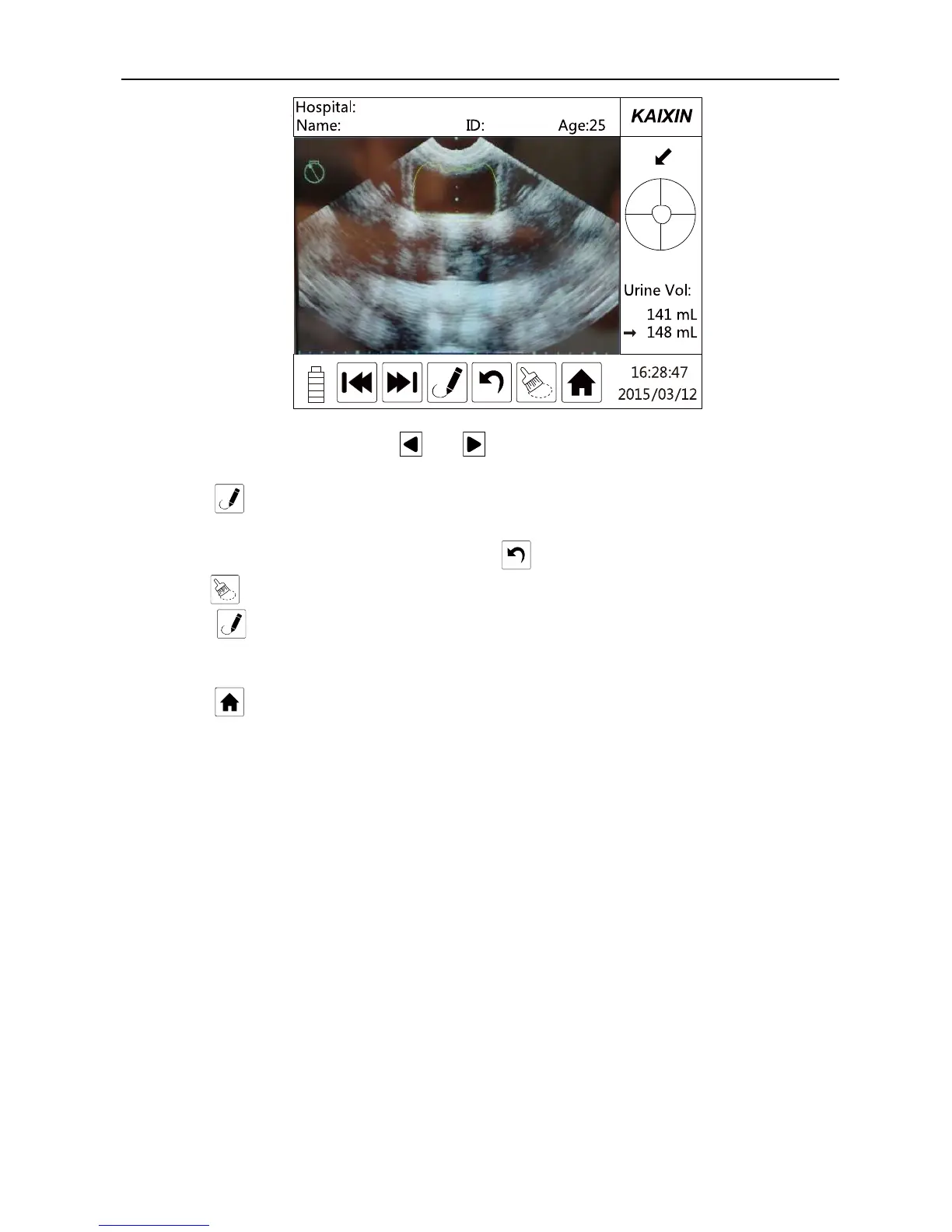
1. In the main interface, touch keys and to select the image which has a great error;
2. Directly touch left or right image which have large error to enter manual contour interface;
3. Touch key, the icon color will from green to orange, it will begin to manually contour;
4. Draw the points along with the border of bladder, it will automatically connect between points; if
the position of point is not correct, you can touch key to cancel each connection step by step, or
touch key to erase all connections, re-draw the line;
5. Touch key again, the first point and the last point will be automatically connected to form a
closed region, and the bladder volume will be automatically displayed on the right side of the
current measurement result;
6. Touch key to return to the main interface.
Note:
(1) Draw lines must be in a clockwise to form a close region, draw lines can not cross.
(2) The point number shall not less than three, but not more than 32.


 To Next Page