15Kamstrup A/S • 55122714_A2_GB_04_2021
flowIQ® Gateway
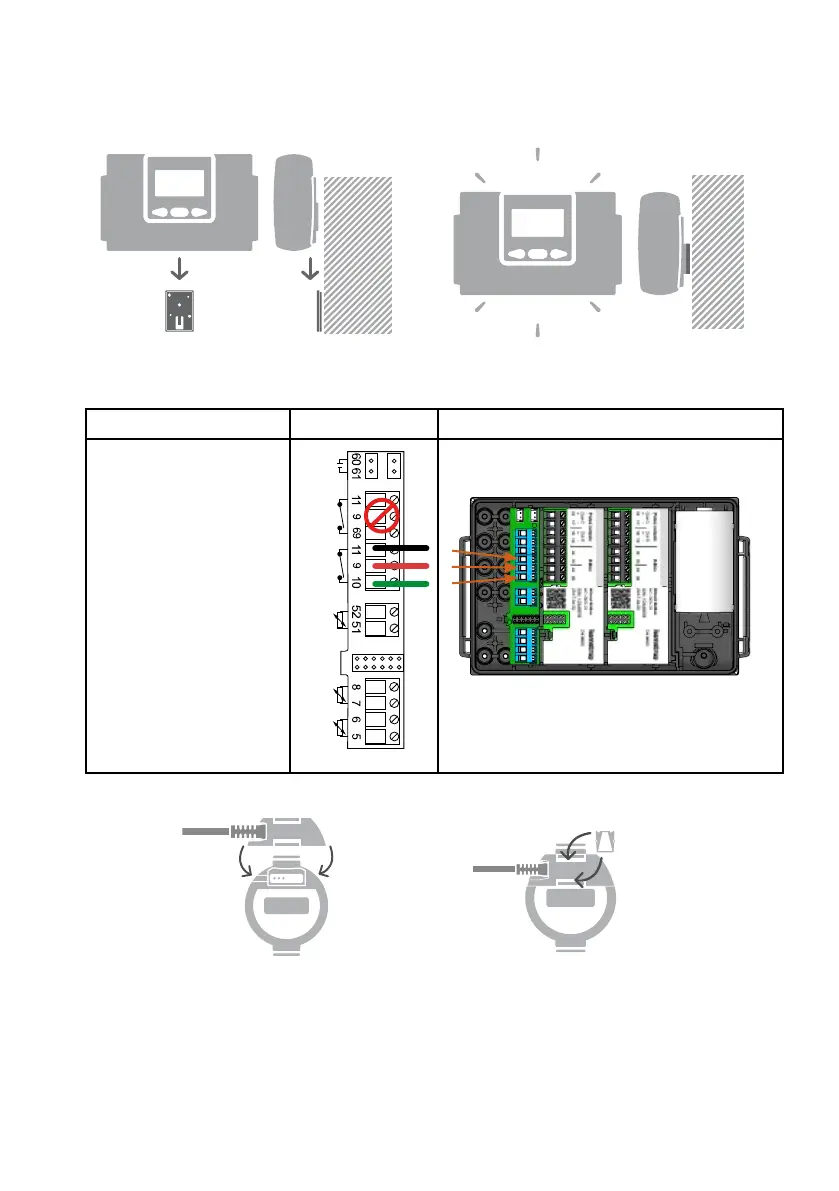
Mount the wall bracket and slide flowIQ® Gateway onto the bracket:
6.2 Connecting flowIQ® Gateway with flowIQ® 2200/3200 meter
Follow the connection diagram below:
Description Schematic Overview
The flowIQ® 2200/3200
meter cable is connected
in the following way:
Black à minus (-) input 11
Red à plus (+) input 9
Green à V1 input 10
The 3 Pt500 temperature
sensors are connected to
terminals t1…3
t2
t3
V1
V2
t1
+
-
-
+
-
+
Connect the plug to the flowIQ® 2200/3200 meter:
Mount the connection cable on the
flowIQ® 2200/3200 meter.
Insert the locking tabs in the
assembly to secure the connection.



 To Next Page