17Kamstrup A/S • 55122714_A2_GB_04_2021
flowIQ® Gateway
6.4 Connecting additional accessories
Additional devices can be connected to flowIQ® Gateway. These devices are dependent on the
choice of communication module. The devices include:
• Up to 3 x Pt500 temperature sensors
• Up to 4 x pulse meters
• Up to 2 x analog input 4...20 mA devices, e.g. pressure sensors
6.4.1 Connecting Pt500 temperature sensors
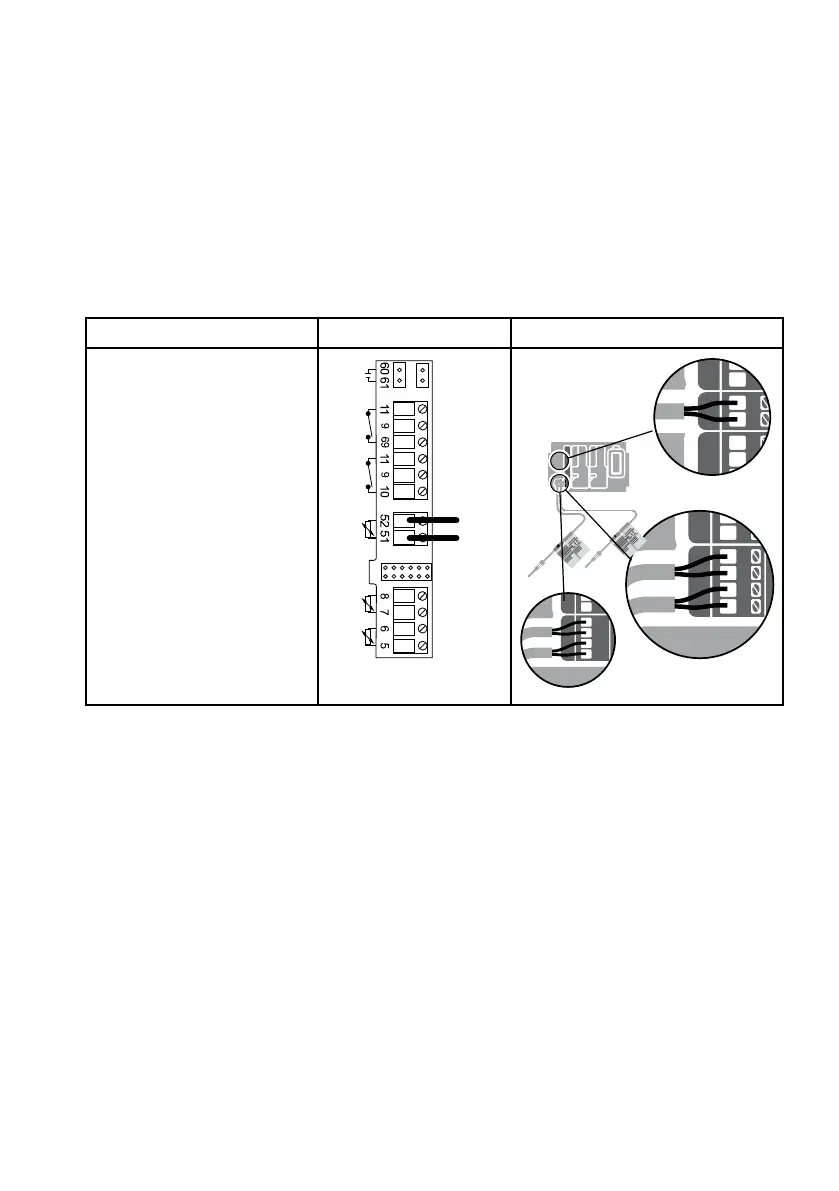
Up to 3 x Pt500 temperature sensors can be connected to flowIQ® Gateway.
Description Schematic Overview
The flowIQ® Gateway Pt500
temperature sensors are
connected in the following
way:
• Connect the two wires
to either the t1, t2, or t3
terminals as shown
t2
t3
V1
V2
t1
+
-
-
+
-
+
5
6
8
7
52
51
t2
t1
t2
t1
t3



 To Next Page