EasyManua.ls Logo

Kamstrup flowIQ - Display Loops; USER Loop

Kamstrup flowIQ
36 pages
Print Icon
To Next Page IconTo Next Page
To Previous Page IconTo Previous Page
Loading...
23Kamstrup A/S • 55122714_A2_GB_04_2021
flowIQ® Gateway
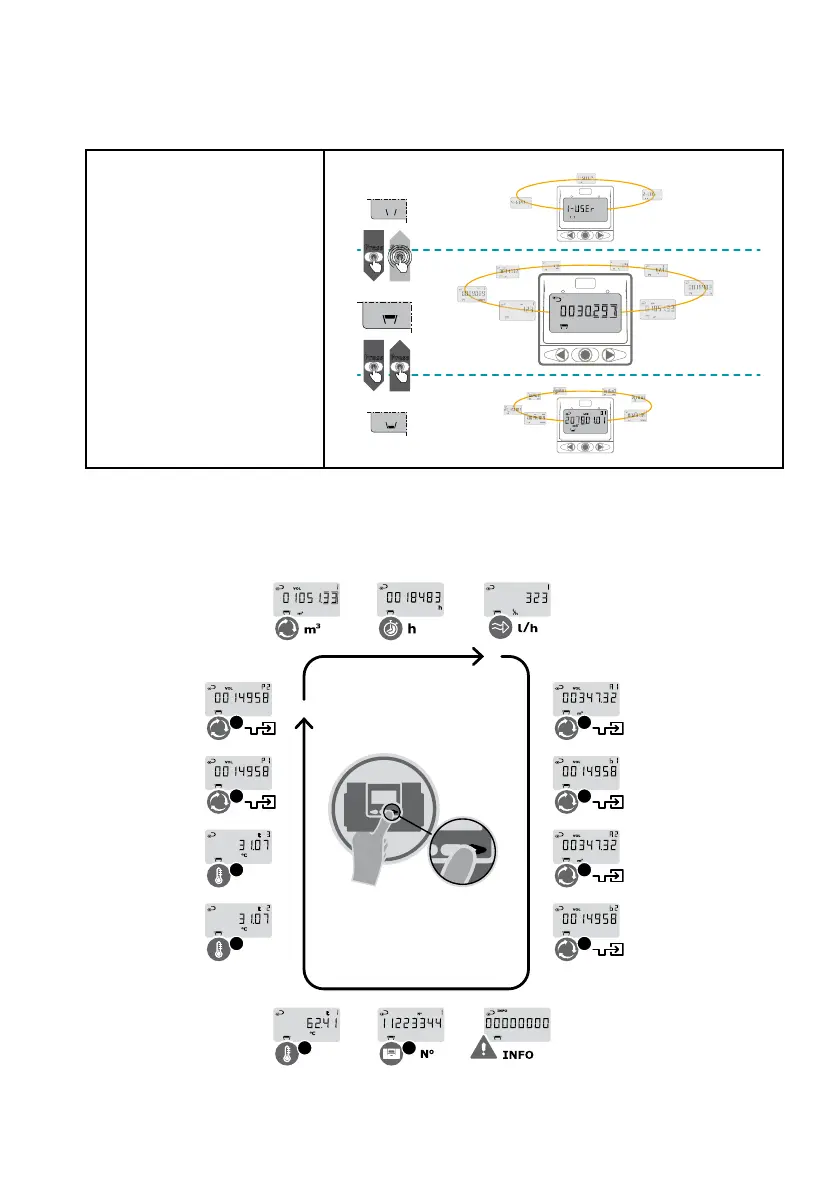
7.1.1 Display loops
Display loops:
Shift between display loops by
holding down the primary key
for 5 seconds.
Main and subloops:
Switch between main and
subloops by pressing the
primary key once.
f
f
l
l
o
o
w
w
I
I
Q
Q
®
®
G
G
a
a
t
t
e
e
w
w
a
a
y
y
-
-
D
D
i
i
s
s
p
p
l
l
a
a
y
y
l
l
o
o
o
o
p
p
Press
M
M
a
a
i
i
n
n
l
l
o
o
o
o
p
p
S
S
u
u
b
b
l
l
o
o
o
o
p
p
L
L
o
o
o
o
p
p
s
s
e
e
l
l
e
e
c
c
t
t
Press
Press
5 sec.
7.1.1.1 "USER loop"
The gateway's display loop is intended for the user. The layout of the readings in this loop is static.
The loop shows you the readings from the attached devices.
t2
t3
P1
P2
A1
A2
B1
B2
t1 1

Table of Contents

Related product manuals