DN1769-1809
14
1 - System Architecture
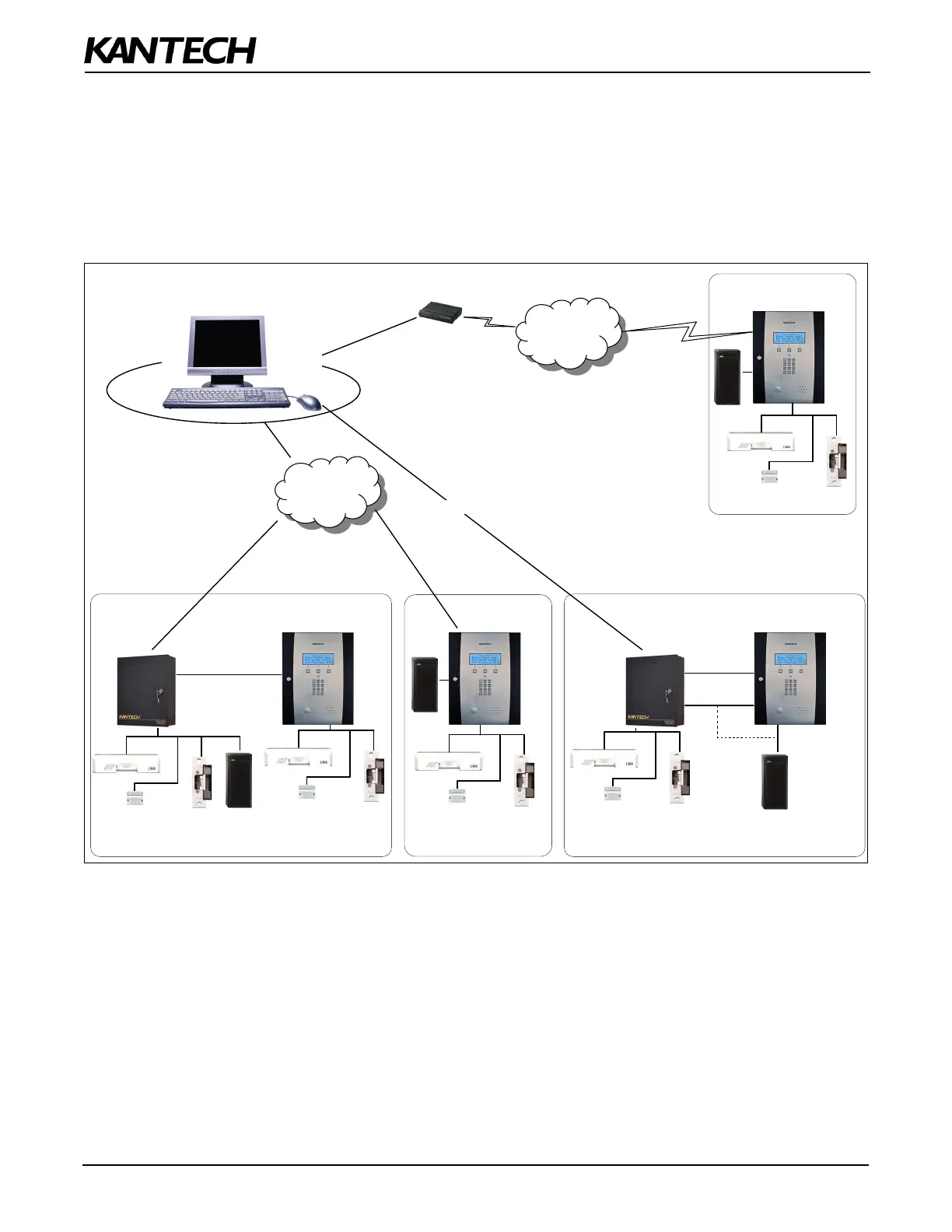
The KTES can be configured and monitored through various means:
• Locally with the Visual User Interface (VUI).
• Remotely with EntraPass over an Ethernet network.
• Remotely with EntraPass over RS-485.
• Remotely with EntraPass over the telephone line with a dialup modem. The KTES is compatible with the
US Robotics V.92 external modem.
Figure 7: KTES Configurations with EntraPass
Note: For the UL 294 Compliance, the KTES-US and KTES-CDN models must be integrated with an access control system
over a Wiegand connection.
PSTN
Dial-up
Connection
Stand-Alone with Reader
Kantech Telephone
Entry System (KTES)
(Special, Corporate & Global Editions
with Corporate Gateway)
LAN
Internet
Ethernet
Connections
(Optional)
(Optional)
RS-485
Wiegand
KTES
Door
Controller
Integrated with Access Control System
KTES
Stand-Alone over IP
with Reader
Pass-Through
RS-485
Integrated with Access Control System
over a Local Area Network (LAN)
KTES
Dial-Up
Connection
(Optional)
RS-485 Link


 To Next Page