DN1769-1809
30
6 - Troubleshooting
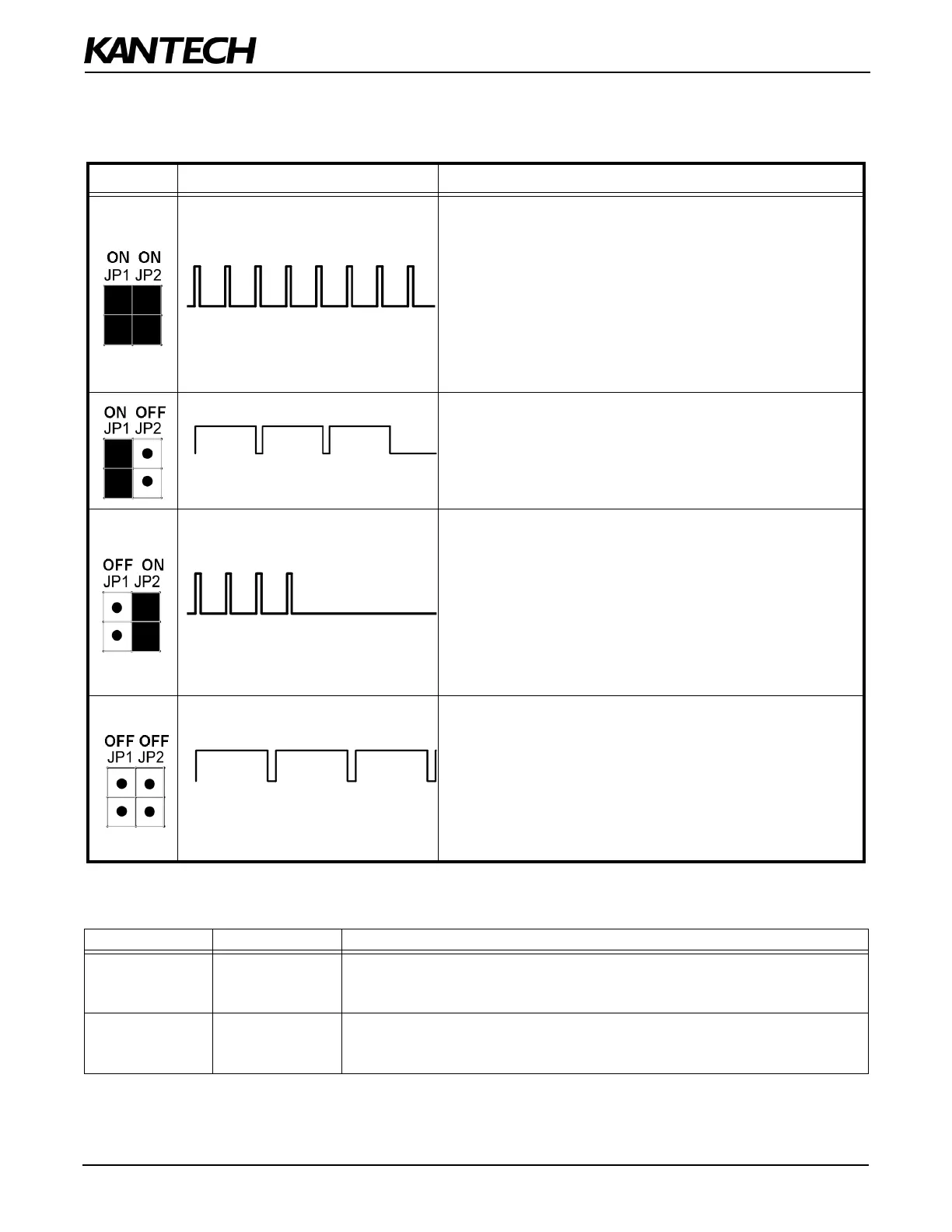
Table 4: Reset Types and Descriptions
Table 5: AC and DC Power LED Status Indicators
Jumpers Heartbeat Patterns Resets
Continuous Short Pulses
Soft Reset:
When JP1 and JP2 are ON, the KTES will reset on a) power up, b)
pushbutton, or c) EntraPass software 'Manual operator soft reset':
• All KTES memory definitions and parameters are verified and
kept intact if still valid.
• The internal event buffer is maintained if still valid.
• IP address is kept if valid.
• The KTES generates the appropriate message: a) 'Power ON
Soft Reset' b) 'Manual Pushbutton Soft Reset' c) 'Operator
Soft Reset'.
3 Long Pulses
Forced Default Static:
When JP1 is ON and JP2 is OFF:
• Same as 'Soft Reset' condition, except IP address is forced to
the default static
IP: 192.168.1.2.
4 Short Pulses
Hard Reset:
When JP1 is OFF and JP2 is ON:
• The default installer PIN (8888) is restored.
• All KTES memory is settled to default values.
• Internal event buffer is cleared.
• IP address is kept if valid.
• KTES generates the message, 'KTES Hard Reset'.
• Internal RTC (Real Time Clock) and clock are settled to the
default time and date values January 1st 2009, 00:00:00.
Continuous Long Pulses
Factory Default:
When JP1 and JP2 are OFF:
• The default installer PIN (8888) is restored.
• All KTES memory is settled to default values.
• Internal event buffer is cleared.
• KTES generates the message 'KTES Factory Default Reset'.
• Internal RTC and clock are settled to the default time and date
values January 1st 2009, 00:00:00.
AC Power LED DC Power LED Status Indicators
ON ON
• The AC power or external AC source is present.
• The DC power level is sufficient for all DC operations such as the readers,
outputs and the 12V AUX.
OFF ON
• The KTES is running on the 12V rechargable backup battery only.
• The DC power supply has been connected with reverse polarity,
for CE compliant models only.


 To Next Page