DN1769-1809
31
Kantech Telephone Entry System Installation Manual
7 - Heartbeat Patterns
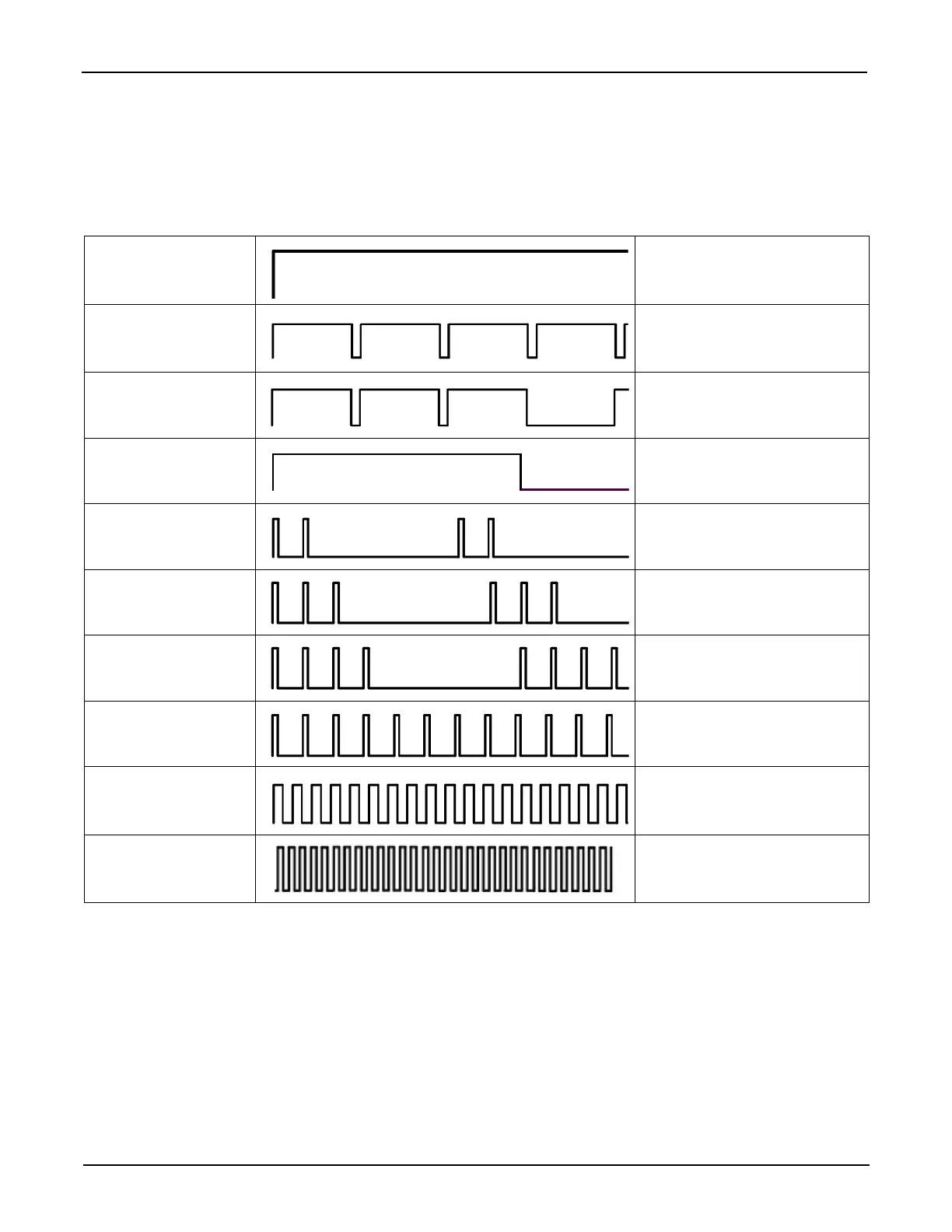
The KTES status can be obtained from the HEARTBEAT blue LED patterns. It is located near the ribbon cable
connected to the door PCB, see Figure 8: PCB view of main board. This information is particularly useful when
connecting the KTES to the EntraPass system. The following table lists all conditions along with a brief
description. Refer to Table 4 on page 30, if you must reset or change the communication mode with the KTES.
Table 6: Heartbeat Patterns
Booting Up Steady
Factory Default Continuous LONG pulses
Forced Default Static 3 Long Pulses
Modem Initialization Single 2.5 Sec. Burst
Dialup Communication
with EntraPass
2 Short Pulses
Corporate Gateway
Communication with
EntraPass
3 Short Pulses
Hard Reset 4 Short Pulses
Fail Soft Continuous Short Pulses
Firmware Update
Quick Pulses
5 pulses per sec.
@ 50% duty cycle
Rebooting
Very Quick Pulses
10 pulses per sec.
@ 50% duty cycle


 To Next Page