DN1769-1809
32
8 - Hardware Default initialization
Note: The Soft Reset and the Hard Reset can be performed directly from the VUI, without having to open the KTES,
refer to the KTES Programming Manual, DN1770.
8.1 How to reset the Kantech Telephone Entry System for Factory
Default
Before you start, you must be able to:
• Open the KTES with the key.
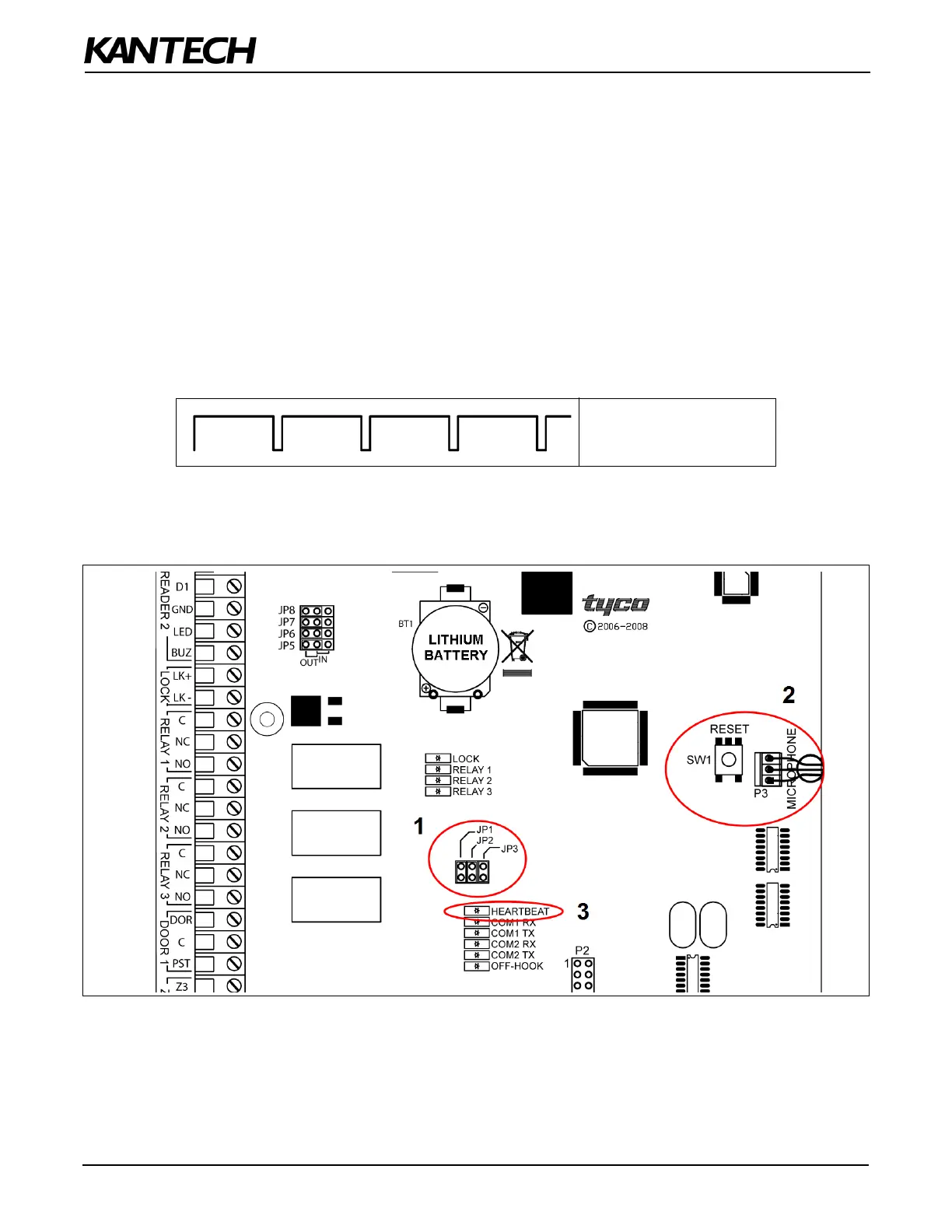
• Locate the reset button (SW1) and the two jumpers JP1 - JP2.
• See the flashing blue Heartbeat LED.
1. Remove JP1 and JP2 jumpers as described in Table 4 for Factory Default.
2. Press the reset button.
3. Check the blue Heartbeat LED pattern, wait until the heartbeat pattern corresponds to this:
4. Put back JP1 and JP2 jumpers, close and lock the KTES.
5. Configure the KTES with the VUI, refer to the KTES Programming Manual, DN1770.
Figure 12: KTES Factory Default Steps
Continuous LONG pulses


 To Next Page