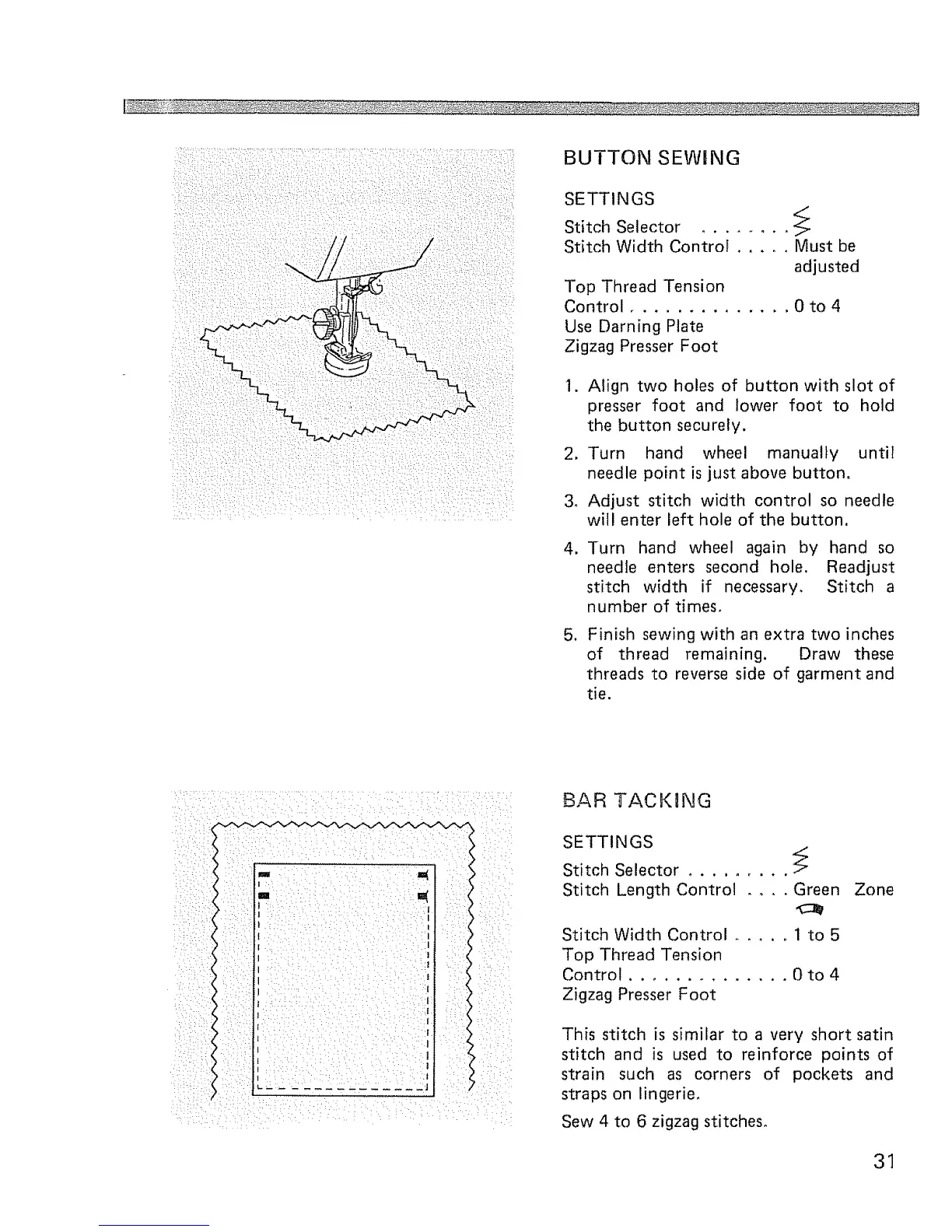
BUTTON SEWING
SETTINGS
/
Stitch Selector ........
Stitch Width Control ..... Must be
adjusted
Top Thread Tension
Control .............. 0 to 4
Use Darning Plate
Zigzag Presser Foot
1. Align two holes of button with slot of
presser foot and lower foot to hold
the button securely,
2. Turn hand wheel manually until
needle point is just above button.
3, Adjust stitch width control so needle
will enter left hole of the button.
4_
,
Turn hand wheel again by hand so
needle enters second hole. Readjust
stitch width if necessary, Stitch a
number of times.
Finish sewing with an extra two inches
of thread remaining. Draw these
threads to reverse side of garment and
tie.
m i _ : m(
! •• • • • h •
IH• • h • • •:••1
i i I
• i• : /: I
£AR TACKING
SETTINGS
Stitch Selector ......... _
Stitch Length Control .... Green
Stitch Width Control ..... 1 to 5
Top Thread Tension
Control .............. 0 to 4
Zigzag Presser Foot
Zone
This stitch is similar to a very short satin
stitch and is used to reinforce points of
strain such as corners of pockets and
straps on lingerie,
Sew 4 to 6 zigzag stitches°
31



 To Next Page