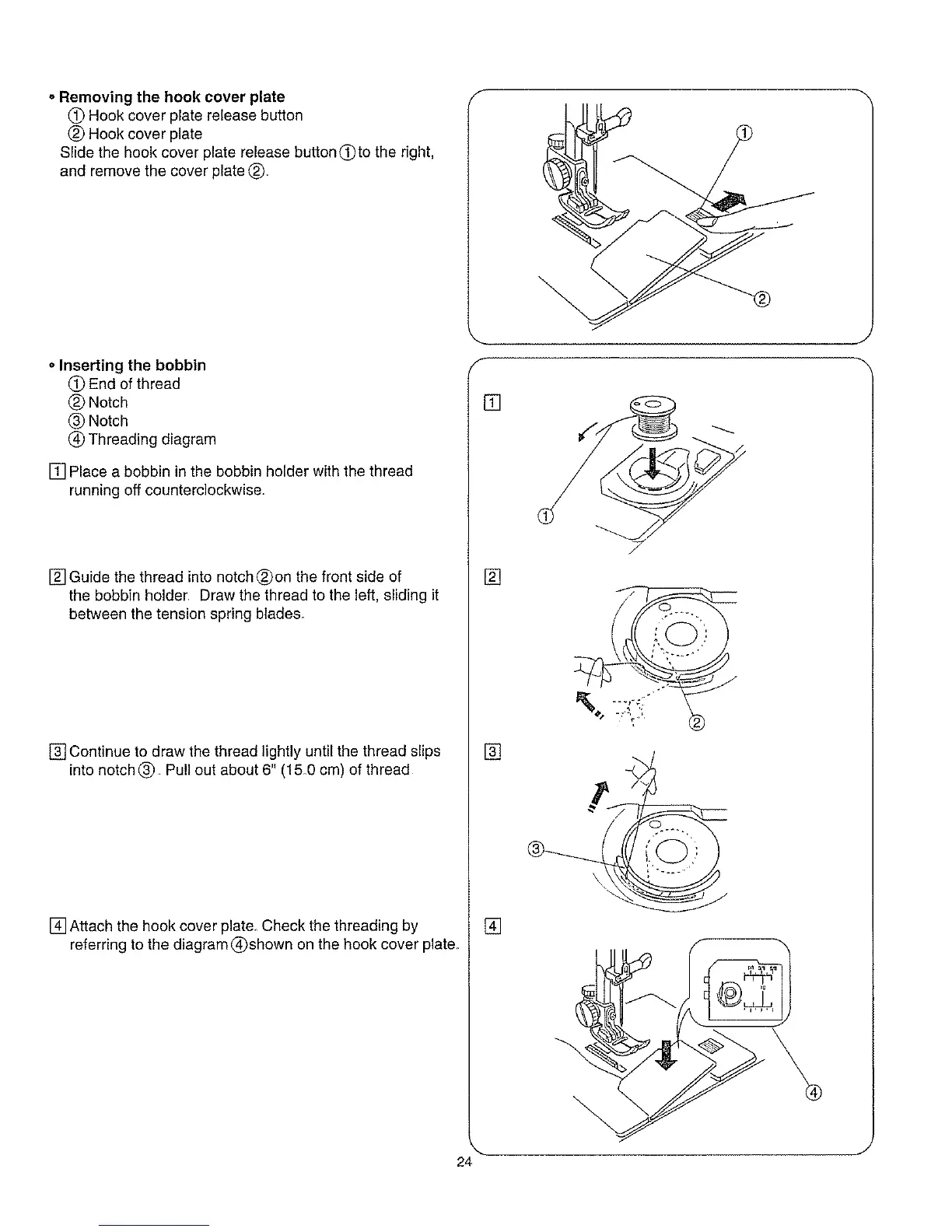
oRemoving the hook cover plate
(_ Hook cover plate release button
(_) Hook cover plate
Slide the hook cover plate release button(T)to the right,
and remove the cover plate (_
oInserting the bobbin
(_) End of thread
(_ Notch
(_) Notch
(_ Threading diagram
[] Place a bobbin in the bobbin holder with the thread
running off counterclockwise.
[] Guide the thread into notch (_on the front side of
the bobbin holder. Draw the thread to the left, sliding it
between the tension spring blades.
[] Continue to draw the thread lightly until the thread slips
into notch(_ Pull out about 6" (15.0 cm) of thread
[] Attach the hook cover plate. Check the threading by
referring to the diagram (_shown on the hook cover plate_
f
[]
[]
[]
[]
J
J
24



 To Next Page