User Controls Overview 4
Man-1452EN Rev.02
Sigma ZXT User Manual
15
User Controls - Access Level 2
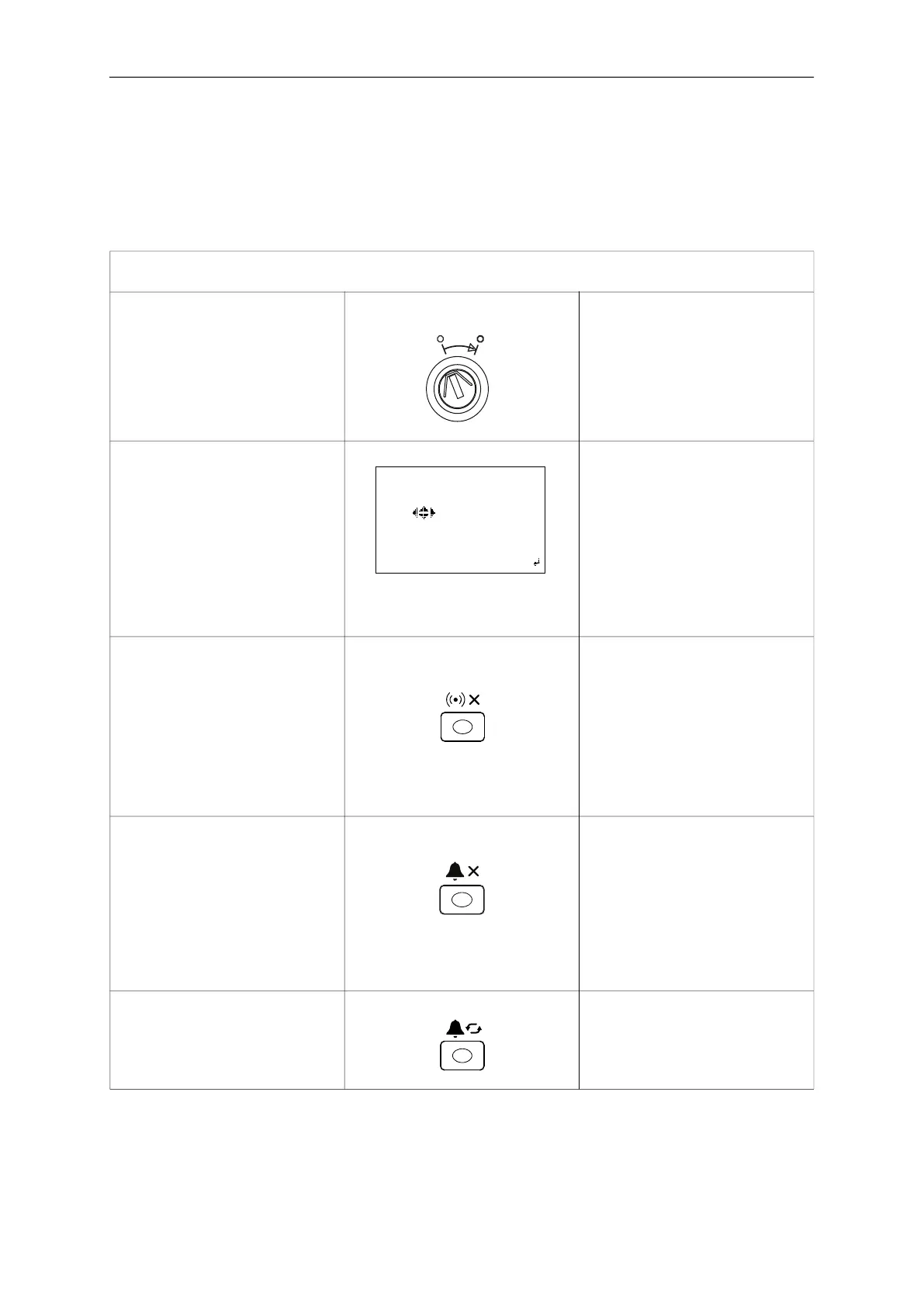
Access Level 2 provides the user additional controls for operation of the Control Panel. Access Level 2 can be
achieved using the Enable key-switch on the Panel fascia or by entering a passcode through the LCD.
Access Level 2 provides the user functionality which can impact the performance of the Control Panel and therefore
MUST be restricted to trained personnel only.
User controls – Access level 2
(Requires operation of enable key switch or passcode)
Enable Key-switch Requires a 901 key.
Insert key and turn to the right position
(solid white dot) to access level 2.
LCD will display the USER MENU.
Note: Access Level 2 can also be
accessed by passcode.
Access Level 2 via Passcode Press enter key to display passcode
entry screen.
Enter 4 digit passcode using cursor
keys - Up = 1, Right = 2, Down = 3, Left
= 4
Note:Default passcode is 2222 it is rec-
ommended to change this to your own
specific passcode. Passcodes can be
changed by a qualified service engi-
neer.
Silence Buzzer Dependent on Panel configuration
Silence buzzer button may be available
at Access Level 2.
Press the Silence Buzzer button to stop
the local panel buzzer sounding.
Silence buzzer LED will illuminate on
Panel.
Buzzer will resound for any new events
that occur.
Silence Alarm Press the Silence Alarm button.
1
st
stage Alarm notification devices
connected to the panel will stop operat-
ing.
Note: Silence Alarm function is applica-
ble to 1
st
stage notification devices
only, 2
nd
stage notification devices can-
not be silenced.
Re-sound Alarm Press the Re-sound Alarm button.
1
st
Stage Sounders which have been
silenced using the Silence Alarm button
will start operating again.
****passcode entry****
*****
42
1
3
xback login



 To Next Page