EasyManua.ls Logo

Kenwood CS-5200 Series - Measuring Time between Two P O I N T

Kenwood CS-5200 Series
57 pages
Print Icon
To Next Page IconTo Next Page
To Previous Page IconTo Previous Page
Loading...
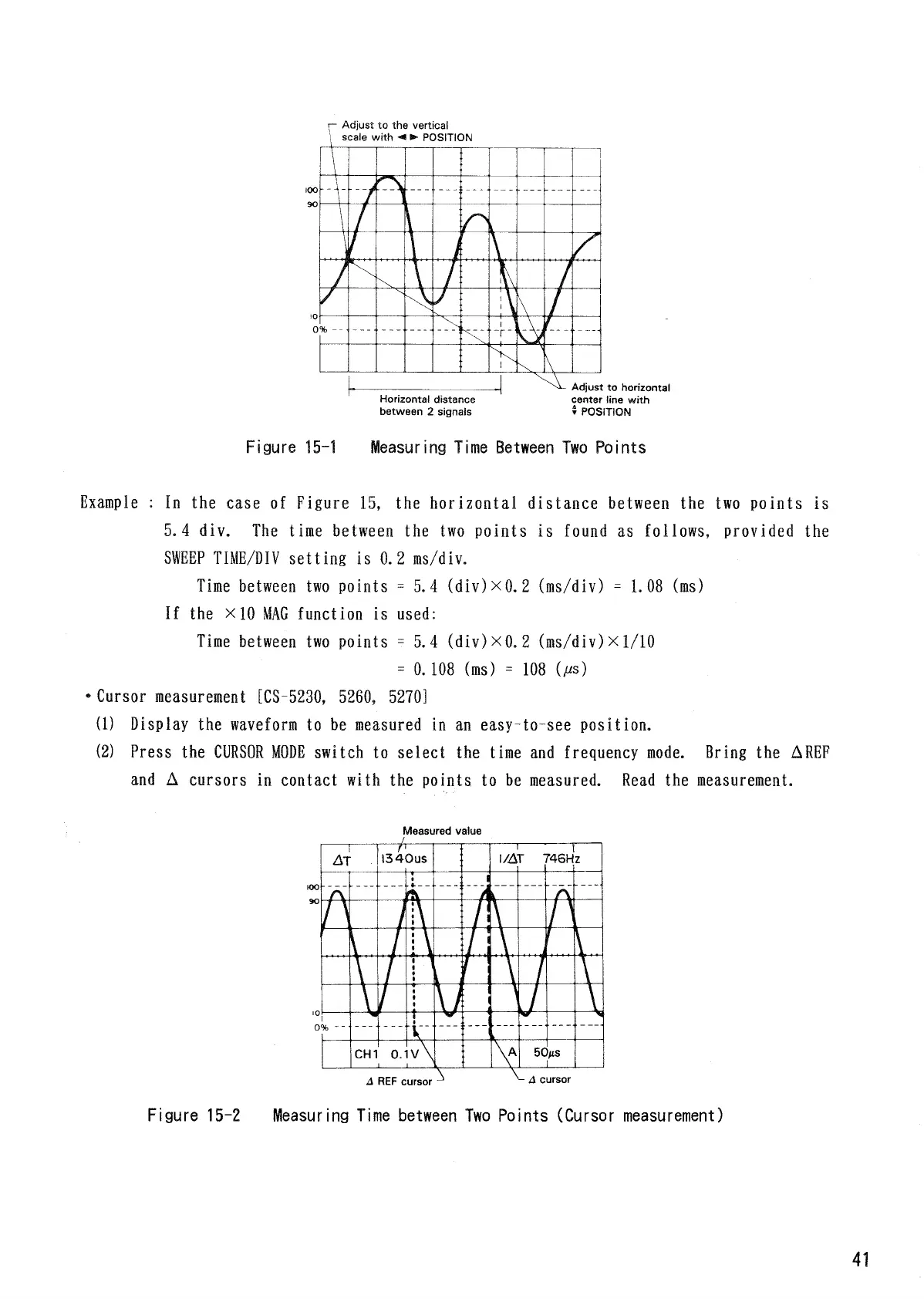
Adjust
to the
vertical
scale
with
POSITION
Figure
15-1
Measuring Time Between
Two
Points
Example
: In the
case
of
Figure
15, the
horizontal distance
between
the two
points
is
5.4
div.
The
time
between
the two
points
is
found
as
follows,
provided
the
SWEEP
TIME/DIV
setting
is
0.2
ms/div.
Time between
two
points
=
5.
4
(div)
xO.
2
(ms/div)
=
1.
08 (ms)
If
the x10 MAG
function
is
used:
Time between
two
points
- 5.4
(div)xO.
2
(ms/div)
x 1/10
=
0.108
(ms)
= 108 0*s)
Cursor
measurement
[CS-5230,
5260, 5270]
(1)
Display
the
waveform
to be
measured
in an
easy-to-see
position.
(2) Press
the CURSOR
MODE
switch
to
select
the
time
and
frequency
mode.
Bring
the
AREF
and
A
cursors
in
contact with
the
points
to be
measured. Read
the
measurement.
Measured value
Figure
15-2
Measuring
Time
between
Two
Points (Cursor
measurement)
41
Horizontal distance
between
2
signals
Adjust
to
horizontal
center line
with
t
POSITION
REF
cursor
cursor

Related product manuals