EasyManua.ls Logo

Kenwood CS-5200 Series - Measuring V O L T a G E R a T I O W I T H C U R S O R

Kenwood CS-5200 Series
57 pages
Print Icon
To Next Page IconTo Next Page
To Previous Page IconTo Previous Page
Loading...
8-4
Measuring
Voltage
Rat
io
with
Cursors
[CS-5230,
5260,
5270]
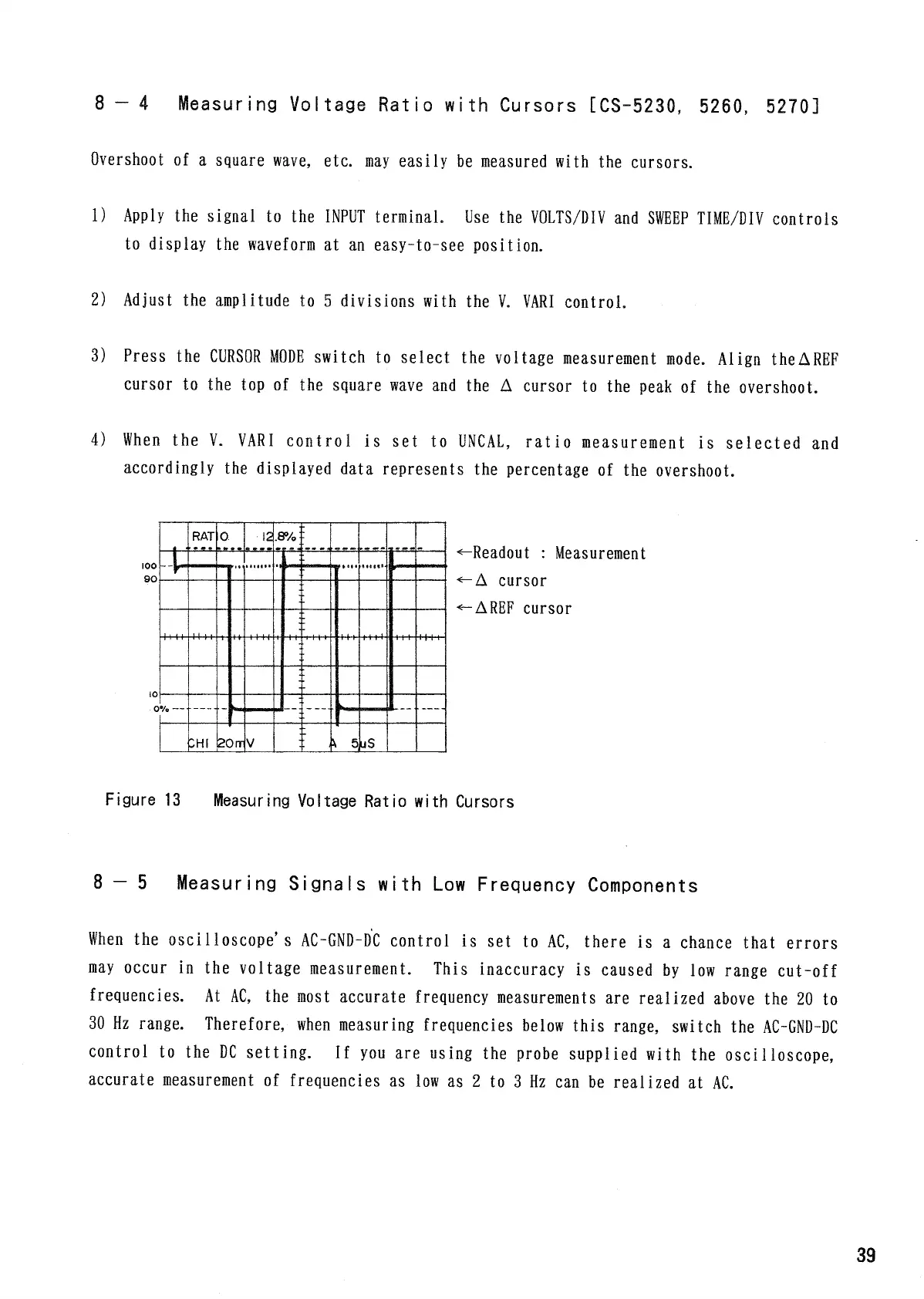
Overshoot
of a
square
wave,
etc.
may
easily
be
measured
with
the
cursors.
1)
Apply
the
signal
to the
INPUT
terminal.
Use the
VOLTS/DIV
and SWEEP
TIME/DIV
controls
to
display
the
waveform
at an
easy-to-see position.
2) Adjust
the
amplitude
to 5
divisions
with
the V.
VARI
control.
3) Press
the CURSOR
MODE
switch
to
select
the
voltage
measurement
mode.
Align
theAREF
cursor
to the top of the
square
wave
and the A
cursor
to the
peak
of the
overshoot.
4)
When the V.
VARI
contro 1
is set to UNCAL,
ratio
measurement
is
selected
and
accordingly
the
displayed data represents
the
percentage
of the
overshoot.
Figure
13
Measuring
Voltage
Ratio
with
Cursors
8
5
Measur
i
ng
Signals
with
Low
Frequency
Components
When the
oscilloscope'
s
AC-GND-DC
control
is set to AC,
there
is a
chance
that
errors
may
occur
in the
voltage
measurement.
This inaccuracy
is
caused
by low
range
cut-off
frequencies.
At AC, the
most
accurate frequency
measurements
are
realized
above
the 20 to
30
Hz
range.
Therefore,
when
measuring
frequencies
below
this
range,
switch
the
AC-GND-DC
control
to the DC
setting.
If
you are
using
the
probe
supplied with
the
osci1 loscope,
accurate
measurement
of
frequencies
as low as 2 to 3 Hz can be
realized
at AC.
-Readout
:
Measurement
cursor
REF cursor
,
39

Related product manuals