Bluetooth Control
45English
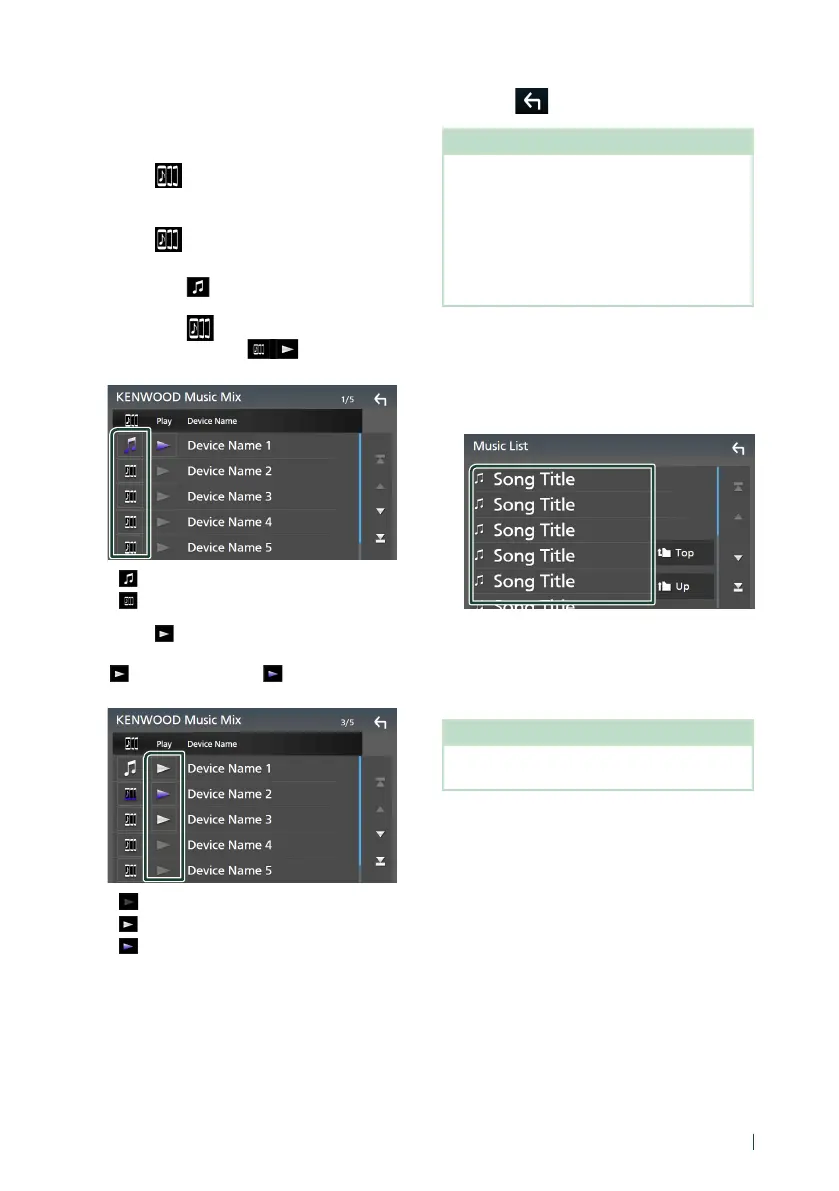
Ñ KENWOOD Music Mix
Up to 5 Bluetooth audio device can be
connected and switched easily to play music.
1
Touch [ ].
A list of registered devices is displayed.
2
Touch [ ] of device name you want to
connect.
• Touching [
] displays the Device List
screen. (P.42)
• Touching [
] on the left of the
connected device ([ ]) disconnects
this device.
• : Device used normally.
•
: Device used for KENWOOD Music Mix
3
Touch [ ] (white) on the left of the name
of the device to be played.
[
] (white) changes to [ ] (purple) and
starts playback.
• (Gray) : Not connected.
•
(White) : Connected.
•
(Purple) : During playback.
4
Touch [ ].
NOTE
• If a connected Bluetooth audio device is operated
to play music, connections are switched.
• When a Bluetooth source is switched to another
one, its settings are deleted and the connection
is restored to the connection before source
switching.
• You cannot select an Android smartphone
connected as an Android Auto device.
Ñ File search
1
Touch [1].
2
Touch the desired file or folder.
When you touch a folder its contents are
displayed.
3
Touch the desired item in the content list.
Playback starts.
NOTE
• For operations in the list screen, see List screen
(P.15).


 To Next Page
 Loading...