10
Data Size: B6L (182 mm x 128 mm)
Book Size: B6L (182 mm x 128 mm)
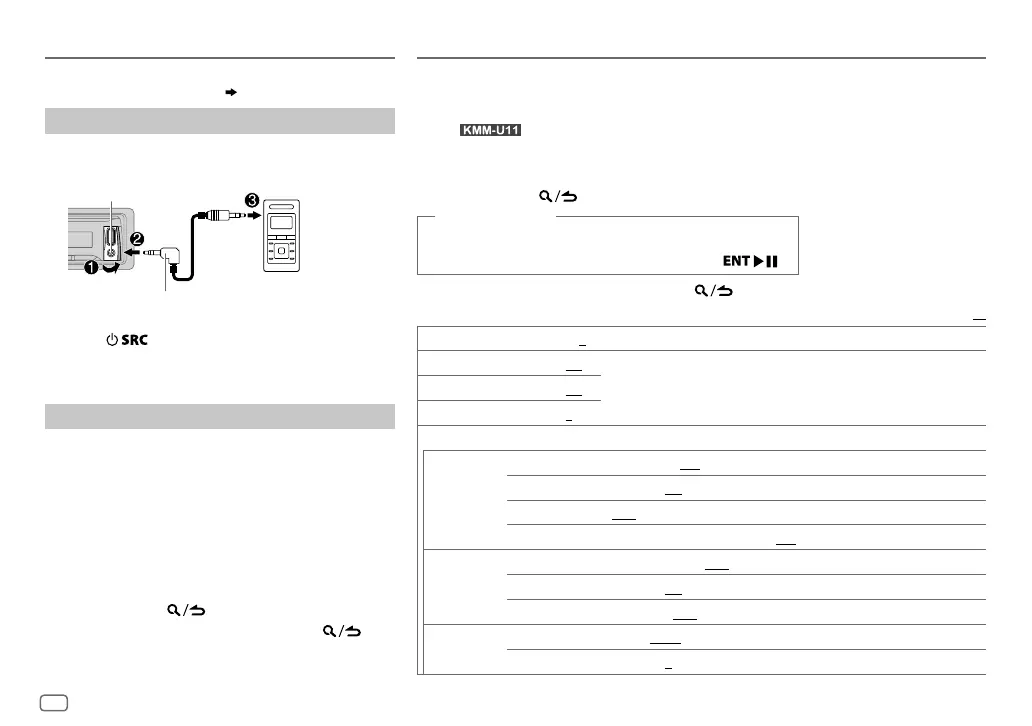
AUX
Preparation:
Select [
ON
] for [
BUILT-IN AUX
]. (
4
)
Start listening
1
Connect a portable audio player (commercially
available).
2 Press repeatedly to select AUX.
3 Turn on the portable audio player and start
playback.
Set the AUX name
While listening to a portable audio player connected to
the unit...
1 Press the volume knob to enter [
FUNCTION
].
2 Turn the volume knob to select [
SYSTEM
], then
press the knob.
3 Turn the volume knob to select [
AUX NAME SET
],
then press the knob.
4 Turn the volume knob to make a selection, then
press the knob.
AUX
(default)/
DVD
/
PORTABLE
/
GAME
/
VIDEO
/
TV
5 Press and hold to exit.
To return to the previous setting item, press .
Auxiliary input jack
Portable audio
player
3.5mm stereo mini plug with “L” shaped
connector (commercially available)
AUDIO SETTINGS
While listening to any source...
1 Press the volume knob to enter [
FUNCTION
].
2 Turn the volume knob to select [
AUDIO CONTROL
], then press the knob.
For
: Pressing AUD enters [
AUDIO CONTROL
] directly.
3 Turn the volume knob to make a selection (see the following table), then press the
knob.
4 Repeat step 3 until the desired item is selected or activated.
5 Press and hold to exit.
(or using RC-406)
1 Press AUD to enter [
AUDIO CONTROL
].
2 Press J / K to make a selection, then press .
To return to the previous setting item, press
.
Default:
XX
SUB-W LEVEL –15
to
+15
(
0
) Adjusts the subwoofer output level.
BASS LEVEL –8
to
+8
(
+6
)
Adjusts the level to memorize for each source. (Before making an adjustment,
select the source you want to adjust.)
MID LEVEL –8
to
+8
(
+5
)
TRE LEVEL –8
to
+8
(
0
)
EQ PRO
BASS ADJUST BASS CTR FRQ
60
/
80
/
100
/
200
:Selects the center frequency.
BASS LEVEL –8
to
+8
(
+6
):Adjusts the level.
BASS Q FACTOR 1.00
/
1.25
/
1.50
/
2.00
:Adjusts the quality factor.
BASS EXTEND ON
:Turns on the extended bass.;
OFF
:Cancels.
MID ADJUST MID CTR FRQ 0.5K
/
1.0K
/
1.5K
/
2.5K
:Selects the center frequency.
MID LEVEL –8
to
+8
(
+5
):Adjusts the level.
MID Q FACTOR 0.75
/
1.00
/
1.25
:Adjusts the quality factor.
TRE ADJUST TRE CTR FRQ 10.0K
/
12.5K
/
15.0K
/
17.5K
:Selects the center frequency.
TRE LEVEL –8
to
+8
(
0
):Adjusts the level.
JS_KWD_KMM_U21_MN_EN_1.indd 10JS_KWD_KMM_U21_MN_EN_1.indd 10 31/7/2014 3:33:18 PM31/7/2014 3:33:18 PM


 To Next Page