ENGLISH
7
Data Size: B6L (182 mm x 128 mm)
Book Size: B6L (182 mm x 128 mm)
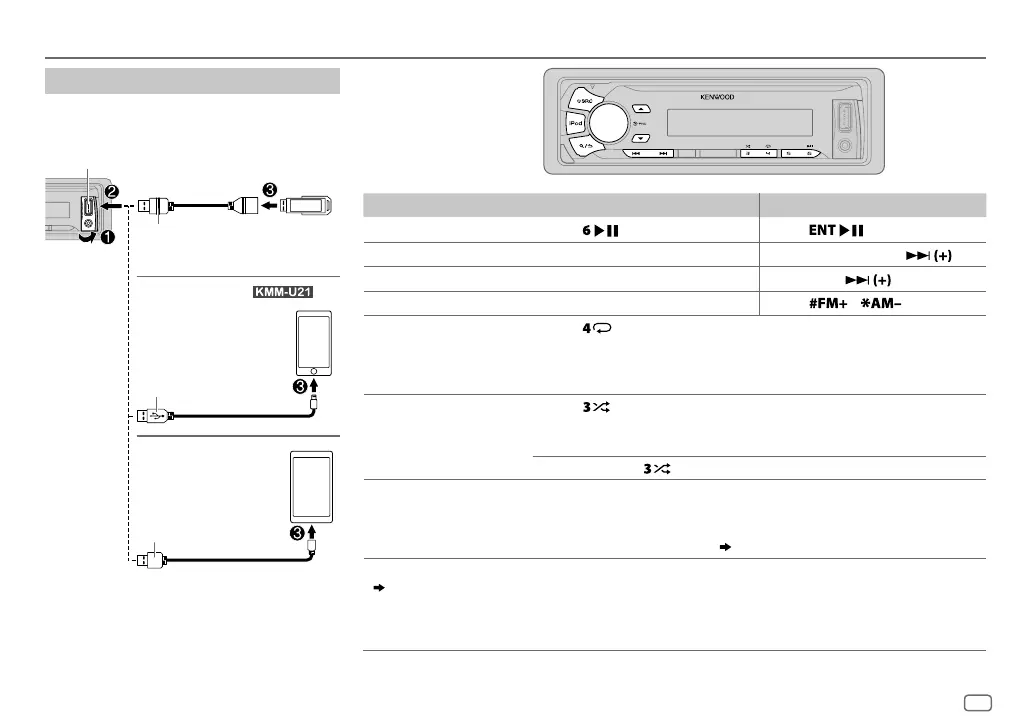
USB / iPod / ANDROID
Start playback
The source changes automatically and
playback starts.
*
1
KCA-iP102 : 30-pin type, KCA-iP103 : Lightning type
*
2
Do not leave the cable inside the car when not using.
To On the faceplate On the remote control
Playback / pause Press .
Press
.
Reverse / Fast-forward
*
4
Press and hold S/T. Press and hold S/ .
Select a file
Press S/T. Press S/
.
Select a folder
*
5
Press J/K.
Press
/ .
Repeat play
*
6
Press repeatedly.
FILE REPEAT
/
FOLDER REPEAT
/
REPEAT OFF
: MP3/WMA/WAV/FLAC file, iPod
or ANDROID
FILE REPEAT
/
REPEAT OFF
: KME Light/ KMC file
*
7
Random play
*
6
Press repeatedly.
FOLDER RANDOM
/
RANDOM OFF
: MP3/WMA/WAV/FLAC file, KME Light/
KMC file, iPod or ANDROID
Press and hold
to select
ALL RANDOM
.
Select control mode While in iPod source, press and hold iPod.
MODE ON
: Control from the iPod
*
8
MODE OFF
: Control from the unit
While in ANDROID source,
(
8
, [
ANDROID SETUP
]
)
Select music drive
(
8
, [
MUSIC DRIVE]
)
Press 5 repeatedly.
The stored songs in the following start playback.
• Selected internal or external memory of a smartphone (Mass Storage
Class).
• Selected drive of a multiple drives device.
USB input terminal
CA-U1EX (max.: 500mA)
(optional accessory)
Micro USB 2.0 cable
*
2
(commercially available)
KCA-iP102 / KCA-iP103 (optional
accessory)
*
1
or accessory cable
of the iPod/iPhone
*
2
USB
iPod/iPhone
(for )
ANDROID
*
3
JS_KWD_KMM_U21_MN_EN_2.indd 7JS_KWD_KMM_U21_MN_EN_2.indd 7 13/8/2014 11:43:03 AM13/8/2014 11:43:03 AM


 To Next Page