ENGLISH
9
Data Size: B6L (182 mm x 128 mm)
Book Size: B6L (182 mm x 128 mm)
Pandora®
(for )
Preparation:
Install the latest version of the Pandora application on your device
(iPhone/ iPod touch), then create an account and log in to Pandora.
• Select [
ON
] for [
PANDORA SRC
]. (
4
)
Start listening
1
Open the Pandora application on your device.
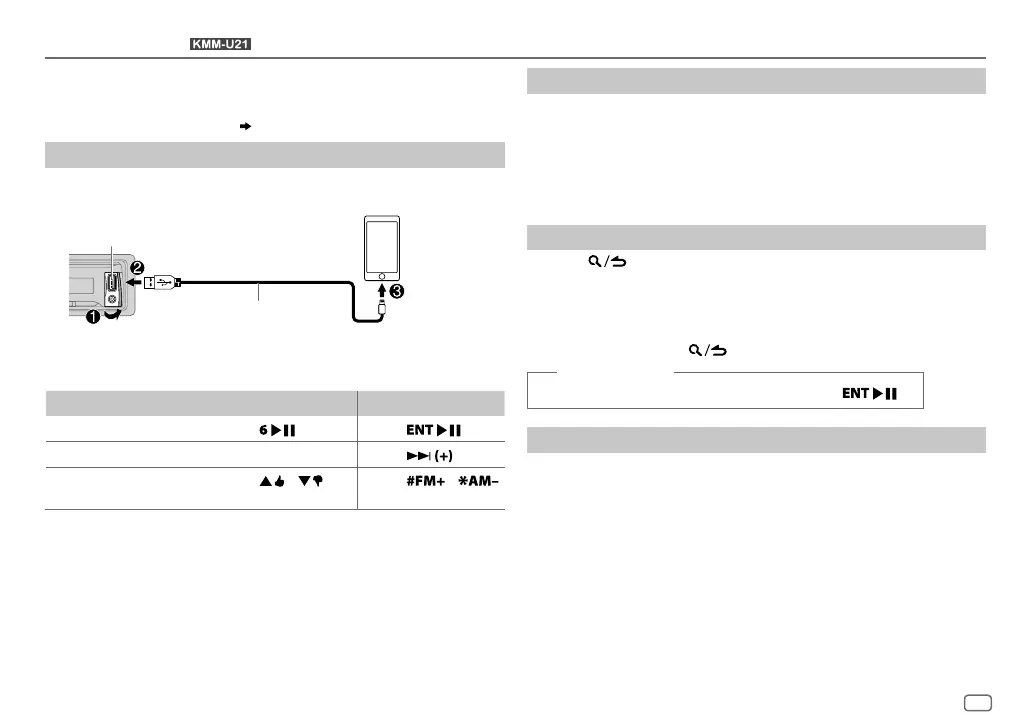
2 Connect your device to the USB input terminal.
The source changes to PANDORA and broadcast starts.
To On the faceplate On the remote control
Playback / pause
Press
. Press
.
Skip a track
Press T.
Press
.
Thumbs up or thumbs
down
*
3
Press / .
Press
/ .
*
1
KCA-iP102 : 30-pin type, KCA-iP103 : Lightning type
*
2
Do not leave the cable inside the car when not using.
*
3
If thumbs down is selected, the current track is skipped.
Create and save a new station
1
Press and hold the volume knob.
2 Turn the volume knob to select [
FROM TRACK
] or [
FROM ARTIST
], then
press the knob.
A new station is created based on the current song or artist.
3 Press and hold one of the number buttons (1to5) to store.
To select a stored station, press one of the number buttons (1to5).
Search for a registered station
1
Press .
2 Turn the volume knob to make a selection, then press the knob.
[
BY DATE
]:According to the registered date
[
A-Z
]:Alphabetical order
3 Turn the volume knob to the desired station, then press the knob.
To cancel, press and hold .
(or using RC-406)
Press J / K to search for a station, then press .
Bookmark a song or artist information
1
Press and hold J.
2 Turn the volume knob to make a selection, then press the knob.
[
THIS TRACK
]:Current song information
[
THIS ARTIST
]:Current artist information
“BOOKMARKED” appears and the information is stored to your device.
The bookmark is available on your Pandora account but not on this
unit.
USB input terminal
KCA-iP102 / KCA-iP103 (optional
accessory)
*
1
or accessory cable of
the iPod/iPhone
*
2
JS_KWD_KMM_U21_MN_EN_1.indd 9JS_KWD_KMM_U21_MN_EN_1.indd 9 31/7/2014 3:33:17 PM31/7/2014 3:33:17 PM


 To Next Page