ES749 Flow Computer
8
2. Installation
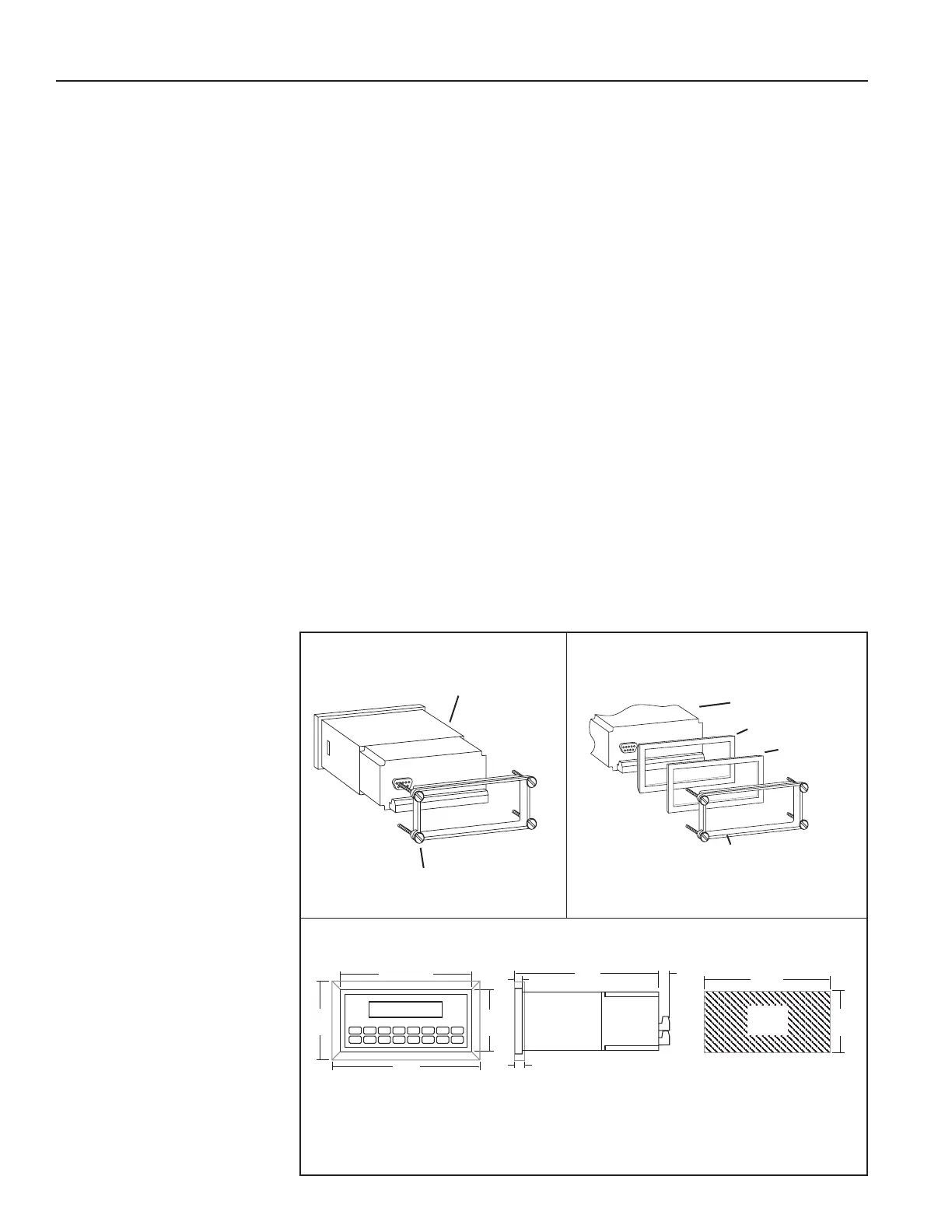
2.1 General Mounting Hints:
The ES749 Flow Computer should be located in an area with a clean, dry atmosphere
which is relatively free of shock and vibration. The unit is installed in a 5.43" (138mm)
wide by 2.68" (68mm) high panel cutout. (see Mounting Dimensions) To mount the
Flow Computer, proceed as follows:
a. Prepare the panel opening.
b. Slide the unit through the panel cutout until the it touches the panel.
c. Install the screws (provided) in the mounting bracket and slip the bracket over the
rear of the case until it snaps in place.
d. Tighten the screws rmly to attach the bezel to the panel. 3 in. lb. of torque must
be applied and the bezel must be parallel to the panel.
NOTE: To seal to NEMA4X / IP65 specications, supplied bezel kit must be used
and panel cannot ex more than .010".
When the optional bezel kit is used, the bezel adaptor must be sealed to
the case using an RTV type sealer to maintain NEMA4X / IP65 rating.
General Mounting Hints
Mounting Procedure
NEMA4X / IP65 Specications
ES749
ES749
Bezel Adaptor
Gasket
Mounting Bracket
Mounting Bracket
Standard Mounting
Bezel Kit Mounting
Dimensions
Dotted Line Shows Optional Bezel Kit
Panel
Cutout
5.43
(138)
2.68
(68)
Dimensions are in inches (mm)
5.67 (144)
2.83
(72)
3.43
(87)
6.18
6.15
(156)
0.5
(13)
0.28 (7.2)
0.4 (10)
2.2 Mounting Diagrams:



 To Next Page