Advanced Settings
After DisPlay Setting is done, Press Back to return to Setting page.
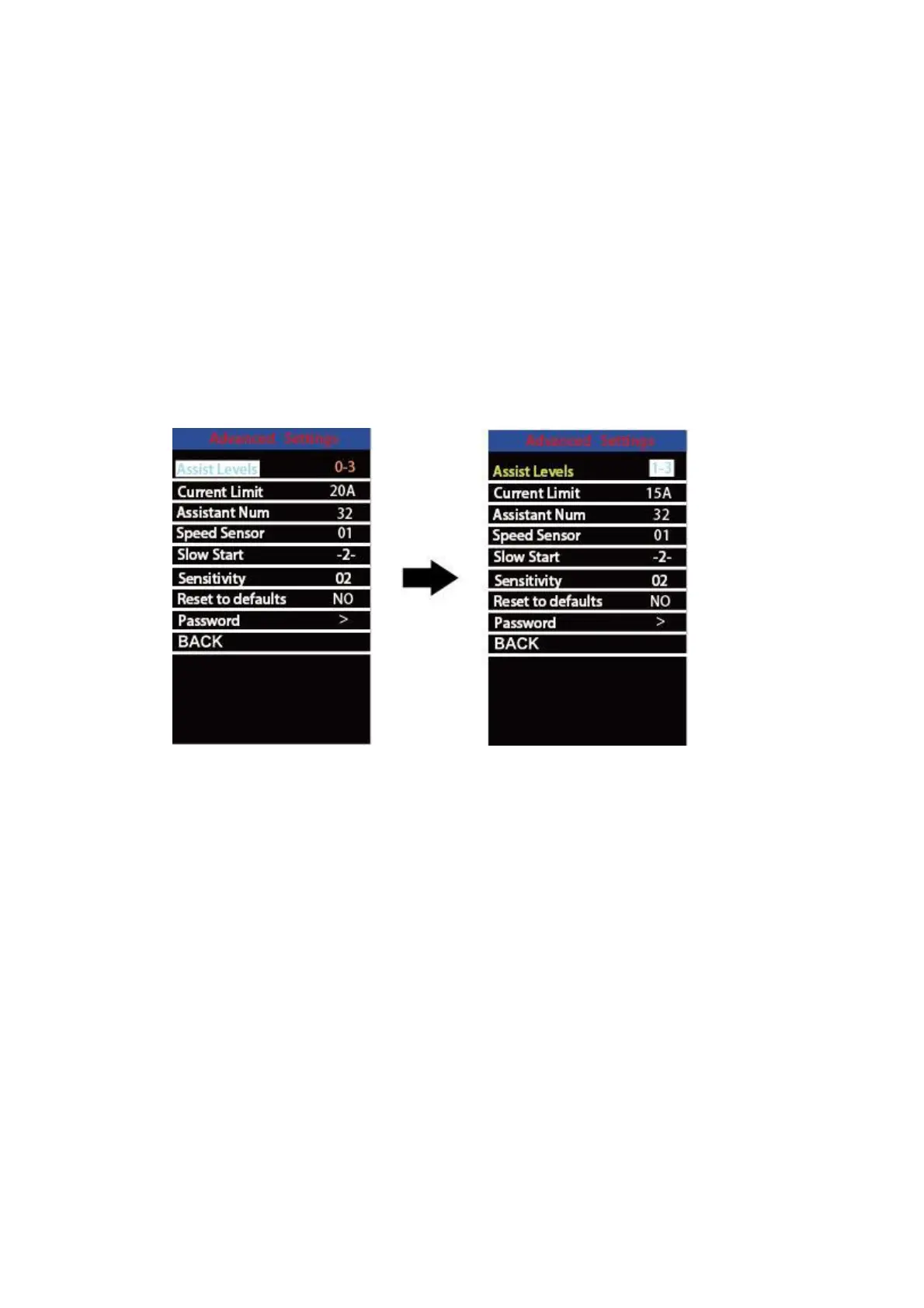
Press UP/DOWN button to choose Advanced Settings and press “i” button to enter
Advanced Settings page.
◆
Assist Level Settings
Assist Level Mode Options
Power Set represents assist level settings. In assist level mode settings, there are 8
modes for your choice:0-3, 1-3, 0-5, 1-5, 0-7, 1-7, 0 -9, 1-9. The default mode is 0-5.
To change assist level mode, press the “+” or the “-” button to choose the desired mode
and press the “i” button to confirm and access assist level ratio settings automatically.
Assist Level Mode Settings Interface
Assist Level Ratio Settings
To change the ratio of a certain assist level, press the "+" button or "-" button to
choose the desired ratio, and press the "i" button to confirm.
For example, the ratio range is “45-55 percent” for level “1”; percentage can be
changed and the default ratio value is 50 percent.
To store a changed ratio setting, press the “i” button and move to the next level ratio
setting.
After ratios of all assist levels are input, press the “i” button to confirm.
Please refer to assist level ratio default values in Attached list 2.


 To Next Page