◆Power-on Password Settings
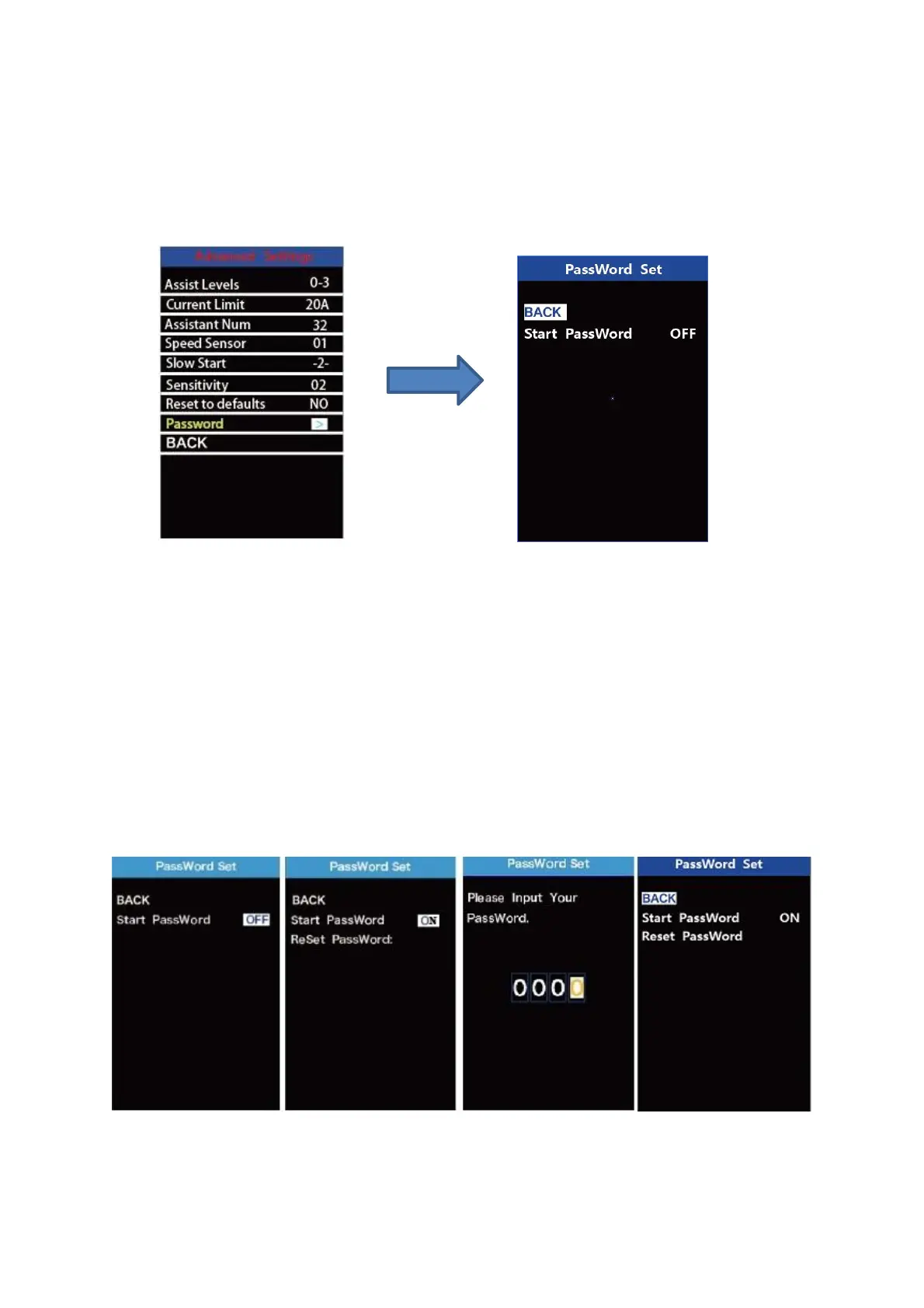
To access the power-on password setting page, select ‘Password’ in the menu and
press “i” button to confirm.
PassWord Set means power-on password settings. Power-on password is a 4-digit
code. The default password is ‘1212’.
Password Setting Interface
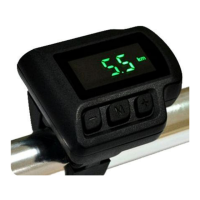
1.Power-on Password Disable/Enable
To enable or disable Start PassWord settings, press the “+” or the “-” button to
select ON or OFF. ON means enabling a power-on password while OFF means disabling
a power-on password. The default value is OFF.
To enable a power-on password, choose ON and press “i” button to confirm and
input the current password or default password’1212’. Press the “+”or the “-”button to
change the number and press the “i”button to confirm digits one by one until the correct
password( current password or default password’1212’ ) is completed.
To disable the current password, choose OFF and press “i” button to confirm and
input the current password correctly. The screen displays ‘PassWord Canceled
Successfully’. *Then the display password is restoring the default code ‘1212’.
Password Enable/Disable Settings Interface


 To Next Page