Keyscan Inc. A Member of the Kaba Group – CA8WL-AL Rev. B Installation Guide (07.15)
Green
Black
Red
Shield*
Ground
Lug
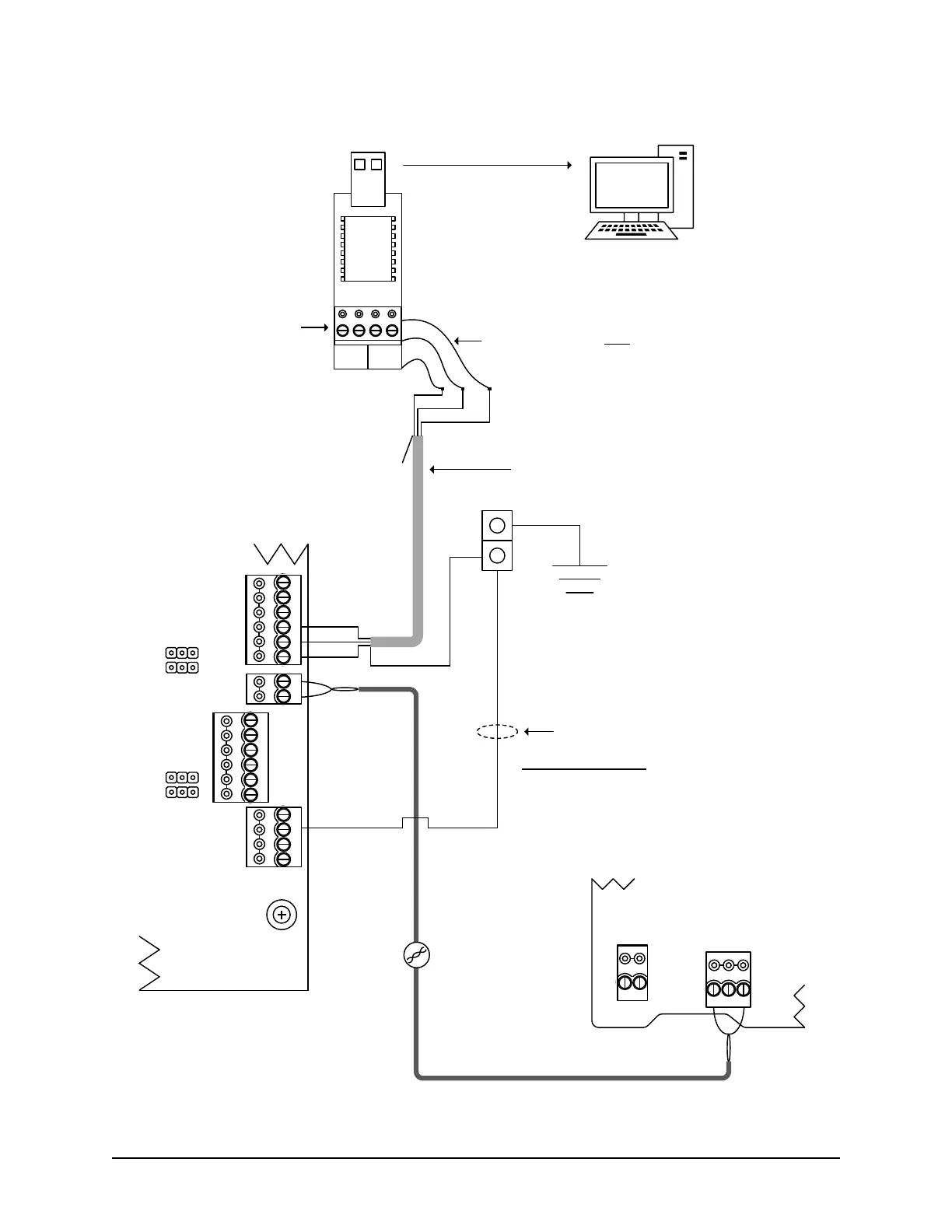
RS-232 - 5 conductors
22AWG shielded cable
Maximum - 20 feet (6 m)
Cut View of CA8WL-AL
with right cover removed
* Ensure that the shield is insulated and connected
to the ground lug. Keyscan suggests Alpha PVC
10516 - #16 clear tubing or a comparable tubing to
insulate the shield. Do not connect the shield to
GND on a communication terminal block.
DIP Switches
S1.11 = OFF
S1.10 = OFF
KI-00532E-12-14
POWER
INOUT
-
+
-
+
DOOR
AUX.
N/C
(+)
COM
(-)
N/O
(+)
N/C
(+)
COM
(-)
N/O
(+)
RS-485
A
B
RS-232
CTS
DTR
DCD
RD
TD
GND
(+ 12 VDC)
KEYSCAN INC.
CA150B
Rev. B
CA8WL-AL
J10
J11
J9
J8
# 18 AWG Green
PC1156
to cold water pipe
RS485
TDA- TDB+RDB
+ POWER -
Cut View of PIM400-485
With front cover removed
A to TDA-
B to TDB+
RS485
CAT 5, 1 twisted pair
maximum 4000 ft.
(1219.2 m)
tape
back
shield
Unused conductors are
taped back separately.
485 terminal
block not used
to USB port on server/
workstation with
communication service –
may require USB extension
cable
Server/workstation
with communication
service
BRNWHTGRN WHT
+ TX - + RX -
485 OUT 485 IN
use 3 loose
RS-232 wires
Note
USB communication is
slower than direct serial or
NETCOM communication.
Green
Black
Red
Note # 18 AWG Green
- required for either PoE or ungrounded power supply
- not required for grounded power supply



 To Next Page