EasyManua.ls Logo

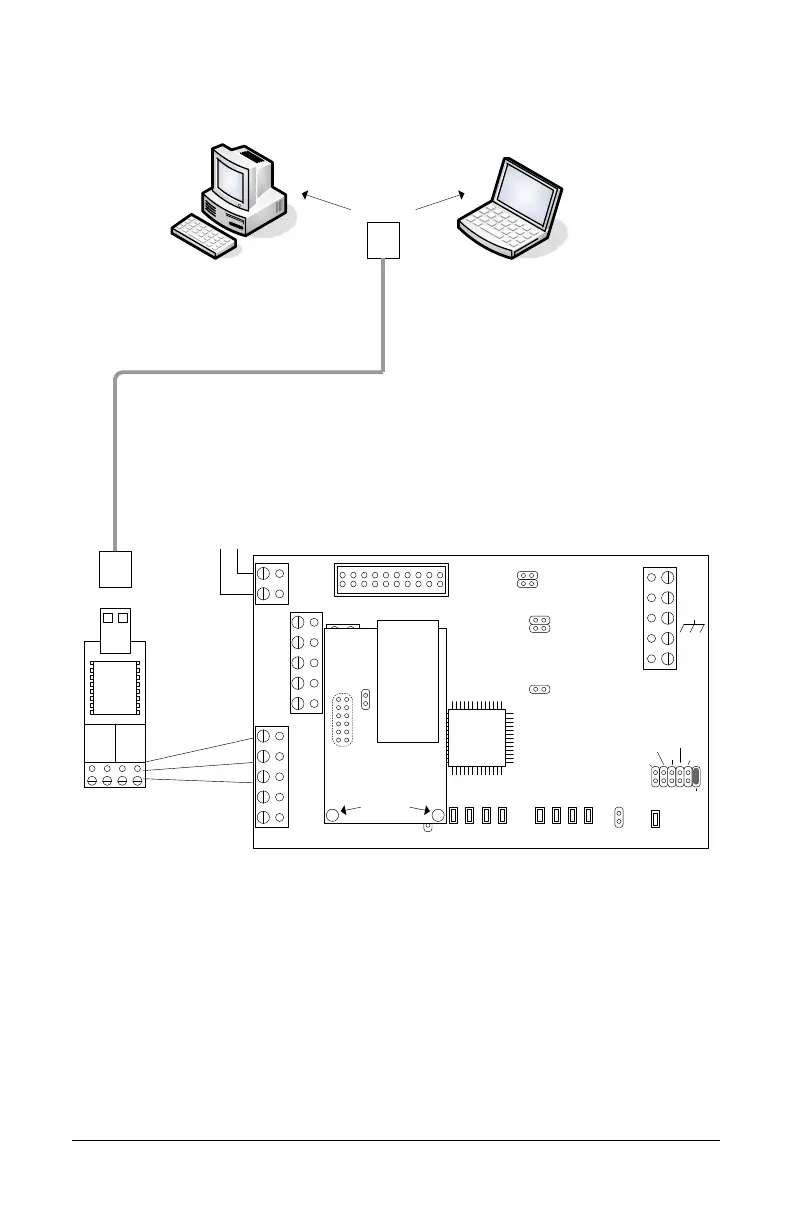
Keyscan CIM-LINK - Optional USB-SER Adaptor Programming Connection with 12 VDC Supply

Keyscan CIM-LINK
28 pages
Print Icon
To Next Page IconTo Next Page
To Previous Page IconTo Previous Page
Loading...
CIM-LINK Setup Guide
13
Figure 9 Optional USB-SER Adaptor Programming Connection with Independent
12 VDC Supply
PC or laptop with
Keyscan
NETCOM2 Utility.
Green
Red
Black
Use 3 loose
RS232 wires.
BRN
WHT
GRN
WHT
+ TX - + RX -
485 OUT 485 IN
USB cable
+-
to
12VDC
power
supply
TD1
RD1
TD2
RD2
GND
RTS1
CTS1
GND
RTS2
CTS2
B3 B2 B1 B0
Diag
J2
RESET
-
CAN2
+
EGND
-
CAN1
+
GND
V +
(+12V)
SCKT1
Tx Data
PC106x
J1
J7
J8
J6
J5
CAN2
CAN1
Rx Data
1 2 1 2 1 2 1 2
COM COM
CAN
CAN
J3
J4
J9
J12
Power
Good
Fault
COM1
COM2
HDR1
J10
J11
RJ45
Terminal
Jack
J1
U2
NETCOMP
Standoffs
To program
NETCOM2P
Jumper ON J12
KI-00320E-07-11

Related product manuals