Omni Wi-Fi IP Camera User’s Manual
13
Web Client
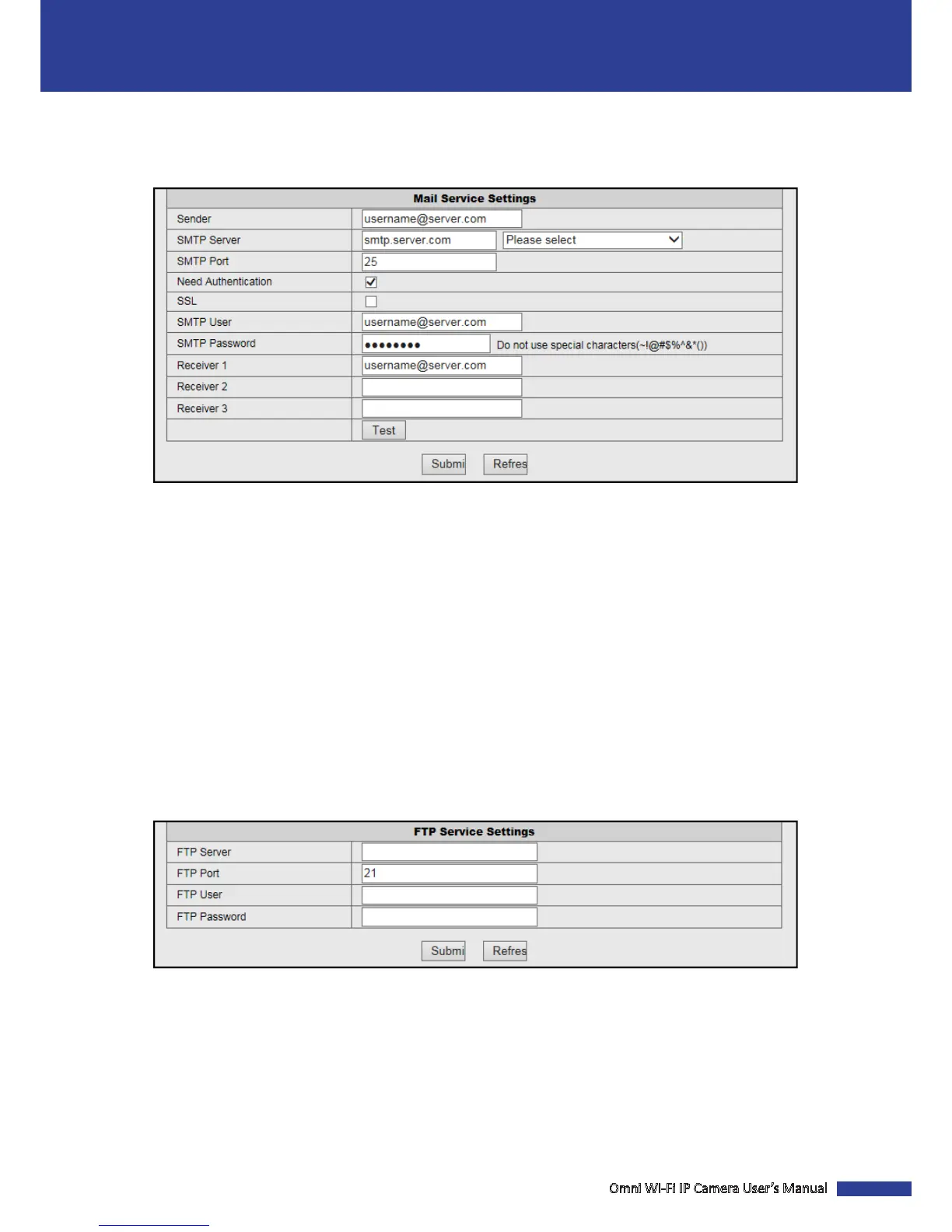
Congure the Email Sengs
Click Mail Service Sengs to congure email sengs. When the email sengs are properly congured, the system
will automacally send a nocaon email when events occur.
Sender: Enter the email address of the sender.
SMTP Server: Enter the SMTP Server of the sending email server.
SMTP Port: Enter the SMTP port of the sending email server.
Need Authencaon: Check the box to verify the user sengs.
SSL: Check the box if your email server needs the SSL vericaon.
SMTP User: Enter the user name of the sender.
SMTP Password: Enter the password of the sender.
Receiver 1/2/3: Enter the email address where the nocaon email is to be sent. You can set up to 3 email addresses.
Test: Click to verify all sengs are correct. The system sends an automated email message to your inbox.
NOTE: If you received the test email, it means the conguraon parameters are correct.
Congure the FTP Sengs
Click FTP Service Sengs to congure the FTP server sengs.
FTP Server: Enter the FTP server address.
FTP Port: Enter the port number of the FTP server.
FTP User: Enter the user name of the FTP server.
FTP Password: Enter the password of the FTP server.
NOTE: Once the alarm is triggered, the system will automacally upload snapshots to the FTP server.


 To Next Page