18
Omni Wi-Fi IP Camera User’s Manual
Web Client
Backup the System Conguraons
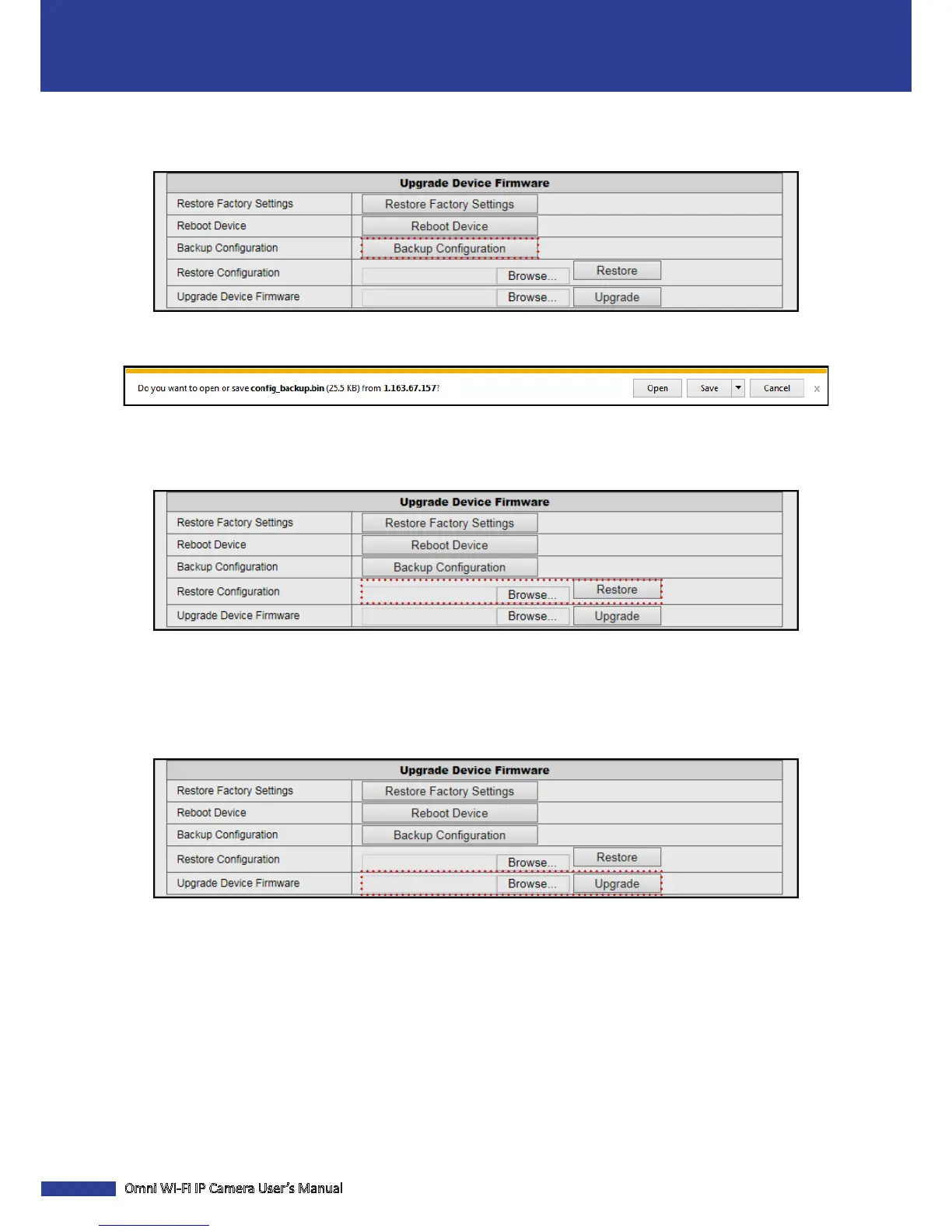
Click Maintain > Backup Conguraon to save the current camera conguraons to your computer.
You will be prompted to conrm whether you want to open or save the conguraon le (specify the locaon). The
default lename: cong_backup.bin.
Restore the System Conguraons
Click Maintain > Restore to restore your camera conguraons.
On the Restore Conguraon opon, click the corresponding Browse buon to select the conguraon le to restore
and click Open. The le is displayed on the eld. Then click Restore.
Update the Device Firmware
Click Maintain > Upgrade to reset the camera.
On the Upgrade Device Firmware opon, click the corresponding Browse buon to select the rmware le and click
Open. The le is displayed on the eld. Then click Upgrade and wait unl the upgrade process is complete.
NOTE: Any interrupon of the rmware update may cause permanent damage to your camera.


 To Next Page