8
Omni Wi-Fi IP Camera User’s Manual
Web Client
Right Panel Control
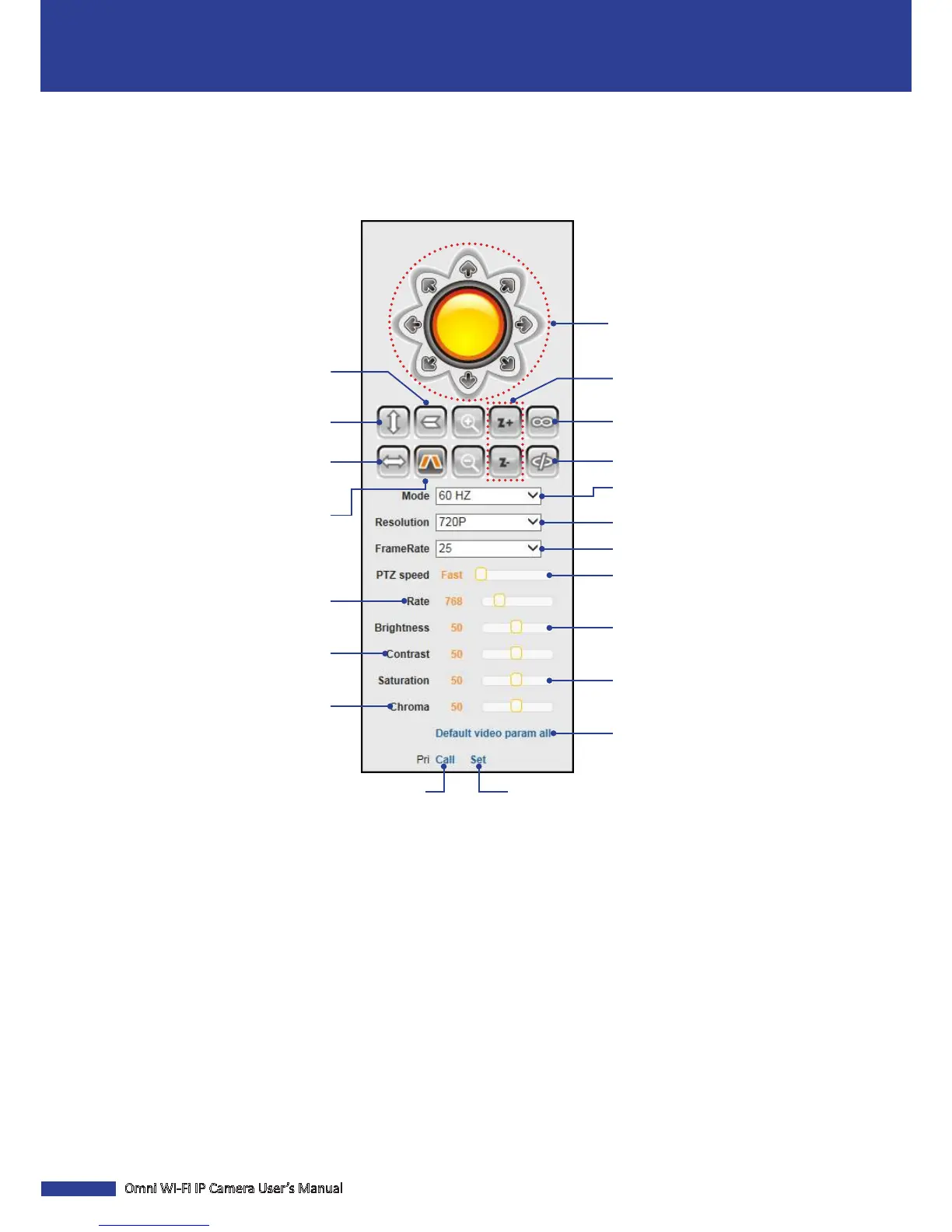
You can use the Panel Control to access the PTZ Control panel and customize the display sengs.
Click the direcon arrow to select the
direcon of the PTZ camera.
Start vercal patrol
(camera moves up and down).
Start horizontal patrol
(camera moves le and right).
Enable the I/O output.
Disable the I/O output.
Zoom in/out.*
Set the baud rate of data
transmission.
Adjust the contrast level of the
display.
Adjust the camera speed.
Select the video stream quality.
Select the video stream frame rate.
Reset all parameters to the default
sengs.
See the reverse image
(image is ipped vercally).
See the mirror image
(le and right sides are reversed).
Adjust the chrominance level of the
display.
Set a preset point.
Go to a specic preset point.
Select the video format of your
locaon.
Adjust the brightness level of the
display.
Adjust the saturaon level of the
display.
NOTE: (*) Not supported in QRT-501.


 To Next Page