4
Omni Wi-Fi IP Camera User’s Manual
Use Web Client to remotely access the camera and congure the sengs of camera.
NOTE: : Ensure that the computer has a web browser, such as Internet Explorer or Safari, installed.
Before accessing Web Client for rst me, you have to establish a connecon from the camera to the wired router in
order to quickly obtain the IP address of your camera. You can also modify the IP address and, if necessary, modify the
default gateway to the new address.
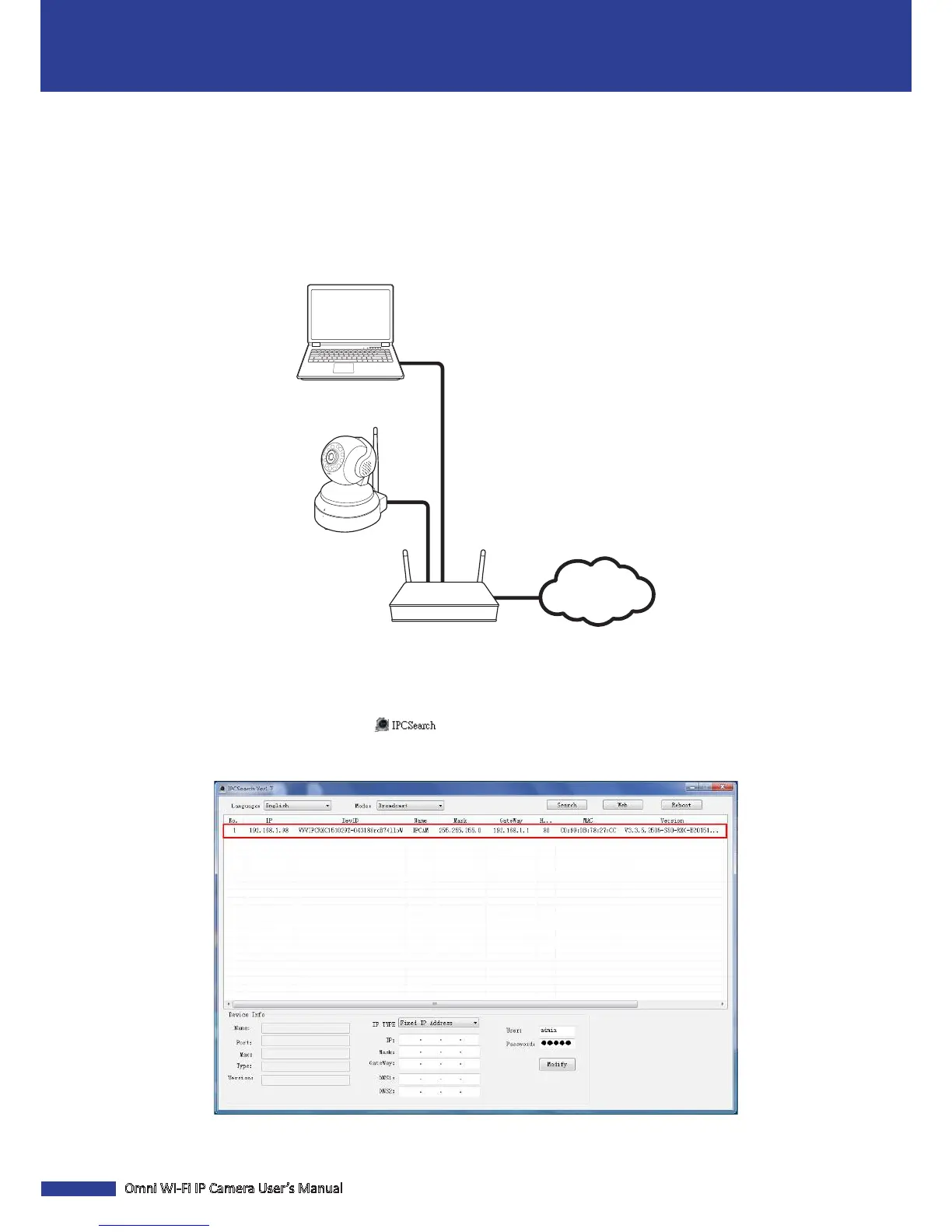
1. Connect the camera to the router using an RJ45 cable. Then connect your notebook to the same router using
another RJ45 cable.
Internet
2. Download and install the IPCSearch soware to your notebook.
NOTE: : The IPCSearch soware is available at hp://www.kguardsecurity.com/global/p/wi--network-
camera-qrt-501/.
3. Double-click the IPCSearch icon ( ) to open the IPCSearch soware.
4. The program lists the camera by IP address. Double-click on the camera IP address eld to open the camera
Web Client on your PC default web browser.
NOTE: : To congure the camera IP address, modify the necessary parameters and click Modify to save the
sengs.
Web Client


 To Next Page